Integrations
Gosendly API and webhooks
Do you have a custom-built online store, a back-office tool or a platform with no direct integration? With Gosendly's API v1 you send data and messages, with webhooks (“outgoing webhooks” in Gosendly) you receive what happens, and with the trigger address you start a flow from any software.
What it does
API v1 creates and updates contacts, sends approved templates and starts flows, with a key that only has the permissions you choose. Outgoing webhooks send every event you pick to your address, signed. The API and webhooks are included in all paid plans; the flow trigger address is available on every plan.
How to connect it
- 1
Create an API key
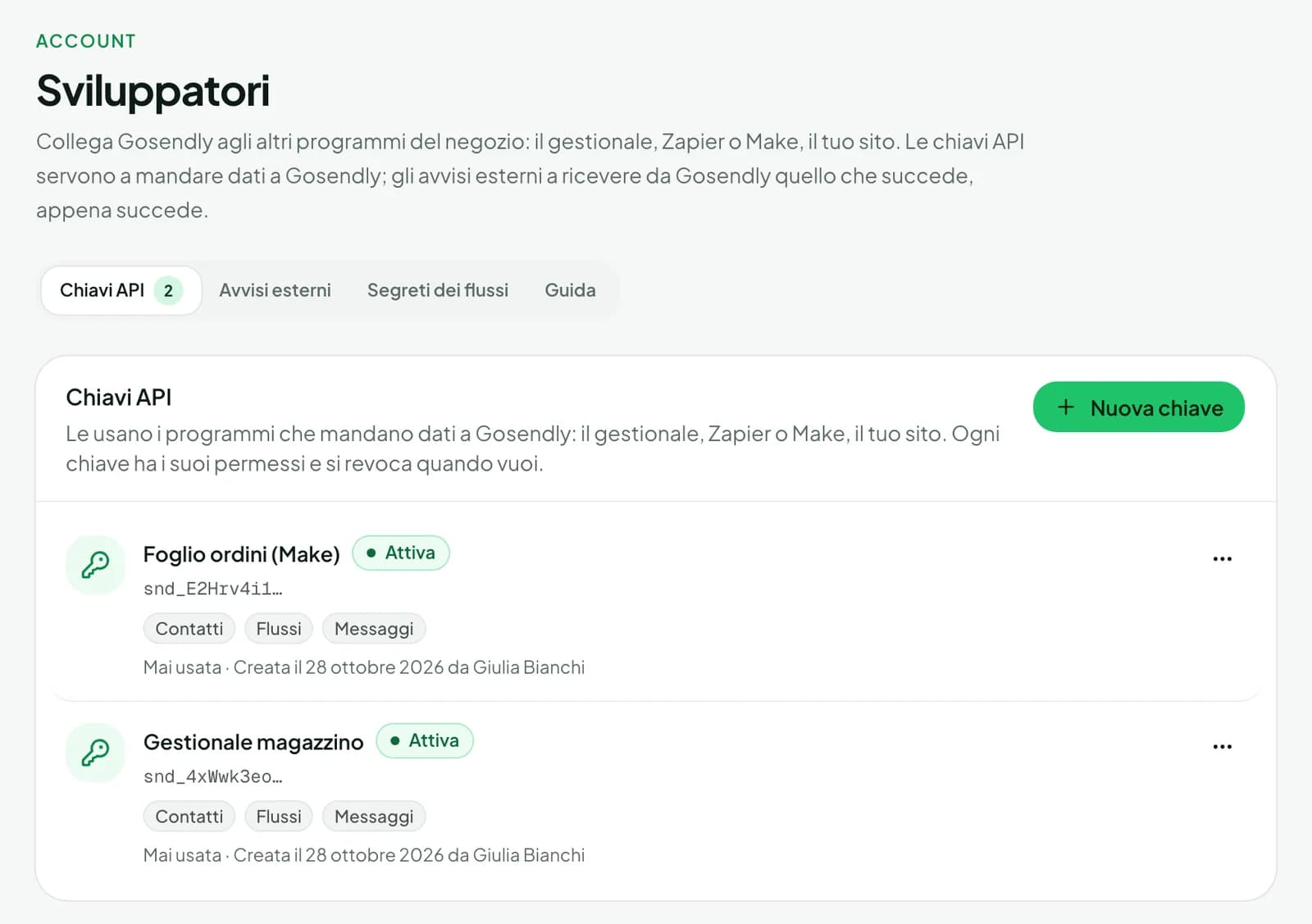
In Settings › Developers (in the app: *Impostazioni › Sviluppatori*), “API keys” tab, click “New key”, give it a name (for example “Warehouse system”) and choose the permissions: Contacts, Flows, Messages. Copy it right away: you won't see it again.
- 2
Call the API
Send the key in the “Authorization: Bearer snd_…” header. The API address and ready-made examples are in the “Guide” tab. With GET /api/v1/me you check which store the key belongs to and what it can do.
- 3
Receive events
In the “Outgoing webhooks” tab click “New address”, enter an https address reachable from the internet and choose the events. Copy the signing secret and click “Send a test event”.
- 4
Check the log
In the “Delivery log” you see every webhook with your address's response, for 30 days; with “Resend” you send it again with the same id.
What API v1 does
The endpoints live under /api/v1 and respond in JSON:
- POST /contacts creates or updates a contact from the phone number, with name, email, language, fields, tags and consent with its wording; GET and PATCH /contacts/{id or number} read and edit it.
- GET /flows lists the flows; POST /flows/{id}/start starts one for up to 500 contacts in a single request, with each one's result (missing consent, blocked, already in the flow, invalid number).
- GET /templates lists the templates; POST /messages/template sends an approved one, with the variable values; GET /messages/{id} tells you whether it was delivered or read.
Rules and limits
Each key can make up to 120 requests per minute: responses include X-RateLimit-Limit, X-RateLimit-Remaining and, over the limit, Retry-After. A marketing template is only sent if the contact has given consent, and it respects quiet hours and the message cap; otherwise the error tells you why. Templates must be approved by Meta, and a store can have up to 20 keys.
Signed outgoing webhooks
The events are message received, sent and message status; contact created, updated and consent; chat assigned and closed; campaign completed and flow completed; order created and updated; payment received; handover from the AI to a person and AI action. Each one arrives as a POST with the event's JSON and the headers Sendly-Event, Sendly-Delivery, Sendly-Timestamp, Sendly-Attempt and Sendly-Signature.
The signature is an HMAC-SHA256 of “timestamp.body” with the address's secret, in the format “t=…,v1=…”. Reply with a 2xx code within 10 seconds; if that fails, Gosendly retries after 1 minute, 5, 30, 2 hours, 6, 12 and 24. After one day without successful deliveries the address is paused and we let you know.
A custom-built online store, in practice
When an order is confirmed, your code calls a Gosendly flow's trigger address with “{"phone": "+393331234567", "name": "Julia", "country": "IT", "data": {"order": "#1001"}}”: the flow sends the confirmation with the template and {order}. Or use POST /api/v1/messages/template. In flows, the “Call an external service” step does the reverse and uses “Flow secrets” for the keys. With Zapier, Make or n8n you can do the same without code.
Frequently asked questions
Which plan includes the API and webhooks?
API v1 and outgoing webhooks are included in all paid plans. The flow trigger address and the “Call an external service” step are available on every plan.
How do I verify that a webhook really comes from Gosendly?
Recompute the HMAC-SHA256 of timestamp, dot and body exactly as you receive it, with the address's secret, and compare it with v1 in Sendly-Signature. Also check that the timestamp is recent.
If my server is down, do I lose events?
No: Gosendly retries for about two days and every delivery stays in the log for 30 days, where you can resend it. Sendly-Delivery stays the same across retries, so you don't process the same event twice.
Is there a test environment?
Yes: in test mode, before you connect your number, the API responds but messages stay inside Gosendly and don't reach customers.
Keep reading
- IntegrationsGosendly and ZapierWith Zapier you connect Gosendly to software that has no direct integration: a form filled in on your website, a new row in a back-office tool, a…Read
- IntegrationsGosendly and MakeWith Make you connect Gosendly to software that has no direct integration, like a back-office tool or a form on your website. The scenario reads the…Read
- IntegrationsGosendly and n8nn8n suits people who want their workflows on their own server or already have a trusted developer. It connects to Gosendly both ways: the “HTTP…Read
- IntegrationsGosendly and Shopify FlowShopify Flow is Shopify's automation app. With its “Send HTTP request” action it can call a Gosendly flow's trigger address: that way a store event…Read
- FeaturesBlock-based WhatsApp automationGosendly's WhatsApp automations are messages that go out on their own at the right moment and stop when they're no longer needed: as soon as the…Read
Similar integrations
- Gosendly and ZapierZapier calls a Gosendly flow's trigger address with the customer's phone number, and the flow starts: welcome, confirmation, reminder. The other way round, Gosendly sends its events to…
- Gosendly and MakeMake picks up the event from your software, prepares the customer's phone number and details and calls the flow's trigger address: Gosendly creates or updates the contact and sends the…
- Gosendly and n8nAn n8n workflow receives an event, for example a form submission or a new row in a back-office tool, and calls a Gosendly flow's trigger address with the customer's phone number: the flow…
- Gosendly and IFTTTIn your flows, add the “Action on a connected service” step and choose IFTTT: there's one action available. An event in IFTTT can start a flow, with the “From a connected service” trigger.
- Gosendly and Pabbly ConnectIn your flows, add the “Action on a connected service” step and choose Pabbly Connect: there's one action available. An event in Pabbly Connect can start a flow, with the “From a connected…
- Gosendly and WPNotifAn event in WPNotif can start a flow, with the “From a connected service” trigger.
Sign-ups open soon
Leave your email and we'll tell you when we launch: then you create your account and find a sample store full of data to try right away.
- We'll write to you once
- Every feature when we open
- Sample store already full of data