Automations
Block-based WhatsApp automation
Gosendly's WhatsApp automations are messages that go out on their own at the right moment and stop when they're no longer needed: as soon as the customer buys, replies or asks you to stop. You build them with blocks on a canvas, without writing code.
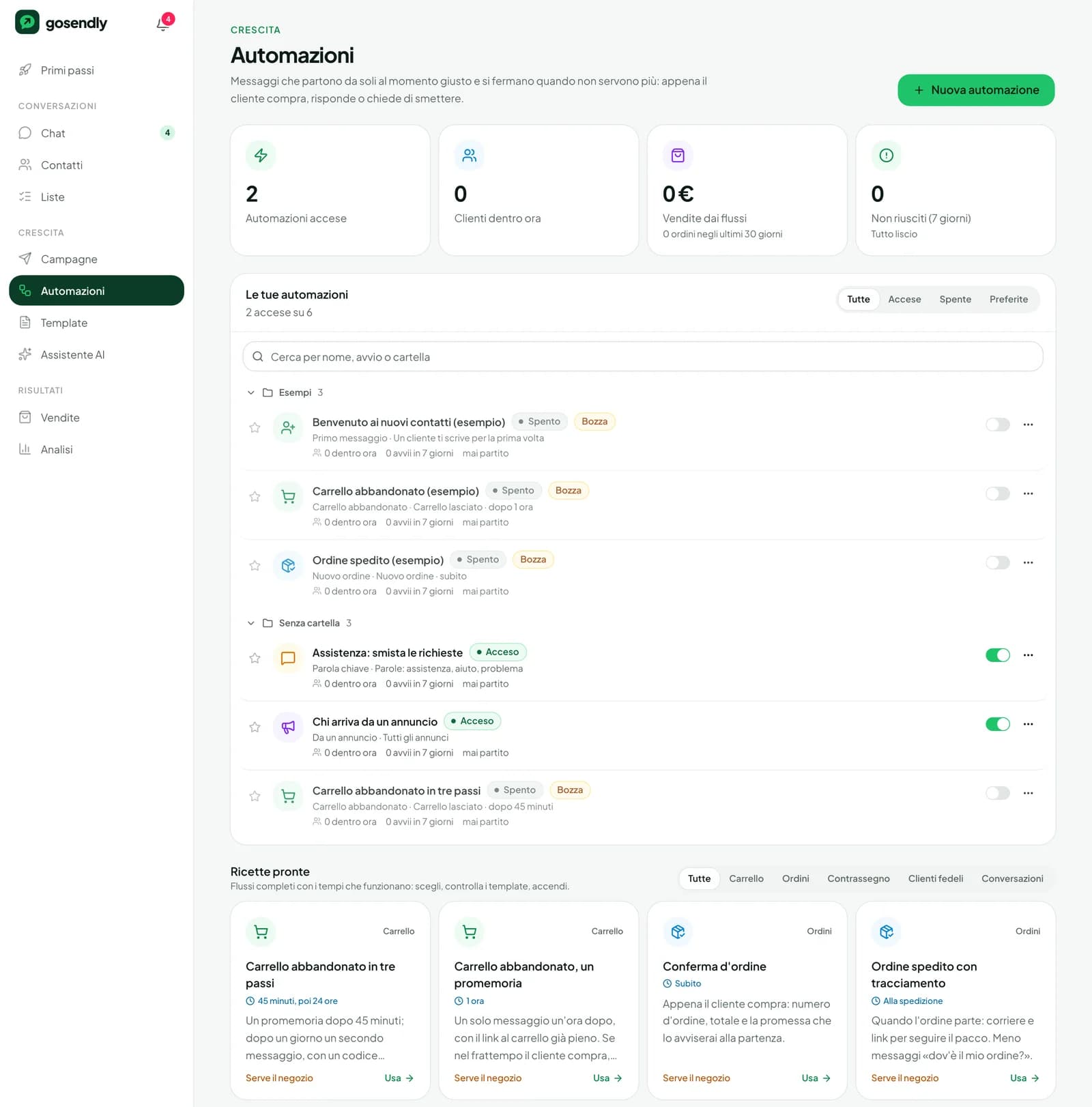
What you get
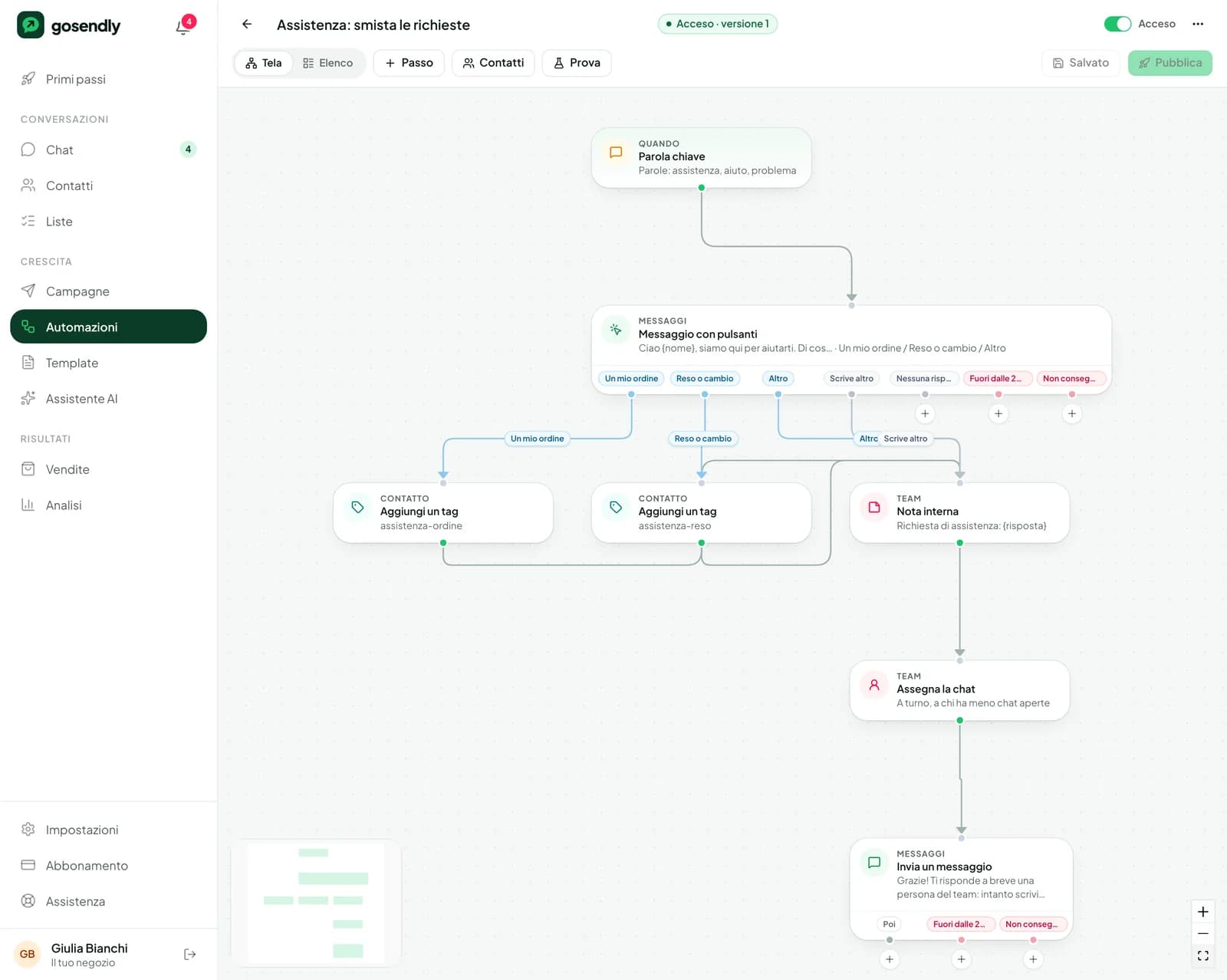
- One trigger and then the steps, connected like on a whiteboard: even from your phone, in list view.
- “Exit the flow as soon as they buy”: no cart reminders after the order.
- Test it on your own number before switching it on, with shortened waits.
- Edits become a new version: people already inside don't get duplicates.
How it works
- 1
Choose what starts it
In Automations click “New flow”, give it a name and choose the trigger: a keyword, an order, a tag, a date and so on. Then click “Create and open the builder”.
- 2
Add the steps
On the canvas you connect messages, waits, conditions and actions on the contact or the team. Every button and every outcome has its own path.
- 3
Test it
With “Test the flow” choose “Simulate”, to see what would be sent and when, or “On your number”, with waits that last just a few seconds.
- 4
Publish and switch on
Gosendly highlights in red anything that needs fixing, such as a template that isn't approved. When everything is ready, click “Publish and switch on”.
What can start a flow
Triggers are divided into four groups:
- From the chat: keyword (even phrased differently, with AI), first message, template button, Facebook or Instagram ad, link click.
- From the store, with Shopify connected: abandoned cart, new order, paid, shipped, delivered, canceled, refunded, cash-on-delivery order.
- From contacts: tag added or removed, joining or leaving a list, a date such as a birthday, opt-in given or withdrawn.
- Other triggers: manually from the chat, from a campaign, from the API or from another tool such as Zapier, Make, n8n or your website, with a trigger URL.
The steps a store needs
Messages: templates, free text within 24 hours, photos and files, buttons, list menus. Waits: a length of time, a date, a time of day or business hours, or “Wait for a reply” with a maximum time. Conditions: “If / else” on tags, orders, times and clicked links, and “Did they buy?” on the store's real orders.
Then the actions: tags, fields, lists, opt-in, blocking; assigning the chat, an internal note, an alert to the team or a WhatsApp alert to the owner; calling an external service. With Shopify connected, also discount codes, order tags or order cancellation and, on paid plans, payment links. With the AI assistant, the “Understand the reply”, “Reply with AI” and “Extract a detail” steps.
It stops when it should
In the flow settings you choose who can enter (only once per customer, or with a pause before re-entering) and what to do if the customer writes something the flow doesn't expect: the bot replies, the AI replies and brings them back to the right point in the flow, or the chat is handed to the team.
If a message isn't delivered, the flow takes the right path for the reason: number without WhatsApp, paused template, marketing blocked, outside the 24-hour window. Marketing messages in flows respect the opt-in, cap and quiet hours set in the sending rules.
Stats and versions
For every step you see sent, delivered, read, replies, clicks and errors, plus the contacts who went through it: you can stop them or add them to a list. Every publish saves a version; you choose whether to move people already inside to the new one, and you can go back to an earlier version whenever you like. To get started quickly there are ready-made automations.
Frequently asked questions
How many automations can I have?
3 on the Free plan, unlimited on paid plans. Abandoned cart and Shopify order triggers run on paid plans.
Do I need Shopify?
No. Keywords, buttons, tags, lists, dates, ads and trigger URLs work with any online store. WooCommerce, PrestaShop, Magento and the other platforms in the integrations connect directly just like Shopify; with a custom-built site, an order can start a flow through Zapier, Make, n8n or the API.
If I edit a live flow, what do the people inside receive?
Edits stay a draft until you publish them. When you publish, you choose whether people already inside finish with the old version or move to the new one from their current step, with no duplicates or skipped steps.
Can I remove a customer from a flow?
Yes, at any time: from the list of contacts in the flow or from the chat, where you can see which flows the customer is in.
Can I send free-form messages to people who haven't written to me in days?
No: outside the 24-hour customer service window WhatsApp only allows approved templates. The “Send a template” step always gets through, “Send a message” only within 24 hours; if the window is closed the flow takes the “Outside the 24 hours” path.
Keep reading
- FeaturesReady-made recipes for online storesYou don't have to start from a blank page. Gosendly's ready-made recipes are complete flows for the typical moments of an online store, with timings…Read
- FeaturesWhatsApp chatbot with buttons and menus“Where's my order?”, “What size do you recommend?”, “Do you ship abroad?”. With the Gosendly WhatsApp chatbot, customers pick from buttons and menus…Read
- FeaturesAbandoned cart recovery on WhatsAppA customer puts a jacket in the cart, reaches checkout and then gets distracted. With Gosendly's WhatsApp abandoned cart recovery, they get a…Read
- IntegrationsGosendly API and webhooksDo you have a custom-built online store, a back-office tool or a platform with no direct integration? With Gosendly's API v1 you send data and…Read
- SolutionsRecover abandoned carts with WhatsAppA reminder 45 minutes later, a second message the next day and a discount only when it makes sense: abandoned cart recovery on WhatsApp with…Read
More features: Automations
Block-based flows and ready-made recipes that work on their own.
- Ready-made recipes for online storesYou don't have to start from a blank page. Gosendly's ready-made recipes are complete flows for the typical moments of an online store, with timings already set and templates already…Also included in the Free plan
- WhatsApp chatbot with buttons and menus“Where's my order?”, “What size do you recommend?”, “Do you ship abroad?”. With the Gosendly WhatsApp chatbot, customers pick from buttons and menus with a single tap, the flow takes them…Also included in the Free plan
Sign-ups open soon
Leave your email and we'll tell you when we launch: then you create your account and find a sample store full of data to try right away.
- We'll write to you once
- Every feature when we open
- Sample store already full of data