Solutions
Sell on WhatsApp, from question to payment
The customer asks if their size is in stock, if it can be personalized, how much shipping costs. To sell on WhatsApp with Gosendly, you answer in the chat and close the order right there, with a payment link that tells you when the money has arrived.
Your store
online
Today
The problem
Many sales start with a question in a chat, and stop there. The customer asks, you answer, then they have to go back to the site, find the product again, make their choice again. People who buy directly in the chat send a screenshot of a bank transfer, and at the end of the day it's unclear who paid for what. Every extra step is a chance to give up.
How Gosendly solves it
- 1
Bring the customer into the chat from the product
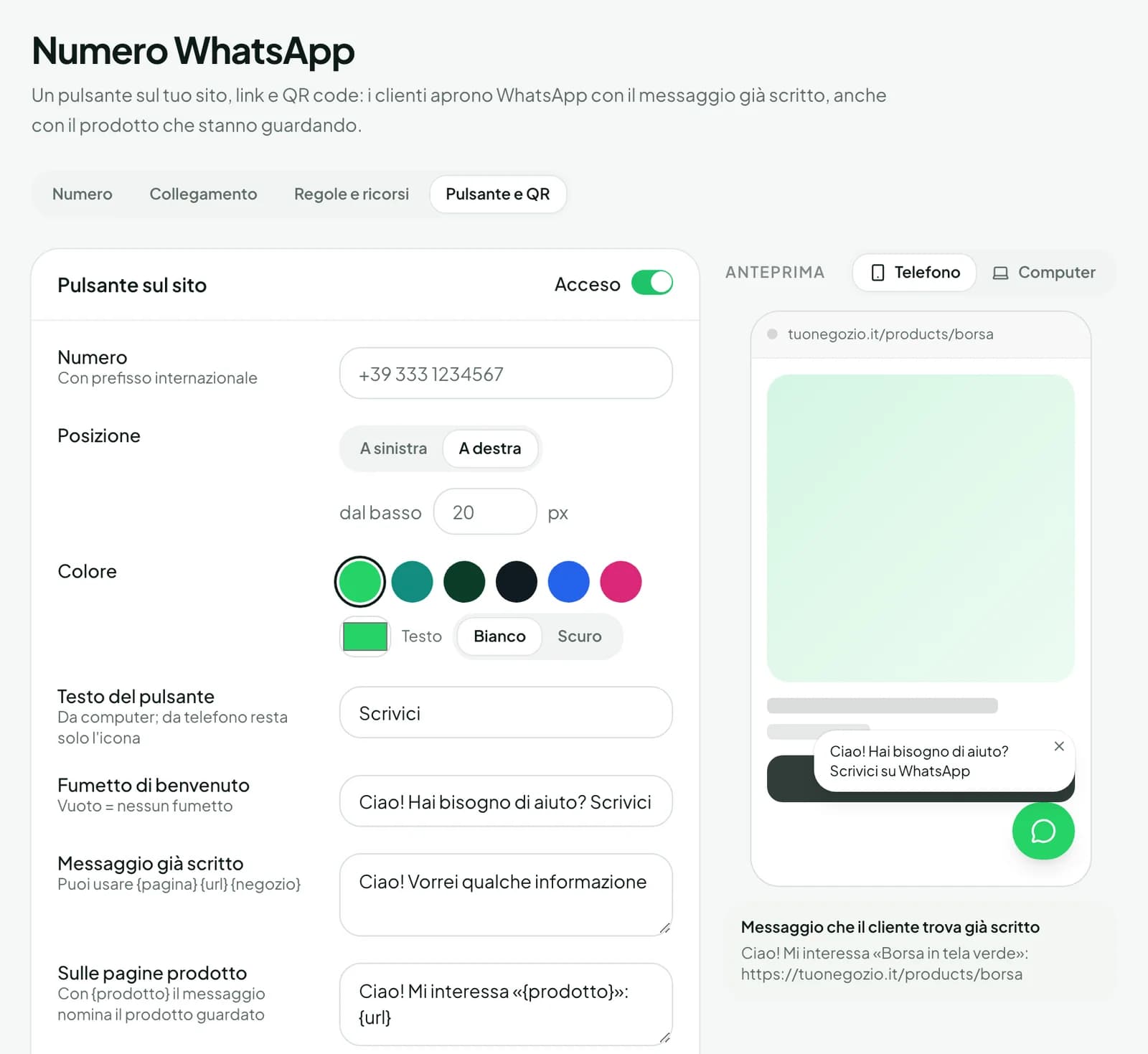
The WhatsApp button goes on any site by copying one line of code. Under a product, it opens the chat with a message that already names the product and the page.
- 2
Take the order in the chat
With Shopify connected, the "Chat orders" bot guides the customer through variants and personalizations. Or you do it yourself: pick the products from the catalog in the customer profile.
- 3
Send the payment link
The customer pays with the methods already active on your store. You can add a discount, an expiry and a reminder if they don't pay.
- 4
Get the "paid" alert
When the payment comes in, the team gets an alert and the sale is attributed to the chat. The customer gets the order confirmation like everyone else.
From product to chat, without "which one?"
The button sits fixed in a corner of the site or on the product page. The message it opens names the product and the page, so the first reply already gets to the point. In your physical store or on packaging you use the QR code, and the click count tells you which pages the chats come from.
For a link to put in your bio or on a flyer there's the WhatsApp link and QR code generator.
The bot that takes the order
With Shopify connected you can switch on "Chat orders" in the automatic replies. Anyone who writes "I'd like to order" or sends a product link is guided step by step: product, variants, personalization (for example the name to print), other products, confirmation. At the end they get the link to pay, and the personalization ends up on the order line.
Anyone who changes their mind can leave right away. If the customer asks to talk to a person, or the bot doesn't understand the answer, your handover message goes out and the bot stays silent in that chat for the hours you choose.
The payment link
The payment link is a draft order on Shopify: the customer pays with the methods you've enabled on the store, like card or PayPal, and the order is created already complete. You can create it from the chat, from a flow step, or have the AI assistant prepare it. It has an expiry and, if you like, an automatic reminder.
One limit to know: you can only send the link freely in the chat within 24 hours of the customer's last message. After that you need a Meta-approved template that contains it. Without Shopify, you send your own link (PayPal.me, Satispay, your bank) and mark it paid when the money arrives.
The AI assistant as a sales clerk
With Shopify connected, the AI assistant knows the catalog: it suggests products with photo and price, only in the variants in stock, collects choices and personalization, and prepares the payment link. Actions that change something, like a discount, can wait for a team member's okay: you decide. Every action is logged, with the source used.
What it doesn't do, for now
WhatsApp's native catalog and cart aren't supported, and neither are carousel messages: products arrive in the chat as messages with a photo and a link. Gosendly doesn't collect payments on your behalf and takes no commission on sales: the money goes from the customer to your store, like any other order.
Sample messages
How your customer reads them on WhatsApp. Start from here and change them however you like.
Payment link in the chat Here's the link to pay for your order: 2 personalized mugs with the names Anna and Luca, €32.00. [payment link] The link is valid for 48 hours.
10:24
Free text, within 24 hours of the customer's last message. Total and description are filled in automatically.
Payment reminder Hi Anna, your personalized mugs order is ready, only the payment is missing: you can complete it here [payment link]
10:24
If the chat has been closed for more than 24 hours, it must be sent as a utility template, with no discounts or other products.
Payment received Thanks Anna, payment received! We're starting on your mugs right away and will message you here when they ship.
10:24
Free text right after the payment; the team gets the "paid" alert.
The features you use
- FeaturesPayment links in chatYour customer made up her mind in chat: she wants the bag in black, with her initials. With Gosendly's payment links in chat, you prepare the order…Read
- FeaturesWhatsApp button for your website and QR codesA shopper looking at a product with a question about sizing shouldn't have to hunt for your number. With the Gosendly WhatsApp website button they…Read
- FeaturesShared WhatsApp inbox for your teamWith the Gosendly shared WhatsApp inbox, your whole team replies from the store's same number, each person with their own login, from a computer or…Read
- FeaturesAI assistant that answers from your sourcesThe Gosendly AI assistant answers customers on WhatsApp using your store's information: shipping, returns, sizes, order status. If it doesn't know…Read
- FeaturesUnique discount codes per customerA code that's the same for everyone ends up on coupon sites within a day. With Gosendly's unique discount codes, each customer gets their own…Read
- FeaturesAnalytics: how much you sell thanks to WhatsAppDoes WhatsApp bring in sales, or just extra work? Gosendly's sales analytics answers with your store's real orders: how much revenue you made thanks…Read
Frequently asked questions
Do I need Shopify to sell in the chat?
For the "Chat orders" bot, the catalog in the customer profile and the payment link that creates the order on its own, yes. Without Shopify you reply in the chat, send your own payment link and mark it paid manually.
Which payment methods can the customer use?
The ones you've enabled on the store: the link opens Shopify checkout, with the same methods your customers find on the site.
What if the customer pays a few days later?
The link is valid until the expiry you choose. If more than 24 hours have passed since the customer's last message, the reminder must be sent inside an approved template.
Can I show my catalog inside WhatsApp?
Not WhatsApp's native catalog. Products arrive in the chat as messages with photo, price and link, sent by you, the bot or the AI assistant.
Which plan?
The in-chat payment link is included in all paid plans; the Shopify connection and the AI assistant are on paid plans. All the details are on the pricing page.
Keep reading
- FeaturesPayment links in chatYour customer made up her mind in chat: she wants the bag in black, with her initials. With Gosendly's payment links in chat, you prepare the order…Read
- FeaturesWhatsApp button for your website and QR codesA shopper looking at a product with a question about sizing shouldn't have to hunt for your number. With the Gosendly WhatsApp website button they…Read
- Free toolsWhatsApp link and QR code generatorEnter your store's number and, if you like, the message your customer will find ready to send: you get the wa.me link to copy and the QR code to…Read
- IndustriesWhatsApp for personalized productsEvery personalized order needs something from the customer and their "yes" before it goes into production. With WhatsApp for personalized products…Read
- IndustriesWhatsApp for online jewelry storesJewelry is chosen carefully, often for someone else and almost always for a date. With WhatsApp for your online jewelry store you confirm engravings…Read
- SolutionsCustomers from ads that open WhatsAppYou're paying for someone to message you: the first reply has to come right away. With Click-to-WhatsApp ads connected to Gosendly, anyone who…Read
Sources
- WhatsApp Business Platform pricing (Meta)(opens in a new tab)Read on October 28, 2026
Sign-ups open soon
Leave your email and we'll tell you when we launch: then you create your account and find a sample store full of data to try right away.
- We'll write to you once
- Every feature when we open
- Sample store already full of data