Solutions
Customers from ads that open WhatsApp
You're paying for someone to message you: the first reply has to come right away. With Click-to-WhatsApp ads connected to Gosendly, anyone who writes from an ad gets the right welcome, enters the flow designed for that ad and, if they want, talks to a person.
Your store
online
Today
The problem
Ads that open WhatsApp bring conversations, not visits: the customer writes and waits. If chats land on a phone nobody checks in the evening, the reply goes out the next morning, when the customer has already changed their mind. And at the end of the month you don't know which ad brought which customers, or whether anyone bought.
How Gosendly solves it
- 1
Create the ad on Meta
In Ads Manager, choose WhatsApp as the destination and the number connected to Gosendly. You don't need a different number: chats arrive in the same shared inbox.
- 2
Prepare the welcome
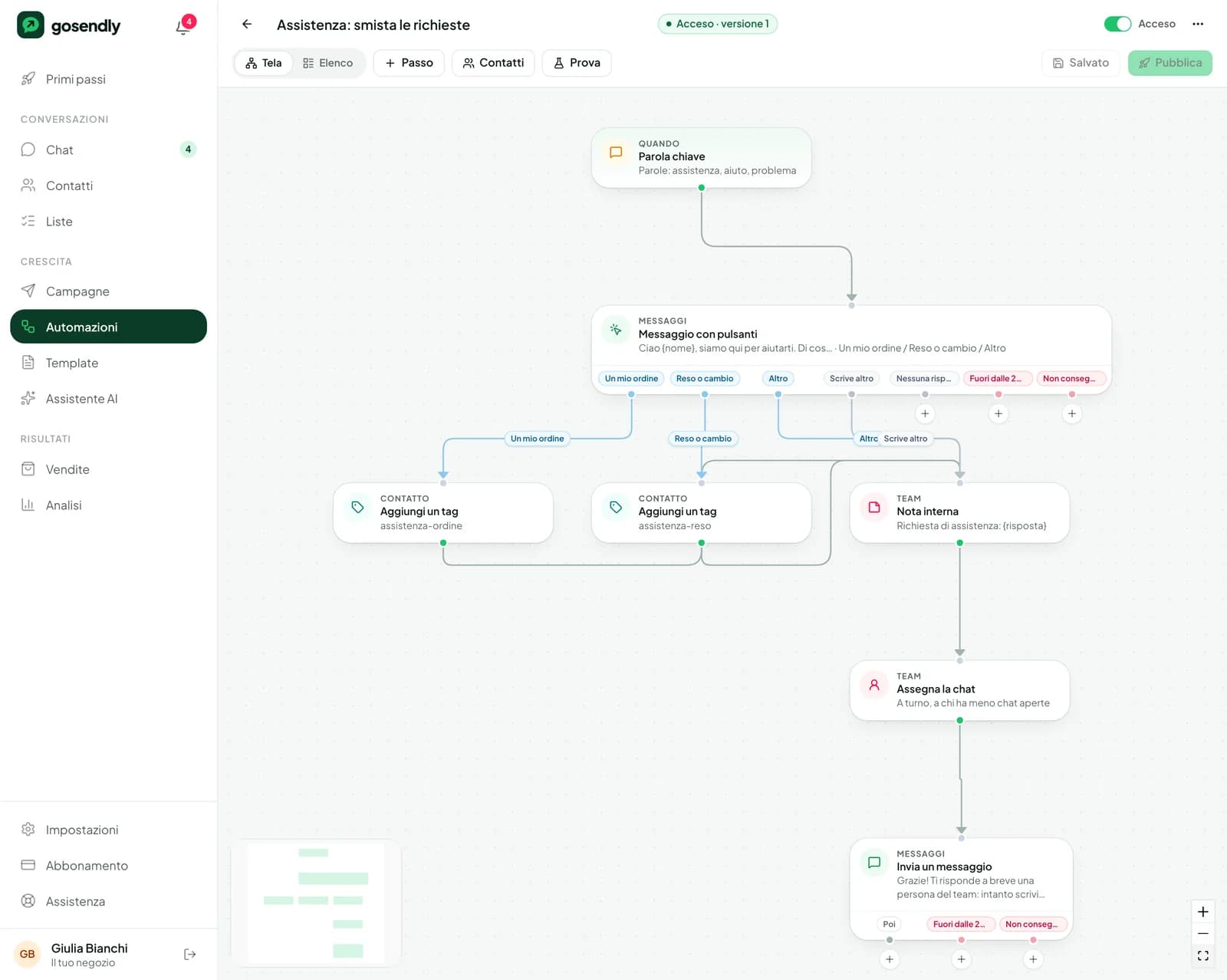
In the automatic replies, switch on "Welcome from ad", or install the "Visitors from an ad" recipe: "from-ad" tag, two buttons and handover to the team.
- 3
A flow for each ad
With the "From an ad" trigger you choose which ads start a flow, identifying them by their ID. A product ad can send the product details, a sale ad the offers.
- 4
Measure chats per ad
Every chat carries the ID of the ad it came from, and the tag lets you find all customers who came from ads with one filter.
The free window for ads
There's a Meta rule worth knowing. When a customer writes to you from an ad that opens WhatsApp, using the app on an Android phone or iPhone rather than a computer, and you reply within 24 hours, your reply opens a free window that can last up to 7 days. During that window Meta doesn't charge for messages, neither service messages nor marketing and utility templates.
In short: the first days with a customer who came from an ad are the time to reply well, send photos and links, and close the order. The condition is replying fast, and that's where the automatic welcome and a team that sees the chats come in.
Reply right away, even in the evening
Ads keep running when your store is closed. The automatic welcome goes out at any time; after hours you can have the AI assistant reply, using your store's information and handing over to a person when needed. Conversations that need a person wait for the team in the "To reply" tab, starting from the oldest.
How to set up replies in the evening and on holidays is explained in the after-hours support solution.
Each ad, its own flow
A generic ad and one about a specific product bring people with different questions. With the "From an ad" trigger you link each ad to its own flow: people coming from the dog harness ad get the size guide and the question "what size is your dog?", people coming from the sale ad get the link to the offers.
Ads are chosen by their ID; seeing them with name and image inside Gosendly requires Meta's advertising permissions, which aren't active yet.
Know which ad brings customers
Today Gosendly tells you which chats came from which ad, thanks to the click ID Meta passes with the first message, and the "from-ad" tag lets you compare these customers with the others. With Shopify connected, on paid plans, sales that started in those chats count toward attributed sales.
What isn't there yet: the ad cost inside Gosendly and sending sales back to Meta to optimize campaigns. For spend figures, Ads Manager is still the place.
People who write from an ad haven't said yes to offers yet
Writing to ask for information isn't consent to receive promotions. If you want to stay close to people who come from ads, the "Welcome and opt-in" recipe asks with two buttons and records the answer with proof. Those who say yes join your campaigns; those who say no still get all the answers they need.
How marketing opt-in works in Gosendly, with the log and unsubscribing, is explained on its own page.
Sample messages
How your customer reads them on WhatsApp. Start from here and change them however you like.
Welcome for people coming from the ad Hi Giulia! Thanks for writing to us. How can we help?
10:24
Free text with the "See the products" and "Talk to you" buttons: the customer wrote first.
After "See the products" Here's our store: [store link]. If you need any advice, just write to us here!
10:24
Free text. With "Talk to you" the chat goes to the person on shift instead, with an alert.
Asking for opt-in Would you like to get our offers and news here? A couple of messages a month at most.
10:24
Free text with the "Yes, please" and "No, thanks" buttons. The yes is recorded with proof.
The features you use
- FeaturesBlock-based WhatsApp automationGosendly's WhatsApp automations are messages that go out on their own at the right moment and stop when they're no longer needed: as soon as the…Read
- FeaturesWhatsApp chatbot with buttons and menus“Where's my order?”, “What size do you recommend?”, “Do you ship abroad?”. With the Gosendly WhatsApp chatbot, customers pick from buttons and menus…Read
- FeaturesAI assistant that answers from your sourcesThe Gosendly AI assistant answers customers on WhatsApp using your store's information: shipping, returns, sizes, order status. If it doesn't know…Read
- FeaturesAutomatic chat assignmentWhen several people reply from the same number, you need to know who is handling which customer. With automatic chat assignment, Gosendly hands each…Read
- FeaturesOpt-in and automatic unsubscribeOn WhatsApp, promotions can only be sent to people who have agreed to them, and anyone who no longer wants them must be able to opt out right away…Read
- FeaturesAnalytics: how much you sell thanks to WhatsAppDoes WhatsApp bring in sales, or just extra work? Gosendly's sales analytics answers with your store's real orders: how much revenue you made thanks…Read
Frequently asked questions
Do conversations from ads cost anything?
If the customer writes from the app on their phone and you reply within 24 hours, Meta's free window opens: up to 7 days from your reply with no message costs. The full rules are in the guide to ads that open WhatsApp.
Do I need a different number for ads?
No. The ad opens the chat with the number connected to Gosendly, and conversations arrive with all the others, recognizable by the tag and the ad ID.
Can I see which ad brought the sale?
You see which ad each chat came from. With Shopify connected, sales from those chats are attributed; the ad cost, however, stays in Ads Manager.
Can I send promotions to people who wrote from an ad?
Only after they've opted in. The "Welcome and opt-in" recipe asks with two buttons right in the first message.
What if they write at night?
The welcome goes out anyway. For questions, you can have the AI assistant reply only when you're closed, or send an after-hours message and reply in the morning from the "To reply" tab.
Keep reading
- GuidesClick-to-WhatsApp ads: the guideClick-to-WhatsApp ads take people from Facebook and Instagram straight into a chat with your store. They work if someone on the other end replies…Read
- FeaturesWhatsApp chatbot with buttons and menus“Where's my order?”, “What size do you recommend?”, “Do you ship abroad?”. With the Gosendly WhatsApp chatbot, customers pick from buttons and menus…Read
- FeaturesBlock-based WhatsApp automationGosendly's WhatsApp automations are messages that go out on their own at the right moment and stop when they're no longer needed: as soon as the…Read
- SolutionsReply after hours too, with AICustomers write in the evening, on Sundays, on public holidays. With Gosendly's after-hours auto replies, the AI assistant answers the questions it…Read
- SolutionsSell on WhatsApp, from question to paymentThe customer asks if their size is in stock, if it can be personalized, how much shipping costs. To sell on WhatsApp with Gosendly, you answer in…Read
- IndustriesWhatsApp for sports and outdoor storesA bike is chosen by height, boots by use, a tent by season. With WhatsApp for your sports and outdoor store you recommend the right size in chat…Read
Sources
- WhatsApp Business Platform pricing (Meta): free entry point window for ads(opens in a new tab)Read on October 28, 2026
- WhatsApp Business Policy: opt-in and stop requests(opens in a new tab)Read on October 28, 2026
Sign-ups open soon
Leave your email and we'll tell you when we launch: then you create your account and find a sample store full of data to try right away.
- We'll write to you once
- Every feature when we open
- Sample store already full of data