Contacts
Opt-in and automatic unsubscribe
On WhatsApp, promotions can only be sent to people who have agreed to them, and anyone who no longer wants them must be able to opt out right away. Gosendly keeps each customer's marketing opt-in with its proof and handles unsubscribes automatically.
What you get
- Three clear states for each customer: opted in, unsubscribed, not stated.
- “STOP” and the “Unsubscribe” button remove the customer from promotions without you lifting a finger.
- A log with the date, method and message of every choice, downloadable as proof.
- Order updates and support continue even for people who unsubscribe from promotions.
How it works
- 1
Collect opt-in
Opt-in comes from several places: a keyword like “subscribe me” in the chat, a button, an import with a consent column, the API, a flow or, with Shopify connected, the checkout checkbox.
- 2
Record it by hand too
In the customer profile, press “Record marketing consent” and write how you got it, for example “replied yes, send me offers in the chat”. For many contacts at once, use “Consent” in Contacts.
- 3
Set up unsubscribing
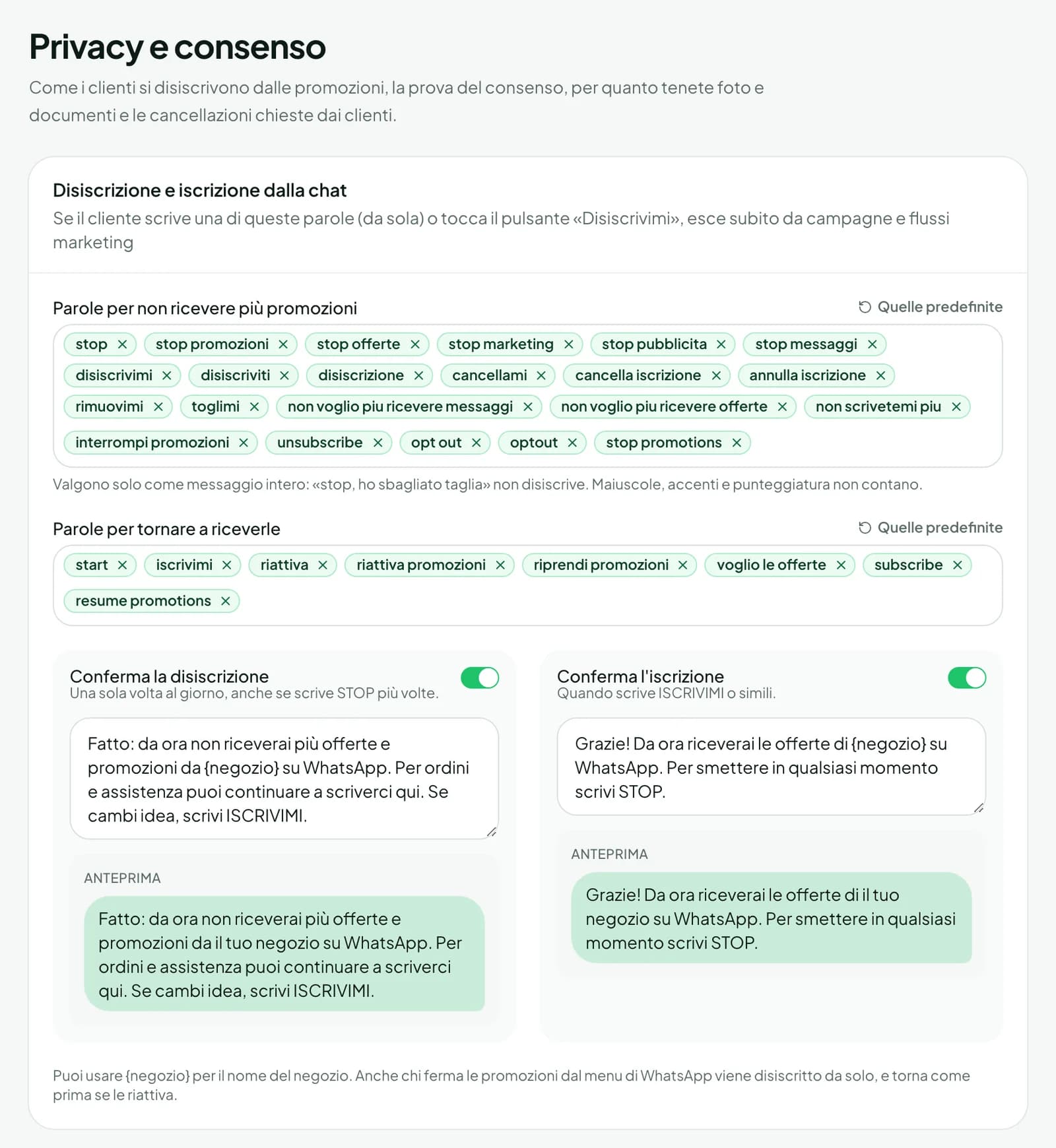
In Settings › Privacy and consent, choose the keywords to unsubscribe and to start receiving promotions again, and the confirmation messages the customer receives.
Say stop, and you're out
If the customer writes one of the unsubscribe keywords on its own, or taps the “Unsubscribe” button, they're immediately removed from marketing campaigns and flows. The default keywords are ready to go (stop, stop promotions, don't message me anymore and others) and you can change them.
The whole message counts: “stop, I ordered the wrong size” doesn't unsubscribe anyone, while capital letters, accents and punctuation don't matter. The unsubscribe confirmation is sent at most once a day, even if the customer writes STOP several times.
Three states, no ambiguity
Every contact has a status: opted in (receives marketing campaigns and flows), unsubscribed (no promotions, but order updates and support continue) or not stated (no choice recorded: no promotions until they opt in). You see it in the contact list, the profile and the chat, and you can filter contacts by status.
The most recent choice always wins: if a customer unsubscribed yesterday, an import with an old “yes” doesn't sign them back up for promotions.
The log, your proof
Every time a customer gives or withdraws consent, Gosendly records when, how and with which message: keyword, button, import, API, flow, Shopify checkout, WhatsApp button on your website, ad that opens WhatsApp or manual entry. The Consent log can be downloaded as CSV from Privacy and consent, and a single customer's log from their profile.
Promotions only to those who asked
Before every campaign, Gosendly only counts people who have opted in and aren't blocked, and marketing flows skip anyone who hasn't. In the sending rules you can decide whether a marketing template without a way to unsubscribe blocks the campaign or just shows a warning.
Meta requires that the person has agreed to receive messages from your store, with your store's name made clear, and that stop requests are honored. For the legal side, see the guide on consent and GDPR.
Frequently asked questions
If a customer writes STOP, do they also stop getting order confirmations?
No. Unsubscribing applies to promotions: marketing campaigns and flows. Messages about orders, shipping and support continue.
Does consent given on Shopify come through to Gosendly?
Yes, with Shopify connected: if the customer accepted WhatsApp marketing messages in your Shopify store, they show up in Gosendly as opted in, and the log lists Shopify checkout as the source.
How do I prove consent if someone disputes it?
With the log: for each choice there's the date, the source and the text, for example the message written in the chat or the note added during the import. You can download it as CSV whenever you want.
Can I import contacts who already subscribed to my newsletter?
Yes, with the consent column and its date, or by stating that everyone gave it, but only if you can prove it for each person. In the import note, write how you collected it: it stays in each contact's log.
Keep reading
- FeaturesImport contacts from CSV and ExcelDo you have your customers in a file exported from your management software, your newsletter or your old platform? With Gosendly's import, you bring…Read
- FeaturesSending rules that protect your numberA customer who gets too many offers blocks or reports your number, and quality drops for everyone. Gosendly's sending rules apply to campaigns and…Read
- FeaturesSecurity, roles and privacyA store's chats contain names, addresses and orders. Gosendly protects them with team roles, two-step verification at login and servers in Germany…Read
- GuidesConsent and GDPR for WhatsApp messagesTo message customers on WhatsApp you need two permissions that go together: the one Meta requires and the one privacy law requires. This guide…Read
- GuidesWhatsApp quality rating: how to avoid blocksYour WhatsApp quality rating is the score Meta gives your messages based on how customers react to them. If it drops, your templates stop and your…Read
More features: Contacts
Contact book, lists and consent always in order.
- Customer contacts with full historyEveryone who messages you on WhatsApp lands in a customer contact list with full history: messages, orders, tags, consent and flows in a single timeline. Before you reply, you already know…Also included in the Free plan
- Lists and dynamic segmentsWith Gosendly's lists and dynamic segments, you choose who to message without spreadsheets: “bought in the last 30 days”, “spent more than €100”, “has the bride tag”. Dynamic lists update…Also included in the Free plan
- Import contacts from CSV and ExcelDo you have your customers in a file exported from your management software, your newsletter or your old platform? With Gosendly's import, you bring contacts from CSV or Excel into your…Also included in the Free plan
Sources
- Meta: how to get opt-in(opens in a new tab)Read on October 28, 2026
- WhatsApp Business Messaging Policy(opens in a new tab)Read on October 28, 2026
Sign-ups open soon
Leave your email and we'll tell you when we launch: then you create your account and find a sample store full of data to try right away.
- We'll write to you once
- Every feature when we open
- Sample store already full of data