Guide
Consent and GDPR for WhatsApp messages
To message customers on WhatsApp you need two permissions that go together: the one Meta requires and the one privacy law requires. This guide explains consent and GDPR for WhatsApp messages using the official sources; it is not legal advice.
At a glance
- Meta requires that the customer gave you their number and agreed to receive messages from your store, named explicitly, and that you honor every stop request right away.
- For promotions on WhatsApp, Italy's data protection authority (Garante) applies Article 130 of the Italian Privacy Code: you need prior, free, specific and documented consent.
- The “soft spam” exception for customers who have already bought from you applies only to email, not to WhatsApp.
- Withdrawing consent must be as easy as giving it, and you must be able to prove when and how you collected it.
- For questions about your specific case, talk to a professional: here you'll find the rules and where to read them.
Two rules that apply together
The first rule is Meta's, and it applies worldwide: without an opt-in you can't message someone first. The second is the law, which in Italy means the European GDPR, the Italian Privacy Code and the guidance of the Garante (Italy's data protection authority). Meta itself points this out: the business is solely responsible for how it collects consent and must comply with the law of its country.
In practice, it helps to think of it this way: the consent the law requires for promotions, if collected properly, also satisfies Meta. The reverse is not always true. This guide summarizes what the official sources say, listed at the bottom; for an opinion on your case you need a professional.
What Meta requires
The WhatsApp Business Messaging Policy (updated September 23, 2026) lets you contact a person only if they gave you their number and gave you permission to message them. Meta leaves you free to choose how to collect the opt-in and gives examples such as your website, SMS, phone and a form signed in person. It also recommends separate opt-ins by message type (order updates, offers, tips) and warns that its systems restrict businesses that keep a low quality for a long time.
The policy and Meta's opt-in page set out these fixed points:
- It must clearly state that the person agrees to receive messages.
- It must clearly state the name of the business that will message them.
- You must comply with applicable law.
- You must honor every request to block, stop or unsubscribe, including by removing the person from your contacts.
What the GDPR says
Regulation (EU) 2016/679, the GDPR, defines consent as an indication of wishes that is freely given, specific, informed and unambiguous, given through a statement or a clear affirmative action (Art. 4(11)). Recital 32 adds that silence, inactivity and pre-ticked boxes do not constitute consent.
Article 7 contains three rules that directly affect a store: you must be able to demonstrate that the customer gave consent; if the request sits in a form with other matters, it must be clearly distinguishable; the customer can withdraw it at any time, and withdrawing must be as easy as giving it.
Article 21 covers direct marketing: the person can object at any time and, from that moment, their data is no longer used for that purpose. This right must be brought to their attention clearly, at the latest in the first communication.
What the Italian Privacy Code and the Garante say
Article 130 of the Italian Privacy Code (Legislative Decree 196/2003) governs unsolicited communications. Paragraphs 1 and 2 state that sending advertising or commercial communications through automated systems and electronic communications, such as email, fax, SMS, MMS “or of other kinds”, is allowed with the recipient's consent.
WhatsApp falls under these rules. The Garante's Guidelines on promotional activities and spam of July 4, 2013 say so explicitly: the same rules apply to promotional messages sent through services such as Skype, WhatsApp, Viber and Messenger. The guidelines predate the GDPR, but they interpret Article 130, which is still in force. Here are the most useful points for a store:
- Consent must be prior: you can't ask for it in the first promotional message, nor use that message to announce the option to object.
- It must be free: it can't be a condition for buying or signing up on the website, and the box can't be pre-ticked.
- It must be specific: the privacy notice must state the channels you'll use to contact the person (for example email, SMS, WhatsApp).
- It must be documented: you need at least the date and who collected it, plus a procedure that ensures withdrawals are honored.
- Finding a number on a website, a social network or a public directory does not authorize you to send automated promotions.
“Soft spam” doesn't apply to WhatsApp
Paragraph 4 of Article 130 provides an exception known as “soft spam”: if a customer gave you their email address when buying from you, you can send them promotions for similar products without asking for consent, as long as they are informed and can refuse right away and in every message. The Garante's guidelines say it clearly: this exception applies to email only.
So for WhatsApp there's no shortcut: even people who have already bought must have said yes to promotional messages on WhatsApp. And consent collected only for the email newsletter does not automatically become consent for WhatsApp, because the contact channel must be stated when you ask for permission.
Order messages and marketing messages
An order confirmation or a shipping notice is not advertising: it serves to perform the contract with the customer, and among the legal bases for processing the GDPR includes processing necessary for the performance of a contract (Art. 6(1)(b)). For Meta, however, these messages also start from you: you still need an opt-in to receive updates on WhatsApp, for example with a checkbox at checkout.
The critical point is the content. If you add a discount code or “you might also like” to the shipping notice, the message is no longer just a service message: Meta treats it as marketing and moves it to that category, and you need marketing consent. Keep the two types of message separate, as explained in the guide to template approval.
How to collect consent in practice
The best approach is to ask for the yes where the customer is already giving you their number, in clear words. Sample checkbox text: “I want to receive offers and news from Bottega Rossi on WhatsApp. I can stop anytime by writing STOP.” Leave the box unchecked and put the link to the privacy notice next to it.
- Shopify checkout: in Settings › Checkout › Marketing opt-in you can turn on the checkbox for WhatsApp marketing, including in place of the SMS one depending on the country; Shopify saves the choice when the customer submits the checkout.
- Website form or popup: number, unchecked box, store name, link to the privacy notice.
- In chat: if the customer messages you, you can reply; to send them promotions later, ask with a button (“Yes, I want offers”) and save the answer.
- In your physical store: a paper or tablet form with date and signature.
- Contacts already in your list with email-only consent: ask for the WhatsApp yes on the channel you already have permission for, for example with an email that leads to a form.
Unsubscribing: as easy as subscribing
The customer must be able to stop in an instant. Meta requires you to honor every request, the GDPR requires withdrawal to be as easy as giving consent, and the right to object to marketing must be made known from the very first message. In practice: in every marketing message include a clear way out, such as an “Unsubscribe” button or an instruction to write STOP.
There's also a way out through WhatsApp itself: the customer can stop offers from your store in the app's settings, and from then on Meta no longer delivers your marketing messages to them (they come back with error 131050). Finally, the customer can block or report you: that's the worst way out, because it lowers your number's quality.
What to keep as proof
If a customer disputes a message, you must be able to show when and how they said yes. For each contact, keep at least:
- Date and time of the consent and of any withdrawal.
- Where it came from: checkout, form, chat, physical store, import.
- The text the customer saw or the message they wrote.
- Who collected or recorded it, if it wasn't automatic.
Your provider and your customers' data
When you use WhatsApp software, the store remains the controller of customer data and the provider processes it on your behalf. Article 28 of the GDPR requires you to choose providers with adequate guarantees and to govern the relationship with a contract, often called a DPA, that sets out what the provider may do with the data. Always ask where the data is stored and which other companies process it.
For Gosendly this information is public on the security and providers page: servers in Germany and an AI assistant powered by Google's Gemini.
How Gosendly helps
Gosendly records each contact's marketing consent in three states (not declared, given, withdrawn) with a log of every change: when, from where, with what text and by whom. The log can be downloaded, and it's the proof to show if needed.
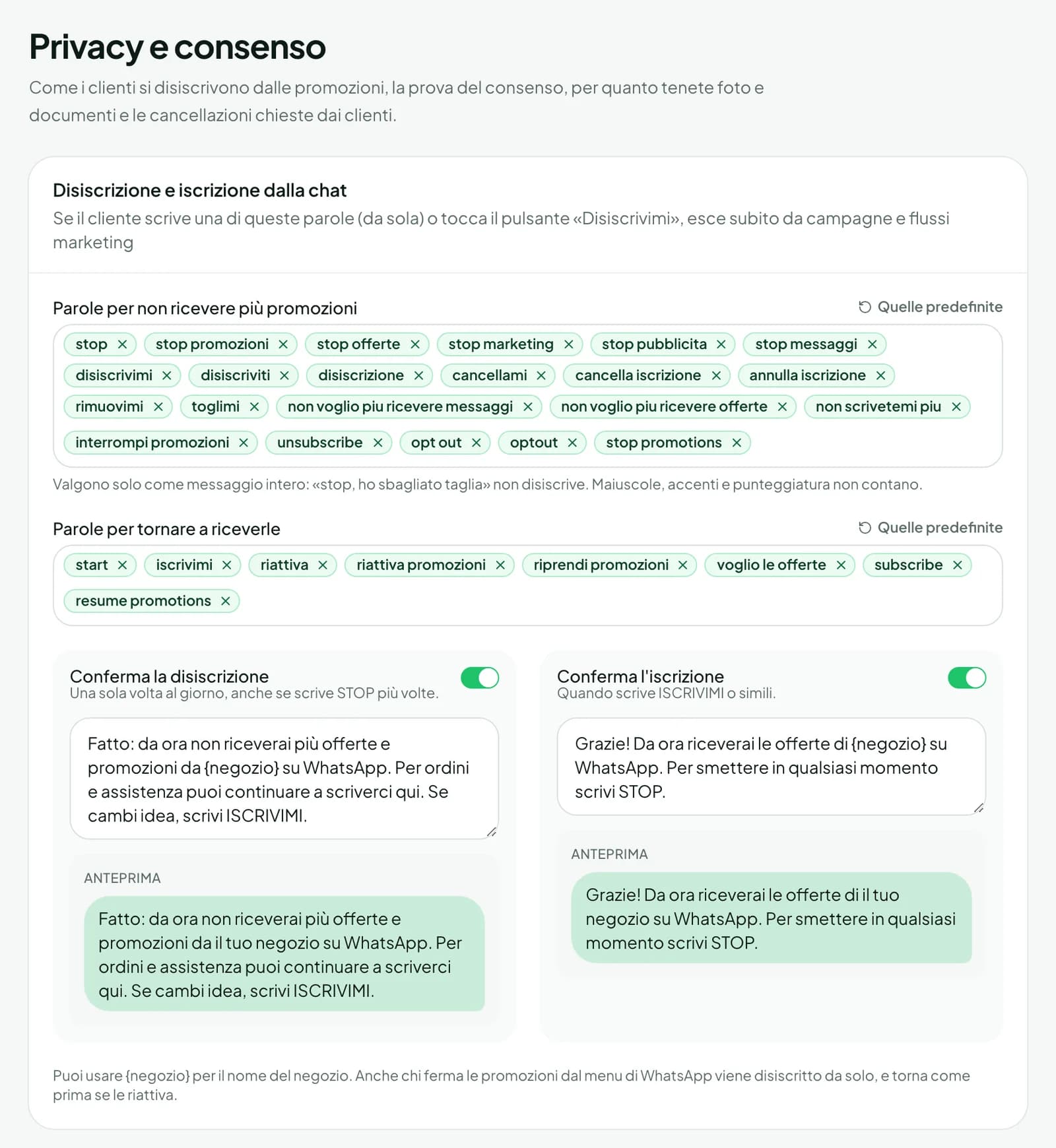
If the customer sends STOP (or “unsubscribe”, “remove me” and similar) as a message, or taps the “Unsubscribe” button, they are immediately removed from marketing campaigns and flows; a sentence like “stop, I got the wrong size” does not unsubscribe them. For Shopify customers, Gosendly reads the WhatsApp consent recorded at checkout. Before every campaign, the check flags marketing messages without a way to unsubscribe, and people who haven't given consent receive no promotions from either campaigns or flows. All of this is in the consent and automatic unsubscribe feature.
Frequently asked questions
Can I send WhatsApp offers to people who gave me their email for the newsletter?
Not with that consent. The Garante's guidelines require the privacy notice to state the contact channels, and the soft spam exception applies only to email. Ask for the WhatsApp yes, for example with an email that leads to a form.
The customer messaged me first on WhatsApp: can I send them promotions?
You can answer their question. To send them promotions afterward you need their marketing consent: ask for it in the chat with a button and record the answer with date and text.
Do I need consent for order confirmations on WhatsApp?
It isn't marketing, so you don't need consent to promotions, but Meta still requires that the customer agreed to receive messages from you on WhatsApp, for example with a checkbox at checkout. And the message must remain a service message, with no offers.
Do I need double opt-in?
The Garante's guidelines don't require a specific form: they require you to be able to prove consent, with date and references. An extra confirmation, such as a welcome message with a button to opt out, does help you get clear proof and customers who expect your messages.
Does this guide count as legal advice?
No. It explains the rules using the official sources listed at the bottom. To make decisions about your case, for example on the privacy notice and legal bases for processing, talk to a professional.
Sources
- WhatsApp Business Messaging Policy (updated September 23, 2026)(opens in a new tab)Read on October 28, 2026
- Meta for Developers: Obtaining user opt-in(opens in a new tab)Read on October 28, 2026
- Meta for Developers: Marketing templates (user preferences, error 131050)(opens in a new tab)Read on October 28, 2026
- EUR-Lex: Regulation (EU) 2016/679 (GDPR), Arts. 4, 6, 7, 21, 28 and Recital 32(opens in a new tab)Read on October 28, 2026
- Italian Data Protection Authority (Garante privacy): Personal Data Protection Code, consolidated text (Art. 130)(opens in a new tab)Read on October 28, 2026
- Italian Data Protection Authority (Garante privacy): Guidelines on promotional activities and combating spam, July 4, 2013(opens in a new tab)Read on October 28, 2026
- Shopify Help Center: Checkout form options (WhatsApp marketing consent)(opens in a new tab)Read on October 28, 2026
- Shopify Help Center: Customer contact information(opens in a new tab)Read on October 28, 2026
Keep reading
- FeaturesOpt-in and automatic unsubscribeOn WhatsApp, promotions can only be sent to people who have agreed to them, and anyone who no longer wants them must be able to opt out right away…Read
- GuidesWhatsApp quality rating: how to avoid blocksYour WhatsApp quality rating is the score Meta gives your messages based on how customers react to them. If it drops, your templates stop and your…Read
- GuidesWhatsApp for Shopify: the complete guideWhatsApp for Shopify means updating customers on their orders, recovering carts and answering in chat without leaving your store's workflow. This…Read
- FeaturesSecurity, roles and privacyA store's chats contain names, addresses and orders. Gosendly protects them with team roles, two-step verification at login and servers in Germany…Read
- GosendlySecurity and providersRead
More guides
- GuideHow much WhatsApp Business costs: Meta's pricesThe WhatsApp Business app is free; the platform for stores is paid per delivered message. Here you'll find WhatsApp Business pricing for Italy as Meta publishes it, with sample…
- GuideWhatsApp Business API: the guide for storesThe WhatsApp Business API is how a store connects WhatsApp to its tools: orders, carts, a shared inbox, automations. This guide explains what you really need to activate it, without…
- GuideWhatsApp Business app vs API: the differencesWhatsApp Business app or API: the choice depends on how many chats you have, who replies and what you want to automate. Here you'll find the differences laid out side by side and the signs…
- GuideWhatsApp blue checkmark: how to get itThe blue checkmark on WhatsApp tells customers they really are messaging your store. Today there are two different ways to get it, one for the API platform and one for the app: here you'll…
- GuideWhatsApp messaging limits and how to increase themWhatsApp messaging limits decide how many people you can message first in a day. Here you'll find how they've worked since 2025, the tiers, how to move up and how to plan a Black Friday…
- GuideWhatsApp for Shopify: the complete guideWhatsApp for Shopify means updating customers on their orders, recovering carts and answering in chat without leaving your store's workflow. This guide starts from what Shopify already…
Sign-ups open soon
Leave your email and we'll tell you when we launch: then you create your account and find a sample store full of data to try right away.
- We'll write to you once
- Every feature when we open
- Sample store already full of data