Guide
WhatsApp for Shopify: the complete guide
WhatsApp for Shopify means updating customers on their orders, recovering carts and answering in chat without leaving your store's workflow. This guide starts from what Shopify already does and gets to the messages to turn on first, with their costs.
At a glance
- Shopify already collects two things WhatsApp needs: the phone number at checkout and, if you turn it on, the checkbox for WhatsApp marketing consent.
- To send messages automatically, you need a connection between Shopify and Meta's WhatsApp platform, through an app or a service.
- Turn these on first: order confirmation, shipping with tracking and cash-on-delivery confirmation (utility, €0.0248 each in Italy), then abandoned cart (marketing, €0.0658).
- Cart reminders and offers go only to people who gave consent to WhatsApp marketing.
- If your store isn't on Shopify, you can connect it with Zapier, Make, n8n or the API.
What WhatsApp does for a Shopify store
An online store messages customers at three moments: when they buy, when they hesitate and when they have a question. WhatsApp covers all three, with different rules for each.
- After the purchase: order confirmation, shipping with the carrier link, delivery, cancellation and refund. For Meta, these are utility messages.
- Before the purchase: abandoned cart reminders, back-in-stock alerts, offers. For Meta, these are marketing messages and require consent.
- Throughout the journey: questions about sizes, delivery times, returns and payments, which you answer in chat inside the 24-hour window.
- Cash on delivery: confirming COD orders before shipping, so you don't send out packages that come back.
Your options
WhatsApp link and button on your site. Free and instant: the customer taps the button and messages you. They work with any setup, even with the app. You can create them with the link and QR code generator.
WhatsApp Business app. You reply by hand from your phone. It's fine at the start, but the app doesn't receive store events: no automatic confirmations and no carts.
Meta's WhatsApp platform connected to Shopify. An app or service receives store events (order created, fulfilled, checkout abandoned) and sends the right template to the right person. This is the route to automation, and it's the one the rest of this guide describes. If you still need to decide, read app or API.
What Shopify already does for you
Before installing anything, check two checkout settings. Without a phone number there's no WhatsApp, and without consent there are no promotions.
The phone field. In Settings › Checkout you can choose whether the phone number in the shipping address is hidden, optional or required; on new stores it's optional. Shopify recommends making it required when the carrier or payment method needs it.
The WhatsApp checkbox. On the same page, under Marketing opt-in, you can turn on the checkbox that lets customers accept WhatsApp marketing, even in place of the SMS one in the countries you choose. Shopify saves the choice when the customer submits the checkout.
Abandoned checkouts. Shopify records a checkout as abandoned after 10 minutes without a purchase, if the customer has already entered their email, and deletes it after three months. Recovery emails are turned on from Apps › Messaging › Automations; if the customer left a phone number instead of an email, the email isn't sent. This is where WhatsApp can help, as the guide abandoned cart: WhatsApp or email explains.
The messages to turn on first
Start with the messages customers expect: everyone reads them, and they cut down on questions in chat. Then add the ones that recover sales. Italian costs as of October 28, 2026, per delivered message:
- Order confirmation, utility, €0.0248: order number and what happens next. Ready-made example: order confirmation template.
- Order shipped, utility, €0.0248: carrier and tracking link. Example: order shipped template.
- Cash-on-delivery confirmation, utility, €0.0248: two buttons, “Confirm” and “Cancel”. Example: COD confirmation template.
- Abandoned cart, marketing, €0.0658: only to people who gave consent. Example: abandoned cart template.
- Review request after delivery, marketing, €0.0658: asks for feedback and leads to the reviews page.
What it costs, in an example
A store with 200 orders a month, all from customers who agreed to receive WhatsApp messages, sends confirmation and shipping messages and spends 400 × €0.0248 = €9.92. If 80 of those orders are cash on delivery, the confirmations add 80 × €0.0248 = €1.98. A hundred cart reminders to customers who gave consent cost 100 × €0.0658 = €6.58.
Total: €18.48 in messages paid to Meta for the month, plus chat replies beyond the 1,000 free ones. The rules in detail are in the guide to WhatsApp Business pricing.
Consent: who you can message and who you can't
For Meta, every message you send first requires that the customer has agreed to receive your messages on WhatsApp. For promotions, such as cart reminders, Italian law also requires prior, documented marketing consent.
In practice: use Shopify's checkbox for WhatsApp marketing, leave it unchecked, and write the store's name next to it along with how to opt out. Keep order updates free of offers: a discount code in the order confirmation turns it into marketing. All the rules, with sources, are in the guide consent and GDPR.
How Gosendly connects to Shopify today
The Shopify connection is included in all paid plans. Today you set it up with the credentials of an app in your store (client ID and secret, or a custom app's token) or with our help; one-click connection will come with the Gosendly Shopify app.
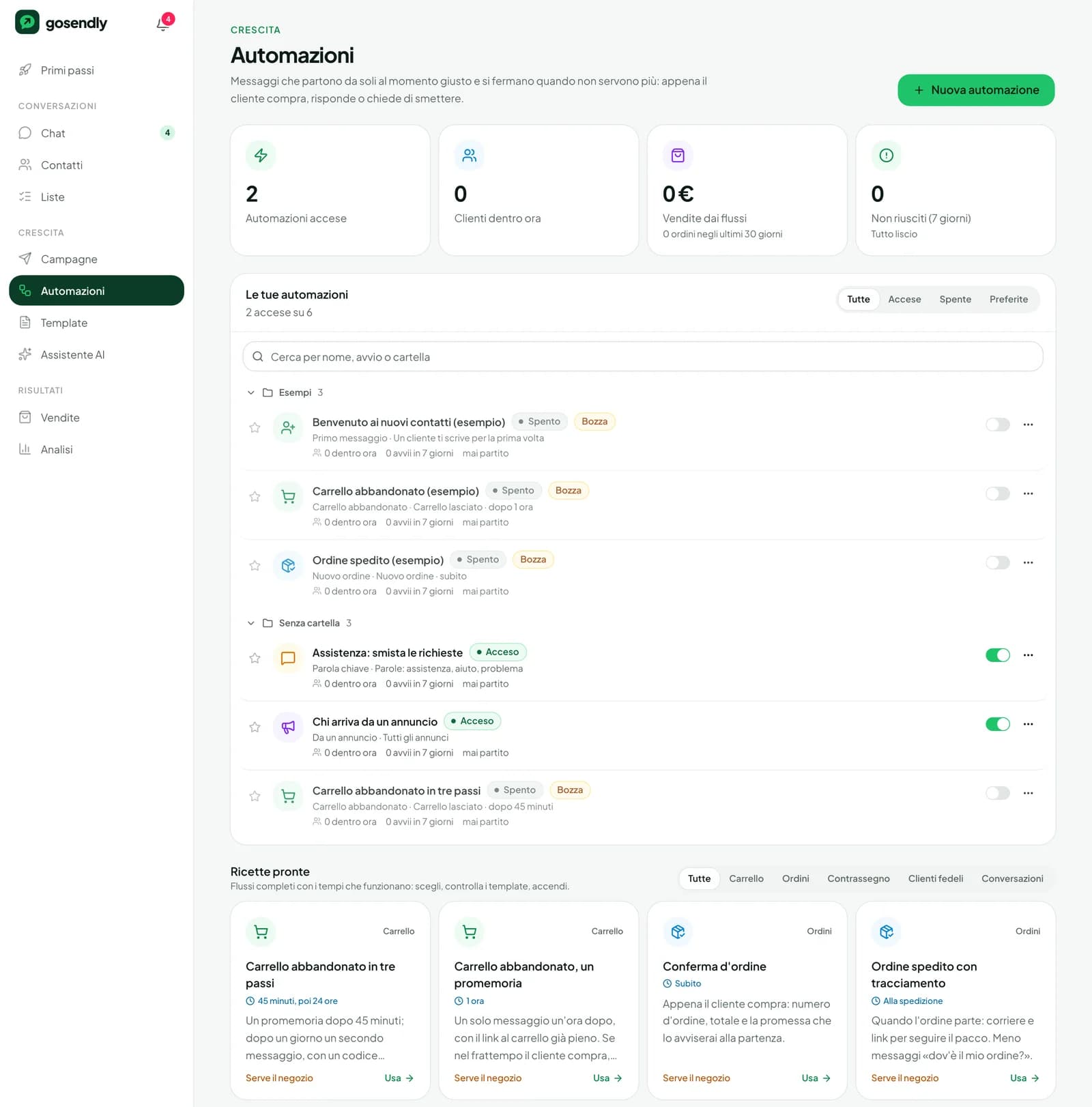
Once connected, Shopify sends Gosendly orders, shipments, refunds, carts and customers. You can import customers with one button: those who accepted WhatsApp marketing at checkout go into your contacts with their consent and its source. Then turn on the ready-made recipes: confirmation, shipping, delivery, cancellation, refund, cash on delivery, cart, review, reorder. Each flow can check whether the customer has already bought and stop on its own.
Example: the cart in three steps
Gosendly's abandoned cart recipe has timings and copy you can change. Cart reminders are marketing messages, so they follow the sending rules: they go only to people who gave consent, never between 9 p.m. and 9 a.m. in the customer's time zone, and they count toward the cap of 2 marketing messages in 7 days per customer. If the customer has already hit the cap, the message goes out later instead of being lost.
Here are the recipe's steps as it comes out of the box:
- 45 minutes after abandonment, a first reminder with the link to pick up the cart.
- After about a day, a second message: with a 10% discount code valid for 2 days if the cart is over €50, otherwise a last reminder without a discount.
- If the customer buys in the meantime, the flow stops.
Other useful tools
Besides flows, some features are built specifically for Shopify stores:
- Cash-on-delivery order confirmation, with the order updated automatically and a list of at-risk orders.
- WhatsApp button for your site, on Shopify via a script added to your theme, with a message that names the product on the page.
- Payment links from the chat, flows or assistant (on paid plans) and unique discount codes created in Shopify at the moment of sending.
- Analytics for sales generated by WhatsApp, on paid plans, with an attribution rule you can change.
- Starting flows from Shopify Flow with the flow's trigger URL.
If your store isn't on Shopify
Gosendly is for anyone who sells online, not just on Shopify. Besides Shopify, WooCommerce, PrestaShop, Magento, BigCommerce, Wix, Ecwid, Shopware and Odoo connect directly (their pages are in the integrations map); other software goes through Zapier, Make, n8n or API and webhooks.
The simplest way is a flow's trigger URL: the tool you use calls that URL with the customer's phone number (and, if you want, name, email and order details) and the flow starts for them.
Frequently asked questions
Does Shopify have a checkbox for WhatsApp consent?
Yes. In Settings › Checkout, under Marketing opt-in, you can turn on the checkbox for WhatsApp marketing, even in place of the SMS one in the countries you choose. The customer's choice is saved when they submit the checkout.
How much does it cost to send the order confirmation on WhatsApp?
It's a utility message: in Italy, as of October 28, 2026, it costs €0.0248 per delivered message. Since October 1, 2026, you pay for it even if the customer messaged you recently.
Can I send the cart reminder to everyone who abandons?
No: it's a marketing message and requires consent to WhatsApp marketing. To people who haven't given it, you can send Shopify's recovery emails, if they left their email and the rules allow it.
Is connecting Gosendly to Shopify one click?
Not yet. Today you connect it with the credentials of an app in your store or with our help; one-click connection will come with the Gosendly Shopify app.
I use WooCommerce: can I use Gosendly?
Yes, with a direct connection: in Settings › Integrations choose WooCommerce, enter your store's address and keys, and orders, customers and products come in automatically. For abandoned carts and the consent checkbox at checkout, also install the free plugin, which you can download from the WooCommerce page.
Sources
- Shopify Help Center: Abandoned checkouts(opens in a new tab)Read on October 28, 2026
- Shopify Help Center: Checkout form options (phone and marketing consent)(opens in a new tab)Read on October 28, 2026
- Shopify Help Center: Customer contact information (WhatsApp consent at checkout)(opens in a new tab)Read on October 28, 2026
- Meta for Developers: Pricing on the WhatsApp Business Platform(opens in a new tab)Read on October 28, 2026
- WhatsApp Business: Business Platform Pricing (Italy rates in EUR, categories)(opens in a new tab)Read on October 28, 2026
- Meta for Developers: Template categorization(opens in a new tab)Read on October 28, 2026
Keep reading
- IntegrationsGosendly for ShopifyShopify is Gosendly's direct integration: once your store is connected, orders, carts, shipments, customers and products come in on their own, with…Read
- FeaturesOrder confirmation, shipping and delivery on WhatsApp“Where's my package?” is the question online stores get most often. With Gosendly's WhatsApp order notifications, customers receive the…Read
- SolutionsRecover abandoned carts with WhatsAppA reminder 45 minutes later, a second message the next day and a discount only when it makes sense: abandoned cart recovery on WhatsApp with…Read
- GuidesAbandoned cart: WhatsApp or email?To recover an abandoned cart you can contact the customer by email or on WhatsApp. There's no winner that fits everyone: costs, permissions and what…Read
- GuidesConsent and GDPR for WhatsApp messagesTo message customers on WhatsApp you need two permissions that go together: the one Meta requires and the one privacy law requires. This guide…Read
- IntegrationsGosendly and Shopify FlowShopify Flow is Shopify's automation app. With its “Send HTTP request” action it can call a Gosendly flow's trigger address: that way a store event…Read
More guides
- GuideHow much WhatsApp Business costs: Meta's pricesThe WhatsApp Business app is free; the platform for stores is paid per delivered message. Here you'll find WhatsApp Business pricing for Italy as Meta publishes it, with sample…
- GuideWhatsApp Business API: the guide for storesThe WhatsApp Business API is how a store connects WhatsApp to its tools: orders, carts, a shared inbox, automations. This guide explains what you really need to activate it, without…
- GuideWhatsApp Business app vs API: the differencesWhatsApp Business app or API: the choice depends on how many chats you have, who replies and what you want to automate. Here you'll find the differences laid out side by side and the signs…
- GuideWhatsApp blue checkmark: how to get itThe blue checkmark on WhatsApp tells customers they really are messaging your store. Today there are two different ways to get it, one for the API platform and one for the app: here you'll…
- GuideWhatsApp messaging limits and how to increase themWhatsApp messaging limits decide how many people you can message first in a day. Here you'll find how they've worked since 2025, the tiers, how to move up and how to plan a Black Friday…
- GuideConsent and GDPR for WhatsApp messagesTo message customers on WhatsApp you need two permissions that go together: the one Meta requires and the one privacy law requires. This guide explains consent and GDPR for WhatsApp…
Sign-ups open soon
Leave your email and we'll tell you when we launch: then you create your account and find a sample store full of data to try right away.
- We'll write to you once
- Every feature when we open
- Sample store already full of data