WhatsApp for online stores
Sell more on WhatsApp, without living in the chat.
- Sign-ups coming soon
- Leave your email and we'll tell you
- No commission on your sales
Gosendly answers your customers while you're doing other things, recovers carts left halfway and confirms orders. When you step in, the bot steps aside.
Automatic reply
Cart recovered
Needs reply
Bot paused
Your store
online
Today
Sample conversation
Automatic reply
Cart recovered
Needs reply
Bot paused
Test mode
Write as if you were a customer and see how the bot replies. Nothing goes out to anyone until you connect WhatsApp.
It runs on the official WhatsApp Business API and connects to Shopify, WooCommerce, PrestaShop, Magento, Klaviyo, HubSpot, Stripe, Zapier and more than 50 other services. All integrations
Inside Gosendly
The real app screens, with a sample store. Pick what you want to see.
Whoever is waiting comes first, and next to each customer you see orders, spend and the 24-hour window.
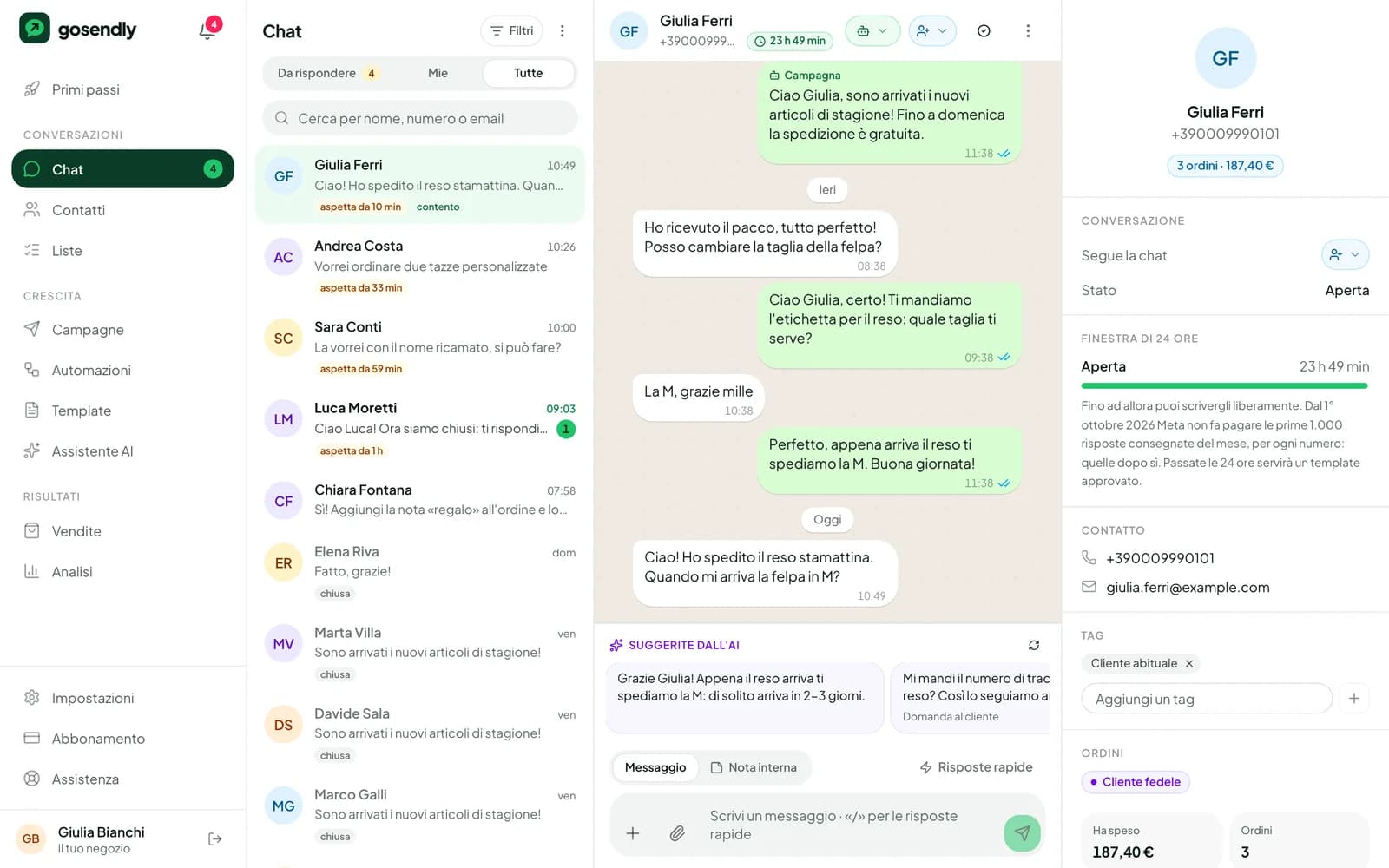
Sample store: names, numbers and orders are made up.
From the first question to the paid order, all in the chat.
Promotions, orders and support all go through the same chat. For every customer you see everything, from the first message to the latest order.
1 · Marketing
Know what a promotion costs before you send it
A dedicated welcome for people who come from your “Send message” ads, automatic keyword replies and campaigns with Meta-approved templates. Before every send you see the preview and an estimate of what Meta will charge you.
New collection reminder
ApprovedPreview
The fall collection is live
Hi Emma, the new pieces have arrived. Free shipping until Sunday.
Estimated Meta fee
shown before sending
2 · Sales
Orders without leaving WhatsApp
With Shopify, WooCommerce or PrestaShop connected, anyone who writes “I'd like to order” or sends a product link orders right in the chat: the bot asks for size, color and customizations, then sends a link to pay through your store's checkout. If a cart is left halfway, a reminder goes out, and it cancels itself if the customer buys.
Your store
online
3 · Support
No customer forgotten
The “Needs reply” tab puts whoever has been waiting longest at the top and isn't fooled by automated messages. After hours, the bot sends a notice at most once every 12 hours, and in any chat you can pause it or turn it off with one tap.
Chats
- Mark Robinson2 h agomy package still hasn't arrived 😕 can you help?2
- Anna Lewis40 min agoCan I change the size on my order?1
- Fiona Taylor5 min agoPerfect, I'll wait for the courier then
After hours: notice sent at 21:14. The next one no sooner than 12 hours.
- The 24-hour window is always visible: you know when you can message freely
- Contacts created automatically from orders and carts, with consent recorded
- Customers' photos, voice messages and documents right in the chat
Every feature, one by one.
Each one has its own page, with real screenshots and the plan it's included in.
Conversations
Reply to customers with your team, from the same chat.
Contacts
Contact book, lists and consent always in order.
Campaigns
Promotions and launches with Meta-approved templates.
Automations
Block-based flows and ready-made recipes that work on their own.
AI assistant
Answers from your sources, suggestions and transcriptions.
Sales
Carts, orders, cash on delivery and payment links.
WhatsApp
Number, templates and a button for your website.
Data and security
How much you sell thanks to WhatsApp, roles and privacy.
A bot that knows when to stay quiet.
Bots usually talk too much. They fire off replies, say hello three times and butt in while you're already helping the customer. Ours follows clear rules, and you change them from a single page.
One reply per message
Never a flood of automated messages. And if five have gone out in the same chat within two hours, the bot stops.
Quiet when you're writing
As soon as someone on your team replies, the bot pauses in that chat: for 2 hours, or as long as you decide.
Welcome only in quiet chats
The greeting goes out only if you haven't written in the last 24 hours. Never two welcomes in a row.
After hours, without nagging
With your hours, holidays and closures: one notice at most every 12 hours per chat, not on every message.
Want a person? You'll get one
During an order, customers just ask to talk to you or cancel: the bot hands over and stays silent.
No repeated replies
Keyword replies reach the same customer at most once every 7 days, or as often as you choose.
Once we open, you can try it right away in test mode.
WhatsApp, for your kind of store.
Clothing stores deal with sizes and returns, jewelers with engravings, food shops with chilled deliveries. For each industry you'll find everyday situations and ready-made messages.
From sign-up to the first reply, no waiting.
Once we open, you can try the bot right away, before you even connect WhatsApp. Activation comes later, once you've decided it's right for you.
- 1
Create your account
Name, store, email and password.
- 2
Try the bot
In the simulator, write as if you were a customer and see how it replies. Nothing is actually sent.
- 3
Choose your messages
Welcome, after hours, business hours: with a preview of how your customers will see them.
- 4
Connect WhatsApp and your store
We connect your number together, with your Meta Business account. Then you connect your store, whether it's Shopify, WooCommerce, PrestaShop or another of the 9 supported platforms. For everything else there are Zapier, Make and the API.
What's different from other platforms
Many platforms are built for large companies. Gosendly is made for the online store that wants to get started today and know what it's spending.
Trial
Traditional platforms: Often a demo by appointment
Gosendly: Once we open, you sign up and try the bot right away in test mode
Price
Traditional platforms: Price lists that change with volume and from one page to another
Gosendly: One price list, written right here: from €0, then €59, €129, €215, €299, or €649 a month
Message costs
Traditional platforms: Separate fees that are hard to predict
Gosendly: You pay Meta directly, with no markup: you see the estimate before every send
Commission on sales
Traditional platforms: Check each provider's contract
Gosendly: None, and it's stated in the price list
Support
Traditional platforms: Sometimes paid, or only after a training course
Gosendly: By email, in Italian, included in every plan
Bot
Traditional platforms: Flows you have to build and keep an eye on
Gosendly: Ready-made rules: it replies when needed and stays quiet when you write
One price, right here.
One plan with every feature: just choose how many conversations you need each month. You pay Meta for WhatsApp messages directly, with no markup. Prices exclude VAT. Sign-ups open soon.
- No commission on your sales
- No setup fee
- No markup on messages
- Save about 20% with annual billing
- Support in Italian included
Free
To get started: up to 100 conversations a month.
€0forever
No payment
- Shared team inbox
- 2 people in total, owner included
- 3 automations
- Utility templates
- Unlimited contacts
Gosendly, everything included
from €59 a month
Every feature in every tier: you only choose how many conversations you have each month. A conversation is a 24-hour window with a customer, opened by the first message from you or from them.
300 conversations
€59 a month
150 AI replies
900 conversations · recommended
€129 a month
400 AI replies
2,400 conversations
€215 a month
1,000 AI replies
4,800 conversations
€299 a month
2,000 AI replies
14,000 conversations
€649 a month
5,500 AI replies
- Unlimited agents and automations
- Marketing templates and campaigns
- Online store integration
- Abandoned cart and order messages
- AI assistant, with your tier's replies
- Payment links and discount codes in chat
- Analytics and attributed sales
- API and webhooks
Save about 20% with annual billing. If you go over your tier in a given month, we don't cut you off: extra conversations cost 20% more. Above 14,000 conversations a month, we'll put together a custom plan: email assistenza@gosendly.com.
Notify me at launchWhat you actually pay
Pick how you pay and how many conversations you have a month: the price updates right away, and everything is already included.
Gosendly
€129a month
€1,548 a year, excluding VAT
- 400 AI assistant replies a month
- Abandoned carts, order messages and payment links
- Campaigns, automations and unlimited agents
If your store grows
- Go over your tier in a month? We don't block you: each extra conversation costs €0.1720.
- Paying yearly you save €312 a year, with the same features.
- You pay WhatsApp messages straight to Meta, with no markup: you see the estimate before every send.
Tiers in detail
The same tiers you'll see in the app, on the subscription page.
Prices exclude VAT
| Conversations per month | AI replies included | Monthly | Billed annually | Each extra conversation |
|---|---|---|---|---|
| Free, up to 100 | — | €0 | — | automations pause until next month |
| 300 | 150 | €59 | €47 a month (€564 a year, −20%) | €0.2360 |
| 900Recommended | 400 | €129 | €103 a month (€1,236 a year, −20%) | €0.1720 |
| 2,400 | 1,000 | €215 | €172 a month (€2,064 a year, −20%) | €0.1075 |
| 4,800 | 2,000 | €299 | €239 a month (€2,868 a year, −20%) | €0.0748 |
| 14,000 | 5,500 | €649 | €519 a month (€6,228 a year, −20%) | €0.0556 |
Meta fees: you pay Meta directly, with no markup
Every template you send (reminders, campaigns, messages to people who haven't written to you in over 24 hours) has a fee set by Meta, which varies by category and by the customer's country; chat replies are only charged after the first 1,000 each month. You pay them directly to Meta, using the payment method linked to your WhatsApp Business account. Gosendly doesn't sell credit or add any markup: before every send, the app shows you the estimated cost.
Meta prices for Italian phone numbers, from October 1, 2026, per delivered message.
Marketing
€0.0658
offers and promotions
Updates
€0.0248
order and shipping updates (Meta calls these “utility”)
Login codes
€0.0248
sign-in codes (Meta calls these “authentication”)
Chat replies
€0.0248
the first 1,000 each month are free, for each number
You add the payment method in Meta Business Suite, under Billing Hub › Payment methods. Customers in other countries are charged their own country's rate. Prices checked on October 28, 2026 against Meta's official pricing, which can change on the first day of each quarter.
What you pay, and to whom
You pay Gosendly only for your plan, monthly or yearly: no commission on your sales and no setup fee.
You pay Meta for WhatsApp messages, using the payment method on your WhatsApp Business account. Gosendly doesn't collect that money or add anything on top: it shows you the estimate before every send.
Support included, in Italian
We reply by email, in Italian, by the next business day. Support is included in every plan, even Free.
No course to take before you can ask for help: just email us at assistenza@gosendly.com.
Learn, copy, calculate.
No account needed. There are templates to copy, tools that run in your browser and guides with official sources.
WhatsApp templates
Ready-made messages for orders, shipping, carts and promotions, with the right category and tips to get them approved.
Free tools
Calculate message costs, create the link and QR code for your number, check a template before Meta does.
- WhatsApp cost calculator
- WhatsApp link and QR code generator
- Check your template before Meta does
- WhatsApp message preview
Guides
Meta pricing, the API, the blue badge, messaging limits and consent: WhatsApp's rules explained for online sellers.
- How much WhatsApp Business costs: Meta's prices
- WhatsApp Business API: the guide for stores
- WhatsApp Business app vs API: the differences
- WhatsApp blue checkmark: how to get it
Where your data lives, in plain words.
The list of who processes the data, where and why is public. You don't have to ask anyone for it.
In the European Union
The Gosendly app and database run on IONOS servers in Germany.
Encrypted where it matters
The keys for your connections to WhatsApp, your store and other apps are encrypted. Nobody can read passwords, not even us.
Secure connections
Between your browser, the app and connected services, data travels encrypted (HTTPS).
A backup every night
Every night a full backup of the database is made and kept for 14 days.
Frequently asked questions
If your question isn't here, write to assistenza@gosendly.com. A person will reply, in Italian.
Notify me at launchDo I need a dedicated phone number?
You can use a new number or one you already have, as long as it isn't active at the same time on the WhatsApp or WhatsApp Business app. Until you connect it, you can try everything in test mode.
How much does it cost to send a message?
You pay for messages directly to Meta, with the payment method on your WhatsApp Business account: Gosendly doesn't sell credit and doesn't add any markup. For a customer in Italy, a marketing template costs €0.0658, a utility or authentication template €0.0248; chat replies are free up to 1,000 a month per number, then cost €0.0248 (Meta prices as of October 1, 2026). Before every send, the app shows you the estimated cost. All the details are on the Pricing page.
Are there commissions on sales or setup fees?
No. You only pay Gosendly for your plan, unless you stay on Free; you pay for messages directly to Meta, with no markup. No percentage of what you sell in chat and no cost to get started.
What support do you offer?
We reply in Italian, by email, by the next business day. It's included in every plan, even Free. You don't need to take any course to get help: just write to us at assistenza@gosendly.com.
What happens at the end of the trial?
The trial lasts 14 days and doesn't ask for a card: during those days you use every feature. At the end you stay on the Free plan, with no charges; if you want, you choose a paid plan.
Can I import my existing contacts?
Yes, from a CSV or Excel file. With Shopify connected, anyone who orders or leaves a cart is added to your contacts automatically, with marketing consent recorded.
Which platforms does it work with?
Any online store. Shared inbox, bot, keyword replies and templates always work, and on paid plans so do campaigns. Shopify, WooCommerce, PrestaShop, Magento, BigCommerce, Wix, Ecwid, Shopware and Odoo connect directly, and orders and customers come in on their own. With the first five, products come in too. For other software there are Zapier, Make, n8n and the Gosendly API. See the integrations.
Who sets up the WhatsApp Business account?
We do it together: you request the connection from the app and we guide you step by step with your Meta Business account. Meanwhile, you prepare messages and hours and try the bot in test mode.
Where is my data stored?
On servers in Germany, in the European Union. Connection tokens are encrypted, passwords are stored only as hashes, and the database is backed up every night. Who processes the data and where, provider by provider, is on the Security and providers page.
Does the AI assistant learn from my store's data?
No: store data doesn't train any model. The assistant uses Google's paid API (Gemini), and for paid services Google's terms rule out using prompts and responses to improve its products. The details are on the Security and providers page.
Your next customer is messaging you.
Leave your email and we'll write to you as soon as we open. Then you create your account and try the bot right away.
We'll let you know as soon as sign-ups open.