Connecting your WhatsApp number
To use Gosendly, your store's WhatsApp number must be connected to Meta's official platform. Today we do the connection together with you, following the same steps as Meta's signup window; in the meantime you try everything in test mode, with a sample store.
What you get
- Your own number, on Meta's official platform: no unauthorized apps.
- A checklist before you start: number, Meta Business account, website, payment method.
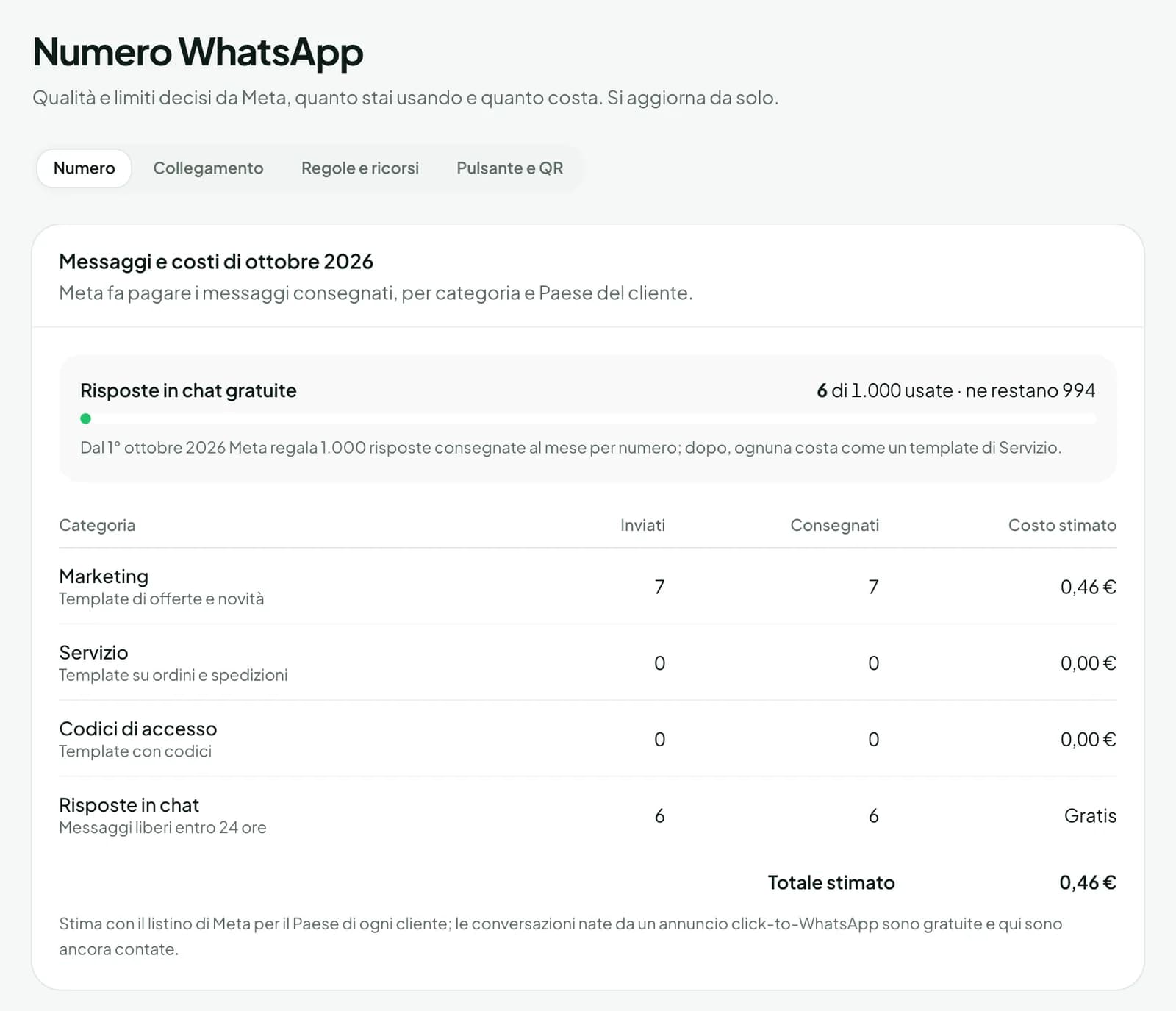
- Your number's quality rating, messaging limit and costs always visible, checked every 30 minutes.
- If your number comes from another provider, you don't lose it and you don't have to delete it.
How it works
- 1
Try it before connecting
As soon as you sign up you're in test mode: nothing goes out to customers until you connect WhatsApp, and with the simulator you write as a customer to see how bots and flows reply.
- 2
Request the connection
In Settings › WhatsApp number, “Connection” tab, write in the “Note for the team” the number to connect and when to reach you, then click “Send request”. We'll get in touch.
- 3
We connect it together
You give us access to your Meta Business account and we go through the same steps as Meta's signup window with you: choosing the business, the number and entering the verification code.
- 4
Check the status
In the “Number” tab you find the quality rating, messaging limit, display name, business verification and payment method in Meta, with what to do if something is missing.
What number you need
Meta requires a number you own, with the country code and full number, that can receive an SMS or a call for the verification code: a landline works too. If it sits behind a switchboard with a voice menu, the call must reach a person. During registration you set a six-digit PIN for two-step verification.
A number already used on WhatsApp, personal or Business, must first be deleted from there, according to Meta. Gosendly reminds you of this in the “Before you start” checklist.
A new number, from another provider or from the app
New number: we connect it together. Number already active with another provider: under Meta's rules from October 2026 the number doesn't move; you share your WhatsApp account with Gosendly and conversations aren't interrupted. The old provider stays connected until you remove it, and the templates stay on its account: in Gosendly you resubmit them to Meta from the Templates page, with “Resubmit all”.
Number from the WhatsApp Business app: Meta lets you keep it on the app too, bringing over contacts and individual chats from the last 6 months (coexistence), but only through its official signup window. In Gosendly this is built and switches on with Gosendly's Meta app, which isn't active yet: until then, to use that number with Gosendly, it has to be removed from the app.
What to prepare in Meta
Three things make the connection easier and your number more reliable:
- A Meta Business account (business portfolio) with admin access.
- A website with your business name, address and VAT number: they're needed for business verification. Without verification you start at 250 people a day you can message first.
- A payment method in your Meta account: Meta bills your store for the messages, not Gosendly.
After the connection
The display name shows up right away in the profile; at the top of chats it appears after Meta's review. Gosendly checks your number every 30 minutes, keeps a history of quality, limit and alerts for the last 90 days and lets you know if anything changes. The sending rules ramp up a new number with gradual sends. What the platform is and how much it costs is explained in WhatsApp Business Platform.
Frequently asked questions
Why can't I do the connection myself?
Opening Meta's signup window directly from Gosendly requires Gosendly's app to be approved by Meta as a tech provider. Until it's active, we do it with you, following the same steps.
Can I keep using the WhatsApp Business app on my phone?
With coexistence, yes, but it goes through Meta's signup window, which isn't active in Gosendly yet. Today a number connected to Gosendly can't also stay on the app: consider connecting a new number.
Can I connect more than one number?
No: today each store has one number. If you connect a new number, it replaces the current one: chats are kept, while the old account's templates must be resubmitted to Meta.
How much does it cost to connect the number?
Connecting is free and is also available on the Free plan. You pay Meta for messages according to its rate card: each number gets 1,000 delivered service replies free per month.
Keep reading
- IntegrationsMeta's WhatsApp Business PlatformGosendly runs on the WhatsApp Business Platform, Meta's official service for business messaging, in its Cloud API version. It's what lets several…Read
- GuidesWhatsApp Business API: the guide for storesThe WhatsApp Business API is how a store connects WhatsApp to its tools: orders, carts, a shared inbox, automations. This guide explains what you…Read
- GuidesWhatsApp Business app vs API: the differencesWhatsApp Business app or API: the choice depends on how many chats you have, who replies and what you want to automate. Here you'll find the…Read
- GuidesWhatsApp blue checkmark: how to get itThe blue checkmark on WhatsApp tells customers they really are messaging your store. Today there are two different ways to get it, one for the API…Read
More features: WhatsApp
Number, templates and a button for your website.
- WhatsApp templates: create them and get them approvedTo message a customer first, or more than 24 hours after their last message, WhatsApp requires a template approved by Meta. With the Gosendly template editor you write it, see exactly how…Also included in the Free plan
- WhatsApp button for your website and QR codesA shopper looking at a product with a question about sizing shouldn't have to hunt for your number. With the Gosendly WhatsApp website button they tap, WhatsApp opens with the message…Also included in the Free plan
Sources
- Meta: platform phone numbers(opens in a new tab)Read on October 28, 2026
- Meta: coexistence with the WhatsApp Business app(opens in a new tab)Read on October 28, 2026
- Meta: new WhatsApp Business account model(opens in a new tab)Read on October 28, 2026
- Meta: display names(opens in a new tab)Read on October 28, 2026
- Meta: messaging limits(opens in a new tab)Read on October 28, 2026
Sign-ups open soon
Leave your email and we'll tell you when we launch: then you create your account and find a sample store full of data to try right away.
- We'll write to you once
- Every feature when we open
- Sample store already full of data