Solutions
WhatsApp customer service, with your whole team
One number, many people replying, no message lost. WhatsApp customer service with Gosendly puts your whole team in the same inbox, routes requests and lets you reply with the customer's orders right in front of you.
Your store
online
Today
The problem
In many stores WhatsApp lives on a single phone, the one with the WhatsApp Business app, passed from hand to hand. Two people reply to the same customer, someone else thinks it's already been handled, nobody checks on Friday night. When the customer writes again a week later, nobody remembers what they were promised.
How Gosendly solves it
- 1
We connect your number
We connect your number to the WhatsApp Business Platform together with you. You can use a new number or the one you already have, as long as it isn't active on the app at the same time.
- 2
Invite your team
Everyone logs in with their own access and role: owner, admin or agent. The Free plan has two people in total, owner included; paid plans have no limit.
- 3
Switch on routing
The "Support: route requests" recipe asks the customer what it's about, adds a tag, leaves a note and hands the chat to the right person.
- 4
Reply with context
Next to the conversation there's the customer profile: orders, tags, notes, consent, running flows. Replies you write often are one "/" away.
One inbox for the whole team
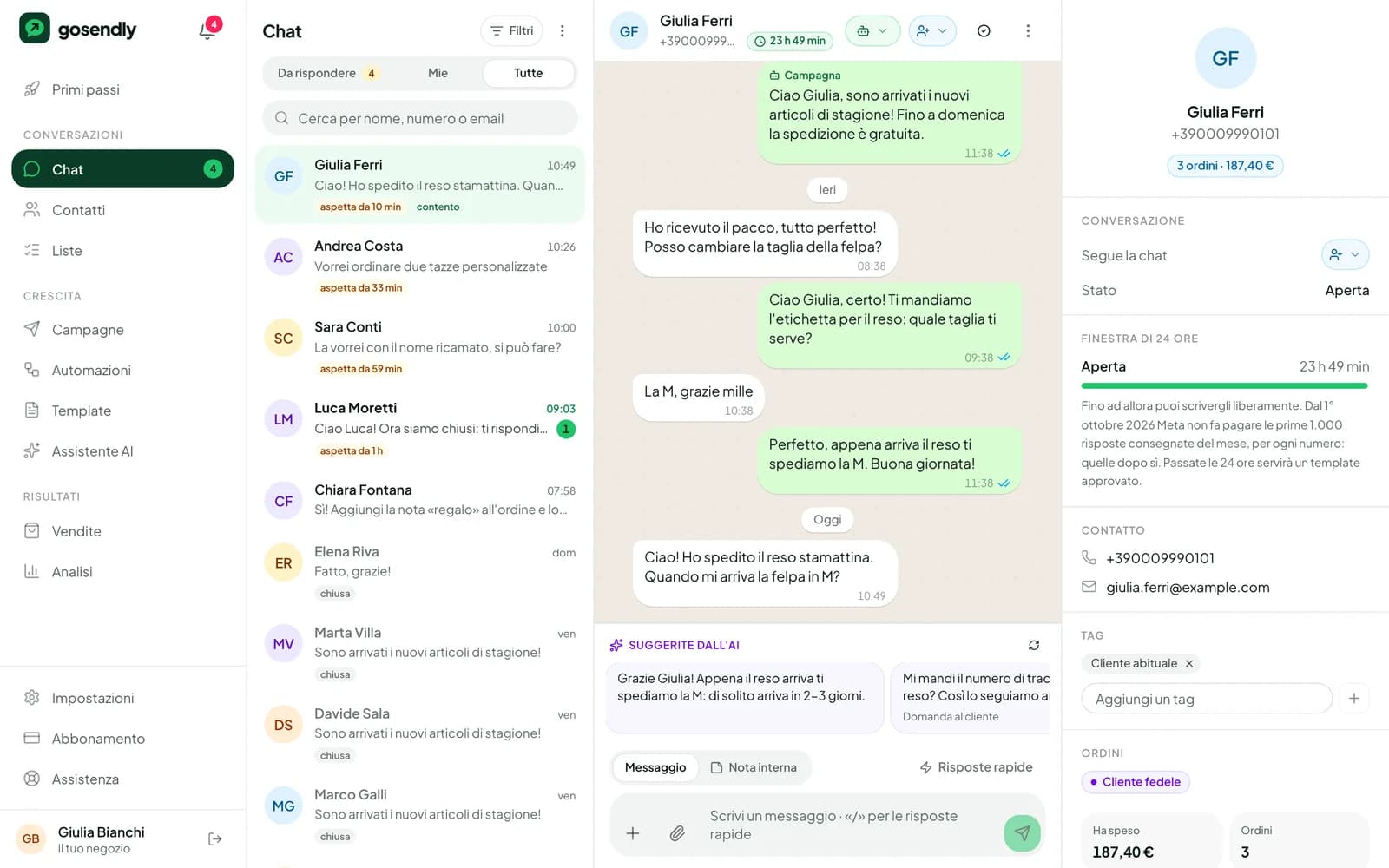
The inbox has three columns: the conversation list, the conversation and the customer profile. You see who is viewing or typing in that chat, so two people don't send the same answer. Chats are assigned manually or automatically, to the person on shift with the fewest open conversations.
The "To reply" tab gathers everyone waiting for a person, with the oldest requests on top. A chat you need to pick up later can be snoozed with "Remind me": at the chosen time it comes back as unread and you get a notification. Notifications reach your computer and your phone, through the web app you install from the browser, no app store needed.
Route requests without reading them all
When a customer writes "support", "help" or "problem", or asks in their own words that the AI recognizes, a message goes out with three buttons: "About my order", "Return or exchange", "Other". The choice becomes a tag, the request goes into an internal note and the chat is assigned to whoever is on shift.
Whoever opens the chat already knows what it's about. With tag filters you see all of the week's return requests at a glance.
Reply well and fast
Quick replies come up with "/" and can contain variables, like the customer's name, and attachments, like the size chart or the return policy. In internal notes you mention a colleague, who gets notified.
On paid plans the AI assistant suggests three replies above the text box: send one with a click or edit it first. When a chat changes hands, the conversation summary saves you from rereading everything.
Returns and exchanges in the chat
Gosendly doesn't handle returns automatically, and on the order it only adds tags or cancels, and only where a flow includes it (for example cash on delivery). What it does is collect the request properly: the customer picks "Return or exchange", sends photos in the chat, and the conversation goes to the person who handles returns, with a tag and a note. You record the return in your store as always, but the history stays in one place, visible to everyone.
The 24-hour window and what replying costs
When a customer writes to you, you can reply freely for 24 hours: these are service messages, and Meta doesn't charge for the first 1,000 delivered replies per month for each number; beyond that they're charged, through the payment method of your WhatsApp Business account. Every new message from the customer restarts the 24 hours.
Once the 24 hours are up, you can only write first with a template approved by Meta. In the chat you see the time left and, when the window is closed, you pick the template and see the estimated cost before sending it.
Sample messages
How your customer reads them on WhatsApp. Start from here and change them however you like.
Routing with three buttons Hi Giulia, we're here to help. What's it about?
10:24
Free text with the "About my order", "Return or exchange", "Other" buttons: the customer has just written, so the 24-hour window is open.
Quick reply about exchanges Sure, Giulia! Size exchanges are free within 30 days of delivery. Send us a photo of the label here and we'll tell you how to ship the item back.
10:24
Quick reply called up with "/exchanges", with the name filled in automatically. The 30 days are an example: write your own terms.
Picking up the conversation after 24 hours Hi Giulia, we're writing about the exchange for order #1043: reply to this message and we'll pick up where we left off.
10:24
Utility template, because it's about a specific customer request. When she replies, the window reopens.
The features you use
- FeaturesShared WhatsApp inbox for your teamWith the Gosendly shared WhatsApp inbox, your whole team replies from the store's same number, each person with their own login, from a computer or…Read
- FeaturesAutomatic chat assignmentWhen several people reply from the same number, you need to know who is handling which customer. With automatic chat assignment, Gosendly hands each…Read
- FeaturesQuick replies with variablesShipping, returns, sizes, delivery times: the questions are always the same. With Gosendly quick replies you type “/” in the chat, pick the reply…Read
- FeaturesInternal notes and mentions“Already asked for a size exchange”, “refund done, waiting for the parcel”: that's information for the team, not for the customer. In Gosendly you…Read
- FeaturesNotifications on phone and computerA customer writes while you're in the stockroom packing orders: if you don't notice, they wait for hours. Gosendly sends you a notification on your…Read
- FeaturesSuggested replies, summaries and translationsNot everyone wants an AI writing to their customers. Gosendly's chat helpers work for whoever is replying: they suggest three replies, summarize the…Read
Frequently asked questions
Can I use the number I already have on the WhatsApp Business app?
Yes. The number moves to the WhatsApp Business Platform and from then on isn't active on the app at the same time. We do the connection together; old conversations from the app don't move to Gosendly. The differences are explained in the comparison between the app and Gosendly.
How many people can reply?
Two people in total on the Free plan, owner included; no limit on paid plans. Everyone works on the same number, each with their own access.
Do agents see all chats?
The owner and admins see everything. For agents you choose: all chats, only the ones assigned to them, or theirs plus the unassigned ones. Exports and deletions stay with the managers.
Can I reply from my phone?
Yes, from your phone's browser, and you can install Gosendly as a web app with notifications for new messages. It isn't an app to download from the app store.
Do replies to customers cost anything?
Replies within 24 hours of the customer's last message are service messages: the first 1,000 delivered per month per number are free, then Meta charges for them. Gosendly adds no markup.
Keep reading
- FeaturesShared WhatsApp inbox for your teamWith the Gosendly shared WhatsApp inbox, your whole team replies from the store's same number, each person with their own login, from a computer or…Read
- FeaturesAutomatic chat assignmentWhen several people reply from the same number, you need to know who is handling which customer. With automatic chat assignment, Gosendly hands each…Read
- SolutionsReply after hours too, with AICustomers write in the evening, on Sundays, on public holidays. With Gosendly's after-hours auto replies, the AI assistant answers the questions it…Read
- GuidesWhatsApp Business app vs API: the differencesWhatsApp Business app or API: the choice depends on how many chats you have, who replies and what you want to automate. Here you'll find the…Read
Sources
- WhatsApp Business Platform pricing (Meta)(opens in a new tab)Read on October 28, 2026
- WhatsApp template categories (Meta)(opens in a new tab)Read on October 28, 2026
Sign-ups open soon
Leave your email and we'll tell you when we launch: then you create your account and find a sample store full of data to try right away.
- We'll write to you once
- Every feature when we open
- Sample store already full of data