AI assistant
Suggested replies, summaries and translations
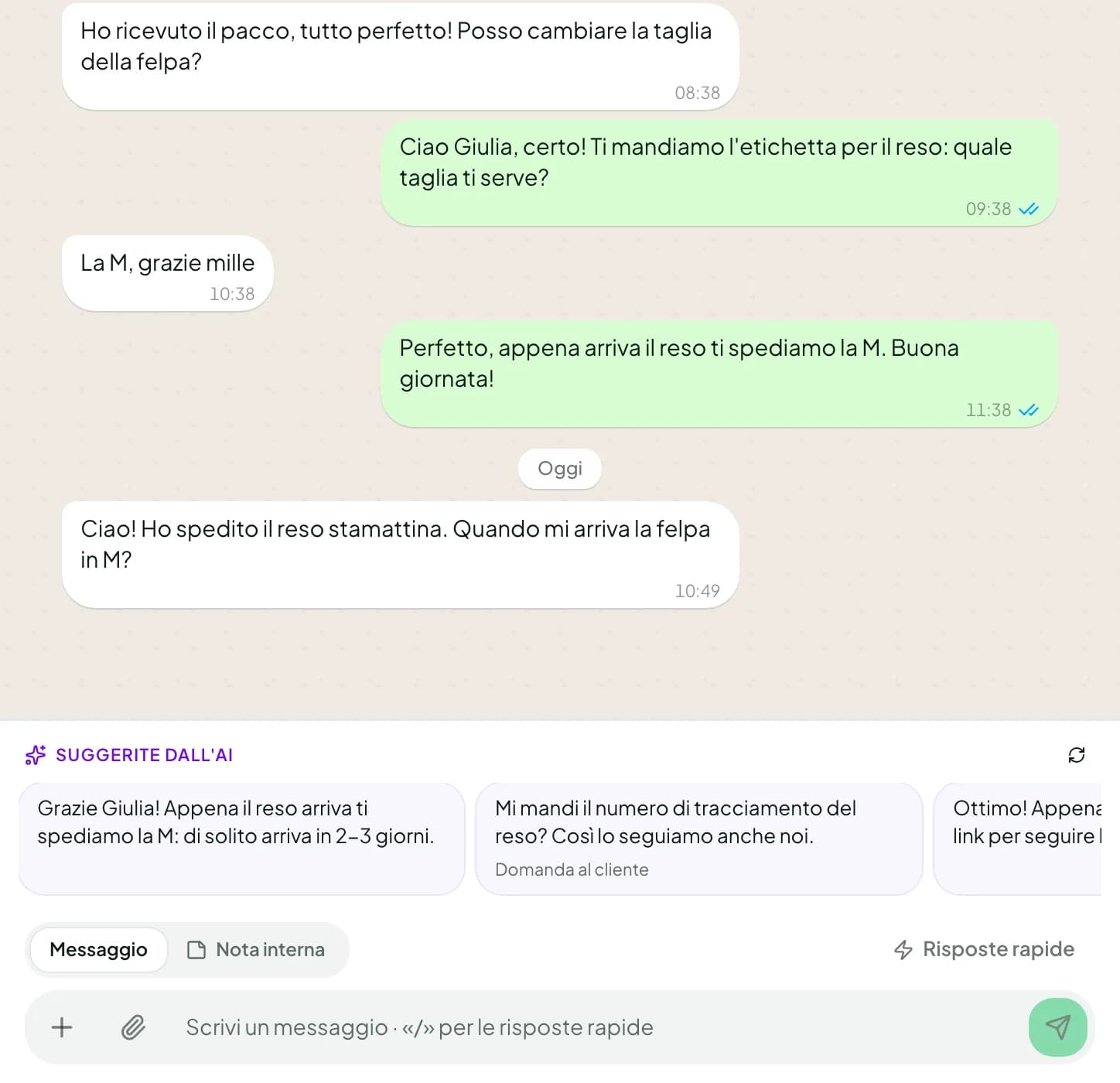
Not everyone wants an AI writing to their customers. Gosendly's chat helpers work for whoever is replying: they suggest three replies, summarize the chat in three lines and translate messages from other languages. They work even with the assistant turned off.
What you get
- Three ready-made replies, with the real order status and your saved replies.
- A long chat understood in three lines, even when you hand it to a colleague.
- A message in German or English shows up translated below the original.
- Nothing goes out to the customer without a person's click.
How it works
- 1
Turn on the helpers
In AI Assistant, “Chat helpers” tab, turn on the ones you need: “Three suggested replies”, “Summary at every handoff”, “Translate messages in other languages”.
- 2
Reply from the chat
Suggestions appear above the message box: you pick one, edit it if needed and send it yourself.
- 3
Read the summary
When a person is handling the chat, next to the messages you'll find the “AI summary”: create it with “Summarize” and refresh it with “Update summary”.
Three suggested replies
A customer asks “when will my order arrive?”. Above the message box, three suggestions appear that use the real order data, like status and tracking with Shopify connected, and the quick replies you've already saved. Tap the right one, tweak it if needed and send it.
When some information is missing, a suggestion can be a question for the customer, for example their order number.
The three-line summary
A forty-message chat about a size exchange, picked up on Monday by a colleague: the summary says what the customer wants, what has already been said, and the linked order with the next step.
With “Summary at every handoff”, it writes itself when the bot or the AI assistant hands the chat to a person, so whoever takes over doesn't have to read everything from the start.
Message translation
If you also sell abroad, customer messages in other languages are translated automatically: the translation appears below the original message, which always stays visible, and you choose the language to translate into. Today Gosendly translates the messages you receive; you write your replies yourself in the customer's language.
Language, mood and topic
The AI also detects the language, mood and intent of the chat, for example someone asking about an order, someone who wants to buy, someone who is upset: you can use these in the chat filters. With “Tags by chat topic”, it adds the tags you choose to the contact, such as “return” or “size exchange”. For automated replies to customers there's the AI assistant.
Frequently asked questions
Do the helpers use up the assistant replies included in my plan?
No. The plan's monthly limit counts the replies the assistant sends to customers; suggestions, summaries, transcriptions and translations are counted separately.
Do they work even if the AI assistant is turned off?
Yes: they help the team and don't write to customers. You need a paid plan, which includes AI.
Are suggested replies sent automatically?
No, never. The suggestion goes into the message box and a person sends it, after reading it and editing it if needed.
Does it translate my replies too?
Not yet: today it translates customer messages for the team. You write your replies in the customer's language, with help from the suggestions.
Keep reading
- FeaturesAI assistant that answers from your sourcesThe Gosendly AI assistant answers customers on WhatsApp using your store's information: shipping, returns, sizes, order status. If it doesn't know…Read
- FeaturesVoice message transcriptionA customer sends a two-minute voice message while you're at the register. With Gosendly voice message transcription, the voice message becomes text…Read
- FeaturesShared WhatsApp inbox for your teamWith the Gosendly shared WhatsApp inbox, your whole team replies from the store's same number, each person with their own login, from a computer or…Read
- SolutionsWhatsApp customer service, with your whole teamOne number, many people replying, no message lost. WhatsApp customer service with Gosendly puts your whole team in the same inbox, routes requests…Read
More features: AI assistant
Answers from your sources, suggestions and transcriptions.
- AI assistant that answers from your sourcesThe Gosendly AI assistant answers customers on WhatsApp using your store's information: shipping, returns, sizes, order status. If it doesn't know, it says so and hands the chat to your…Included in all paid plans
- Knowledge base from your website, FAQs and PDFsThe AI assistant answers only as well as its sources are clear. The Gosendly knowledge base gathers what you know about your store, from your website to your FAQs, from PDFs to your…Included in all paid plans
- Voice message transcriptionA customer sends a two-minute voice message while you're at the register. With Gosendly voice message transcription, the voice message becomes text, with a one-line summary next to it: you…Included in all paid plans
Sign-ups open soon
Leave your email and we'll tell you when we launch: then you create your account and find a sample store full of data to try right away.
- We'll write to you once
- Every feature when we open
- Sample store already full of data