Conversations
Shared WhatsApp inbox for your team
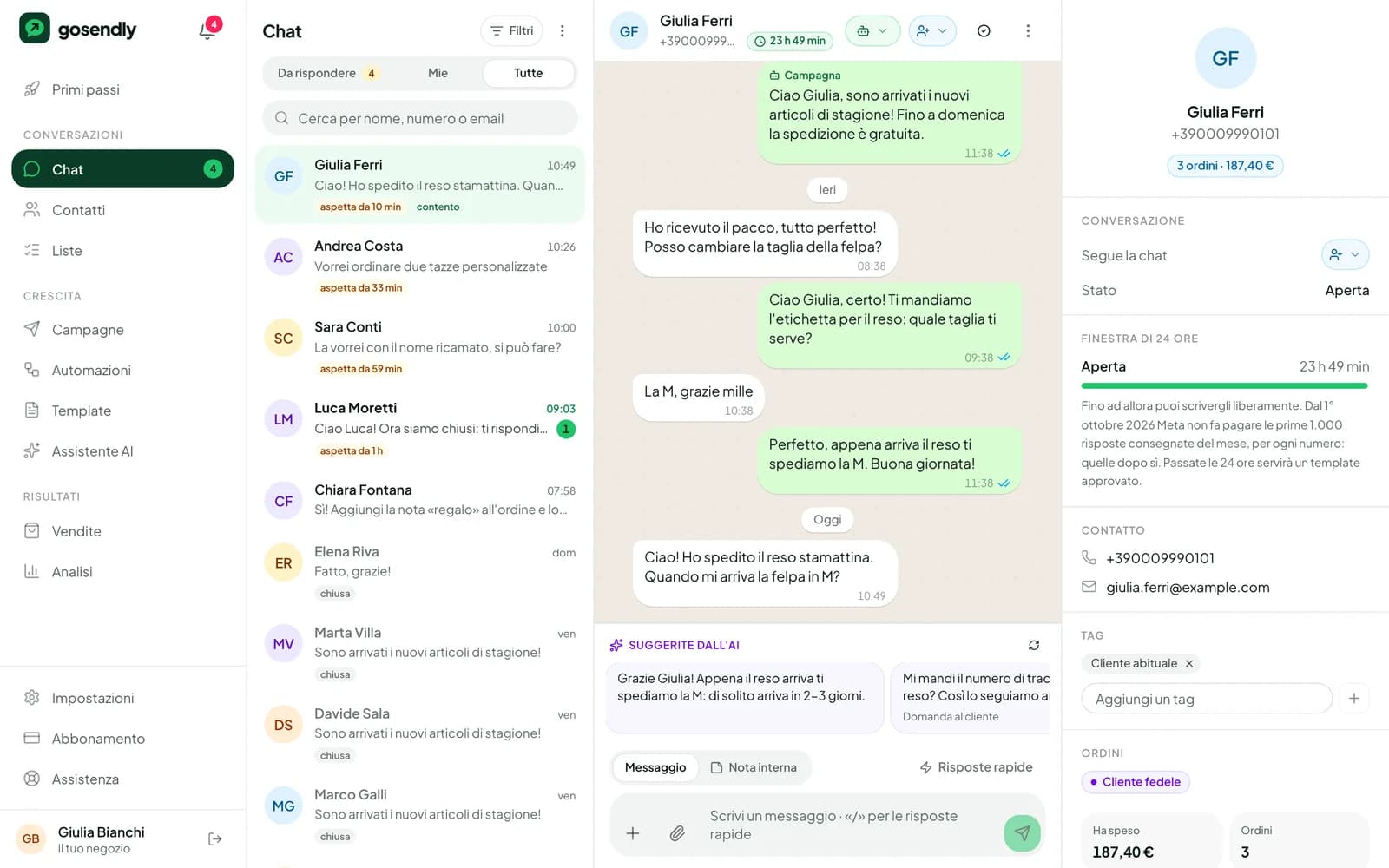
With the Gosendly shared WhatsApp inbox, your whole team replies from the store's same number, each person with their own login, from a computer or a phone. You see who handles each chat, who is already typing and which customers are still waiting for a reply.
What you get
- One number, several people: no more passing the store phone around.
- See when a teammate is already typing to the customer: nobody replies twice.
- The “To answer” tab puts whoever has been waiting longest at the top.
- Next to the chat you have tags, consent, notes and, with Shopify connected, the customer's orders.
How it works
- 1
Connect your number
Your store's WhatsApp number connects through Meta's official API: for now we do it together with you. In the meantime you can try everything in test mode, with a sample store.
- 2
Invite your helpers
In Settings › Team and assignments, click “Invite someone” and choose the role. For extra help at Christmas, turn on “Timed access”: on the date you choose, access closes by itself.
- 3
Reply from Chat
Open Chat from the menu: on the left, the list with the “To answer”, “Mine” and “All” tabs; in the middle, the conversation; on the right, the customer profile.
- 4
Close or snooze
When you're done, set the chat to “Closed”: it reopens by itself if the customer writes again. To come back to it later, use “Remind me”, for example tomorrow at 9:00.
Three panels, everything on one screen
A customer asks whether the hoodie in size M will arrive by Saturday: to answer well you need the chat, who they are and what they've already bought. In Gosendly it's all on the same screen.
In the customer profile you find tags, marketing consent, notes pinned by the team, running flows and the status of the 24-hour window. With Shopify connected you also see their orders.
- Photos, videos, voice messages, location, contacts and documents, with PDF previews.
- Every message shows whether it was sent, delivered, read or not delivered, with the reason for the error in plain language.
Nobody replies twice
The risk of a shared number: two people reply to the same customer with two different answers. In Gosendly, above the text box you see “Marco is typing to the customer” or “Giulia is also viewing this chat”, in real time.
Each chat can have an agent: you assign it by hand or with automatic assignment, which hands it to whoever is on shift and has the fewest open chats.
Waiting customers at the top
“To answer” gathers the chats from the last 7 days where the customer is waiting for a person, oldest first, with the count next to Chat in the menu. Bot and campaign replies don't count: if only the bot has replied, the customer stays on the list.
There are also filters by agent, tag, list, status, reminder and unread messages. A combination you use often, such as “Returns to handle”, can be saved with “Save as view” and shared with the team.
Buttons, menus and the 24-hour window
From “Attach or send more” you send files, a message with up to 3 buttons, a list menu with up to 10 items, the store's location or the courier's contact. With Shopify connected you can also send a discount code from there; on paid plans, a payment request.
At the top you see how much of the 24-hour window is left. Once it's closed you can only write with a Meta-approved template: Gosendly offers “Template” or “Free text” and shows the estimated cost of sending.
From your phone too
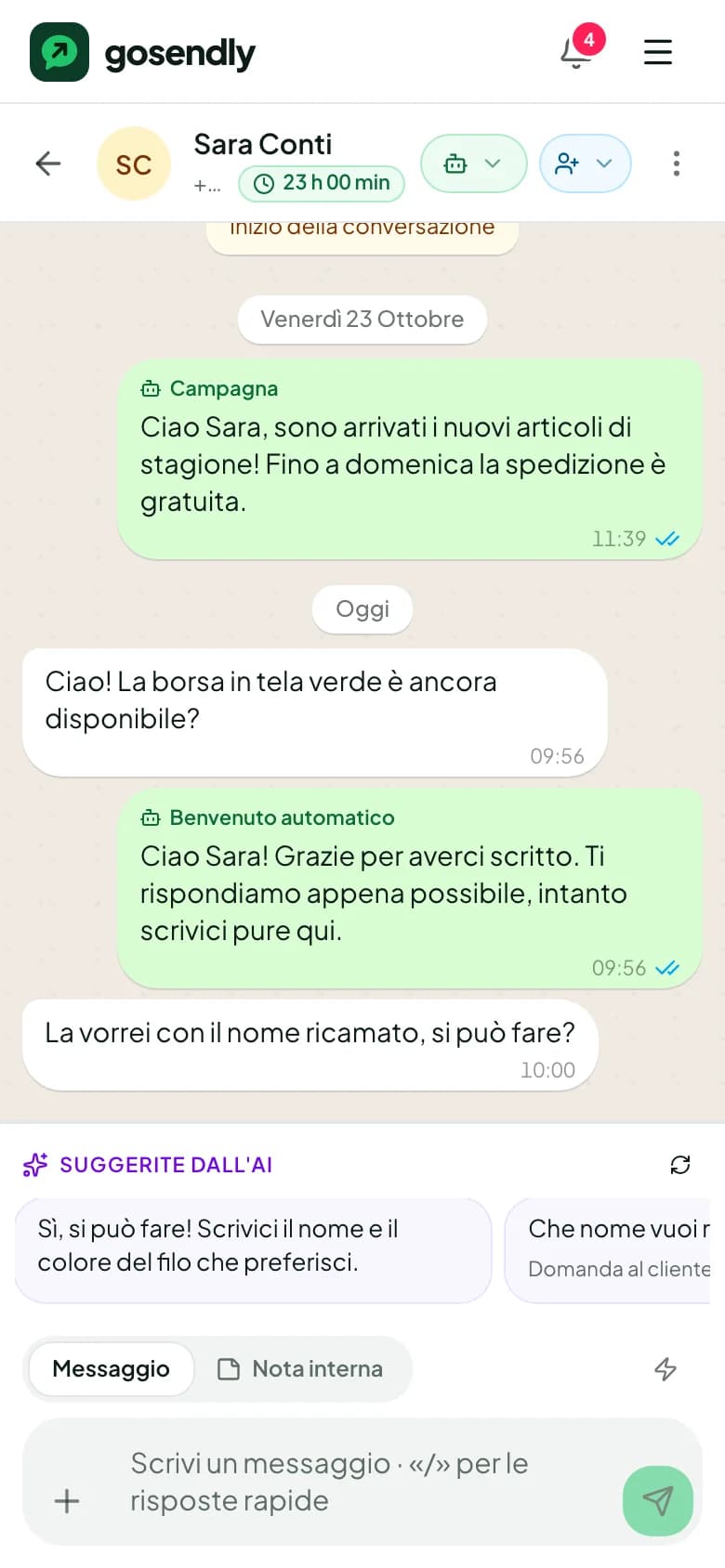
Gosendly installs on your phone like an app, with “Add to Home Screen”, and shows one thing at a time: list, chat, customer profile. With phone notifications you know right away when a customer writes, on iPhone too.
Frequently asked questions
How many people can reply from the same number?
On the Free plan, 2 people in total, owner included; on paid plans, unlimited, each with their own login. Owners and admins see all chats; agents see the ones you decide: all of them, their own plus unassigned ones, or only their own.
How do we avoid two of us replying to the same customer?
Gosendly shows who is viewing or typing in a chat, and each chat can have an agent. With automatic assignment the chat goes to an available person as soon as the customer writes, or only when the bot isn't enough.
Can I write to a customer more than 24 hours after their last message?
Yes, but only with a Meta-approved template: it's a WhatsApp rule. The chat tells you when the window is closed and shows the estimated cost before sending.
Do I need a Shopify store to use the chat?
No: the shared inbox works for any online store, even on the Free plan. If you connect Shopify (on paid plans), the customer profile also shows their orders.
Keep reading
- FeaturesAutomatic chat assignmentWhen several people reply from the same number, you need to know who is handling which customer. With automatic chat assignment, Gosendly hands each…Read
- FeaturesInternal notes and mentions“Already asked for a size exchange”, “refund done, waiting for the parcel”: that's information for the team, not for the customer. In Gosendly you…Read
- FeaturesQuick replies with variablesShipping, returns, sizes, delivery times: the questions are always the same. With Gosendly quick replies you type “/” in the chat, pick the reply…Read
- SolutionsWhatsApp customer service, with your whole teamOne number, many people replying, no message lost. WhatsApp customer service with Gosendly puts your whole team in the same inbox, routes requests…Read
More features: Conversations
Reply to customers with your team, from the same chat.
- Quick replies with variablesShipping, returns, sizes, delivery times: the questions are always the same. With Gosendly quick replies you type “/” in the chat, pick the reply and the text arrives already filled in…Also included in the Free plan
- Automatic chat assignmentWhen several people reply from the same number, you need to know who is handling which customer. With automatic chat assignment, Gosendly hands each conversation to a team member: whoever…Also included in the Free plan
- Internal notes and mentions“Already asked for a size exchange”, “refund done, waiting for the parcel”: that's information for the team, not for the customer. In Gosendly you write it as internal notes inside the…Also included in the Free plan
- Notifications on phone and computerA customer writes while you're in the stockroom packing orders: if you don't notice, they wait for hours. Gosendly sends you a notification on your phone or computer when a customer is…Also included in the Free plan
- Business hours, holidays and away messageA customer messages you at 10 p.m. on Sunday and has no idea if anyone will read it. With your store hours set in Gosendly, they instantly get the away message, and on Monday morning their…Also included in the Free plan
Sources
- Meta: sending messages and the 24-hour customer service window(opens in a new tab)Read on October 28, 2026
Sign-ups open soon
Leave your email and we'll tell you when we launch: then you create your account and find a sample store full of data to try right away.
- We'll write to you once
- Every feature when we open
- Sample store already full of data