Conversations
Business hours, holidays and away message
A customer messages you at 10 p.m. on Sunday and has no idea if anyone will read it. With your store hours set in Gosendly, they instantly get the away message, and on Monday morning their chat is waiting for you in “To reply”.
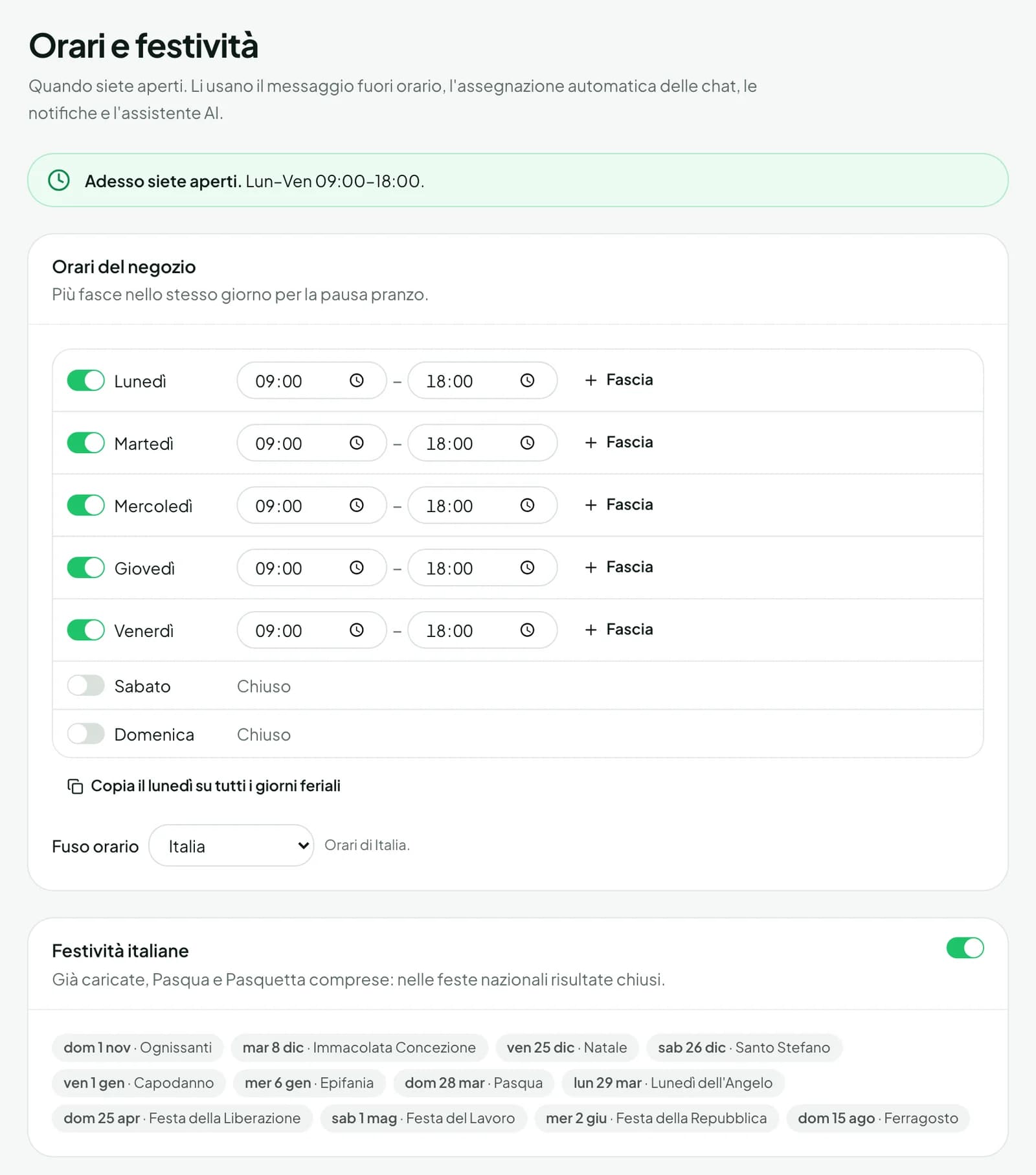
What you get
- Italian national holidays preloaded, Easter and Easter Monday included.
- Vacations, long weekends and stocktaking in one list of closures, each with its reason.
- The away message is sent at most once every 12 hours per chat.
- The same hours apply to chat assignment, notifications, flows and the AI assistant.
How it works
- 1
Set your hours
In Settings › Hours and holidays, choose your opening days and time slots (even more than one per day, for a lunch break) and your time zone.
- 2
Add your closures
“Italian holidays” is already on. In “Store closures”, pick “From”, “To (optional)” and the reason, for example “Summer vacation”, and press “Add”. Then “Save hours”.
- 3
Turn on the away message
In Settings › Automatic replies, turn on “Outside hours” and write your text: a preview appears next to it. You can use {nome} and {negozio}.
- 4
Different hours for people on shifts
In “Team member hours”, press “Edit” next to a person and turn on “Hours different from the store's”.
One schedule, used everywhere
At the top of the page, Gosendly tells you whether you're open or closed right now and when you open again. The same hours, with holidays and closures, are used by the away message, automatic chat assignment, notifications and the AI assistant: you set them once and they apply everywhere.
The preloaded holidays are Italy's national ones: New Year's Day, Epiphany, Easter and Easter Monday, April 25, May 1, June 2, Ferragosto (August 15), All Saints' Day, the Immaculate Conception, Christmas and St. Stephen's Day. Your city's patron saint day you add yourself as a closure.
The away message
When the store is closed and a customer writes, the bot replies with your text. The default one in Gosendly says:
“Hi! We're closed right now: we'll get back to you as soon as we reopen. In the meantime, feel free to write your question here.”
You can add your opening hours or where to find answers to common questions. The message is sent at most once every 12 hours per chat, so someone who writes three times doesn't get it three times. If a teammate has just written to the customer, the bot stays quiet for the hours you choose in “When the bot steps aside”.
Shifts and assignment
Team members who only work mornings or weekends set their own personal hours. With “Only to whoever is on shift”, automatic assignment only passes them chats while they're on shift, and with “On my phone only during my working hours” notifications wait in the bell. Store holidays and closures apply to everyone: on those days nobody is on shift, and with “Only to whoever is on shift” chats stay with the team.
Flows and AI assistant that follow your hours
In automations, the “Wait” step has the option “Until business hours”: if the store is open the flow continues right away, otherwise it waits for the next opening. The condition “Store open (business hours)” sends the customer down two different paths.
On paid plans, the AI assistant can reply “Only when you're closed”: during the day you answer, at night and on holidays it answers from your store's sources, instead of the away message.
Frequently asked questions
Does the away message cost anything?
It's a reply to a customer who has just written to you, so for Meta it's a service message: each phone number gets 1,000 delivered free per month, after which in Italy they cost €0.0248 each (price list effective October 1, 2026), paid directly to Meta. Gosendly adds nothing on top.
Are local holidays included too, like the patron saint day?
No, only national holidays are preloaded. You add your patron saint day, long weekends and vacations in “Store closures”, also as a period with an end date.
What happens to chats that come in at night?
The customer gets the away message and their chat waits in the “To reply” tab, oldest first: in the morning you know where to start.
If the customer only sends a photo or a voice message, do they get the away message?
No: the away message replies to written messages and button taps. A photo or voice message without text still arrives in the chat and you'll find it in “To reply”.
Do I need a paid plan?
No: hours, holidays, closures and the away message are included in Free. The AI assistant that replies when you're closed is available on paid plans.
Keep reading
- FeaturesAI assistant that answers from your sourcesThe Gosendly AI assistant answers customers on WhatsApp using your store's information: shipping, returns, sizes, order status. If it doesn't know…Read
- SolutionsReply after hours too, with AICustomers write in the evening, on Sundays, on public holidays. With Gosendly's after-hours auto replies, the AI assistant answers the questions it…Read
- FeaturesAutomatic chat assignmentWhen several people reply from the same number, you need to know who is handling which customer. With automatic chat assignment, Gosendly hands each…Read
- FeaturesNotifications on phone and computerA customer writes while you're in the stockroom packing orders: if you don't notice, they wait for hours. Gosendly sends you a notification on your…Read
- FeaturesShared WhatsApp inbox for your teamWith the Gosendly shared WhatsApp inbox, your whole team replies from the store's same number, each person with their own login, from a computer or…Read
More features: Conversations
Reply to customers with your team, from the same chat.
- Shared WhatsApp inbox for your teamWith the Gosendly shared WhatsApp inbox, your whole team replies from the store's same number, each person with their own login, from a computer or a phone. You see who handles each chat…Also included in the Free plan
- Quick replies with variablesShipping, returns, sizes, delivery times: the questions are always the same. With Gosendly quick replies you type “/” in the chat, pick the reply and the text arrives already filled in…Also included in the Free plan
- Automatic chat assignmentWhen several people reply from the same number, you need to know who is handling which customer. With automatic chat assignment, Gosendly hands each conversation to a team member: whoever…Also included in the Free plan
- Internal notes and mentions“Already asked for a size exchange”, “refund done, waiting for the parcel”: that's information for the team, not for the customer. In Gosendly you write it as internal notes inside the…Also included in the Free plan
- Notifications on phone and computerA customer writes while you're in the stockroom packing orders: if you don't notice, they wait for hours. Gosendly sends you a notification on your phone or computer when a customer is…Also included in the Free plan
Sources
- Meta: WhatsApp Business Platform pricing and free service replies(opens in a new tab)Read on October 28, 2026
- WhatsApp Business: official pricing calculator by country(opens in a new tab)Read on October 28, 2026
Sign-ups open soon
Leave your email and we'll tell you when we launch: then you create your account and find a sample store full of data to try right away.
- We'll write to you once
- Every feature when we open
- Sample store already full of data