Integrations
Gosendly for Shopify
Shopify is Gosendly's direct integration: once your store is connected, orders, carts, shipments, customers and products come in on their own, with no files to export. From there you send order messages, cart reminders and sell on WhatsApp.
What it does
Shopify notifies Gosendly of every order, payment, shipment, refund, cart, customer and product. Gosendly updates your contacts with each customer's value, starts the right flows and counts the sales that came from WhatsApp. The connection is included in all paid plans.
How to connect it
- 1
Open Store and sales
In Gosendly, go to Settings › Store and sales. The owner or an admin connects the store, on a paid plan or during the trial.
- 2
Create your store's app
With “I'll do it myself (5 minutes)” you follow the steps: in Shopify's Dev Dashboard you create an app, for example “Gosendly”, choose the permissions Gosendly lists for you, release it and install it on your store.
- 3
Copy the credentials into Gosendly
From the app settings you copy the Client ID and Client secret, enter the address ending in .myshopify.com and click “Connect the store”. Gosendly tests the connection before saving it and renews access on its own every day.
- 4
Or we do it for you
If you prefer, choose “We'll do it for you”, click “Request the connection”, leave a note with your store address and when to reach you, and we'll get in touch.
What comes in from Shopify
When you connect, Gosendly registers Shopify's notifications on its own and copies your catalog and the orders from the last 60 days; from then on everything stays up to date through the notifications.
- Orders: new, paid, edited, canceled and refunded, with shipments and carrier updates.
- Carts: checkouts started but not completed, with products, photos, total and a link to pick them up again.
- Customers: name, phone, email, number of orders, total spent and marketing consent.
- Products: descriptions, variants, prices and stock, for the AI assistant and payment links.
- Payments requested in the chat: when the customer pays, Gosendly knows.
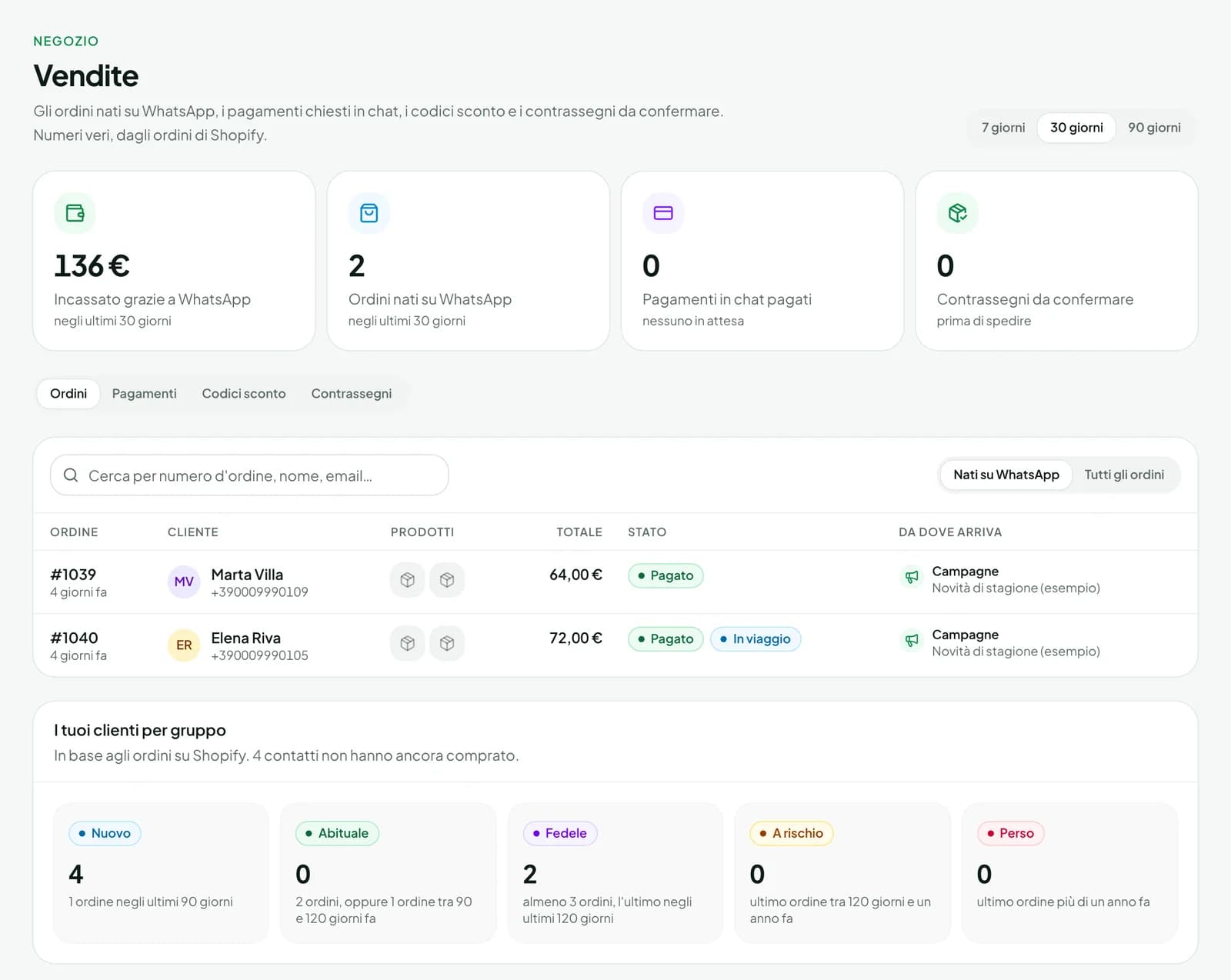
What Gosendly does with it
On a paid plan: abandoned cart messages, order, shipping and delivery confirmations, cash on delivery confirmation, unique discount codes, orders and value on the customer's profile, segments based on purchases. With the AI assistant, order status and recommendations for products in stock.
There are also payment links in the chat and sales analytics for sales that came from WhatsApp, with the attribution rule you choose.
Permissions and security
Gosendly tells you which permissions to grant and what they're for: reading and updating orders (confirmation tags and canceling cash on delivery orders), customers, products and inventory, discount codes, draft orders, carts, shipments, store policies. Credentials stay encrypted and are never shown again.
By default a Shopify app can see the orders from the last 60 days: that's the period Gosendly copies when you connect.
Not on Shopify?
Chat, campaigns, automations and the AI assistant work for any online store. WooCommerce, PrestaShop, Magento, BigCommerce, Wix, Ecwid, Shopware and Odoo connect directly, just like Shopify: orders, customers and products come in on their own (their pages are on the integrations map). With a custom-built site, orders reach Gosendly through the API or via Zapier, Make and n8n, and start flows through the trigger address.
Frequently asked questions
Does it connect in one click?
Not yet. Today you connect it with the credentials of an app on your store, in about 5 minutes, or we do it together with you: leave a note from Settings › Store and sales and we'll contact you.
I have a custom app created before 2026: does that work?
Yes. In Gosendly choose “I have a custom app created in the admin before 2026” and enter that app's access token (shpat_…) and API secret key. New apps, on the other hand, are created in the Dev Dashboard and give you a Client ID and Client secret.
What happens if I disconnect the store?
Orders already copied stay in Gosendly. Order messages, abandoned carts, cash on delivery confirmations and payment links stop until you reconnect the store.
Can I see older orders too?
When you connect, Gosendly copies the orders from the last 60 days, which is what an app can see by default on Shopify. To have all your customers in your contacts with their total spent, use “Import all customers with a phone number”.
Keep reading
- FeaturesAbandoned cart recovery on WhatsAppA customer puts a jacket in the cart, reaches checkout and then gets distracted. With Gosendly's WhatsApp abandoned cart recovery, they get a…Read
- FeaturesOrder confirmation, shipping and delivery on WhatsApp“Where's my package?” is the question online stores get most often. With Gosendly's WhatsApp order notifications, customers receive the…Read
- IntegrationsGosendly and Shopify FlowShopify Flow is Shopify's automation app. With its “Send HTTP request” action it can call a Gosendly flow's trigger address: that way a store event…Read
- GuidesWhatsApp for Shopify: the complete guideWhatsApp for Shopify means updating customers on their orders, recovering carts and answering in chat without leaving your store's workflow. This…Read
Similar integrations
- Gosendly and Shopify FlowFlow watches your store (an order created, a tag added to a customer, a carrier update), checks the conditions you choose and sends Gosendly the customer's phone number with the order…
- Gosendly for WooCommerceWooCommerce notifies Gosendly of every order, refund, customer and product. Gosendly updates your contacts with each customer's value, starts the right flows and counts the sales that came…
- Gosendly for PrestaShopThe module notifies Gosendly of every order, status change, refund, tracking number, customer, product and abandoned cart. Gosendly updates your contacts with each customer's value, starts…
- Gosendly for MagentoGosendly reads orders, shipments, customers and products from Magento, updates your contacts with each customer's value, starts the right flows and counts the sales that came from…
- Gosendly for BigCommerceOnce connected, orders, customers and products from BigCommerce flow into Gosendly in the same format as Shopify's: you use them in automations, lists and campaigns, and order messages go…
- Gosendly for WixOnce connected, orders, customers and products from Wix flow into Gosendly in the same format as Shopify's: you use them in automations, lists and campaigns, and order messages go out…
Sources
- Shopify: custom apps and the Dev Dashboard(opens in a new tab)Read on October 28, 2026
- Shopify: client credentials grant(opens in a new tab)Read on October 28, 2026
- Shopify: app access scopes and orders from the last 60 days(opens in a new tab)Read on October 28, 2026
Sign-ups open soon
Leave your email and we'll tell you when we launch: then you create your account and find a sample store full of data to try right away.
- We'll write to you once
- Every feature when we open
- Sample store already full of data