Data and security
Analytics: how much you sell thanks to WhatsApp
Does WhatsApp bring in sales, or just extra work? Gosendly's sales analytics answers with your store's real orders: how much revenue you made thanks to WhatsApp, where it comes from and what it costs, with a rule you read in plain words and change yourself.
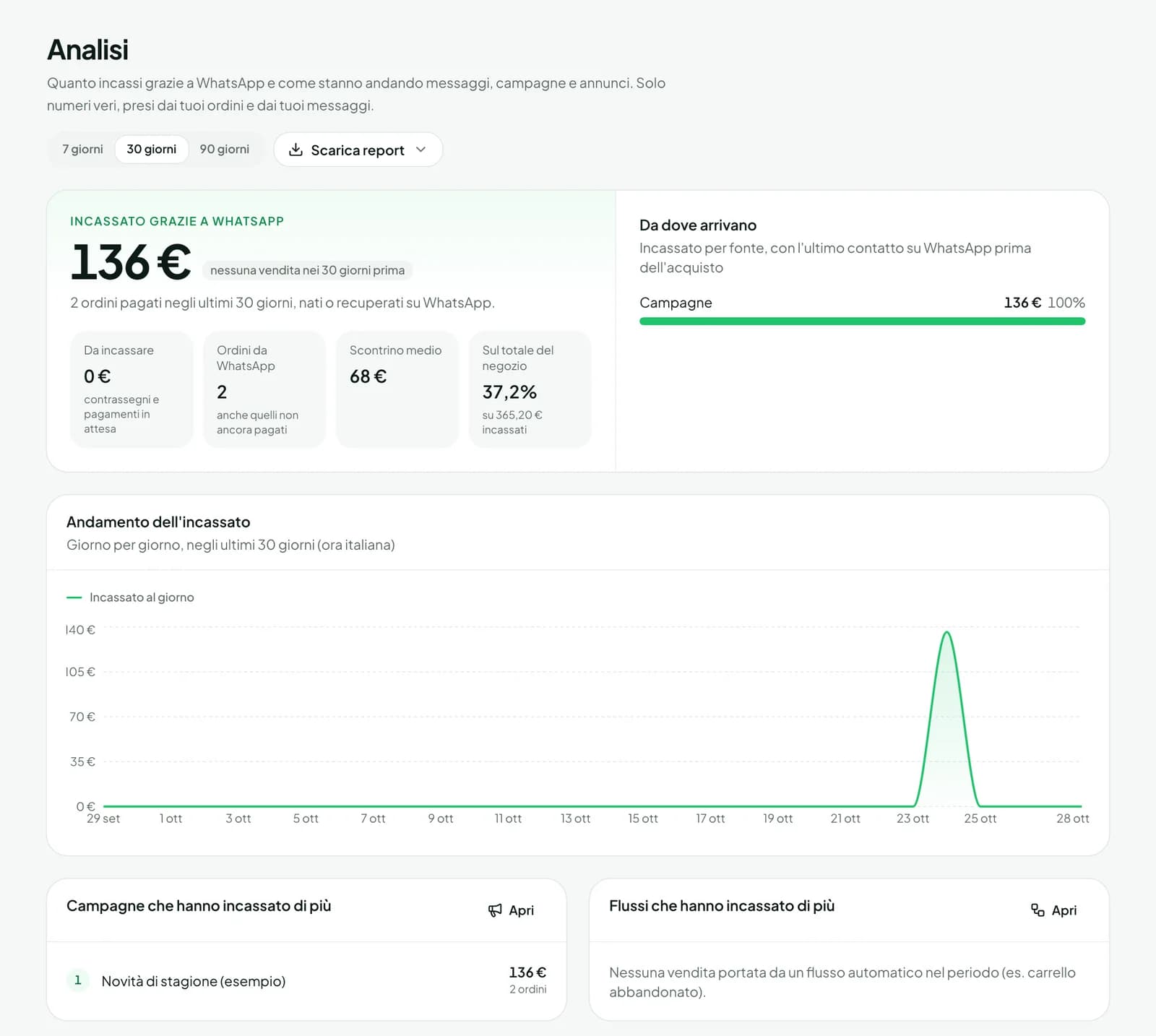
What you get
- One number at the top: how much revenue you made thanks to WhatsApp in the period.
- Broken down by source: campaigns, flows, team chats, AI assistant, links, ads.
- The attribution rule written in plain words, and you're the one who changes it.
- Reports in Excel or CSV to pass on to your accountant or business partner.
How it works
- 1
Connect Shopify
Sales are counted on your store's real orders: connect Shopify from Settings › Store and sales.
- 2
Choose the rule
In “Sales thanks to WhatsApp” you decide within how many days of the purchase a touchpoint counts (7 is a good starting point), which touchpoints count and whether a message counts only once the customer has read it.
- 3
Open Analytics
In Analytics, pick the period, 7, 30 or 90 days, and scroll: revenue, sources, trend, messages, campaigns and flows. With “Download report” you export everything to Excel or CSV.
How much you earn, and from where
The top of Analytics shows the revenue collected thanks to WhatsApp, the amount still to be collected, orders, average order value and WhatsApp's share of your store's total. Below, revenue by source, based on the last WhatsApp touchpoint before the purchase, and the day-by-day trend.
In Sales you find the list of orders that started on WhatsApp, each with “Where it comes from”, together with payments requested in chat, discount codes and cash on delivery orders.
A rule you read in plain words
Each store decides what “sold thanks to WhatsApp” means, and Gosendly spells it out. For example: “An order counts as a sale thanks to WhatsApp when, in the 7 days before the purchase, the customer received a message from a campaign or a flow, opened a link received on WhatsApp or chatted with the team. If there is more than one touchpoint, the last one counts.”
Payments requested in chat and discount codes created by Gosendly always count. The same rule applies to Analytics, campaigns and flows.
From message to sale
For every campaign and every flow you see the full funnel: delivered, read, replies, link clicks, buttons tapped and orders. That way you understand where customers drop off, for example a campaign read by many but clicked by few, and what to change.
If customers come from Facebook or Instagram ads that open WhatsApp, you see conversations, new contacts and customer spend for each ad. Ad spend, however, isn't in Analytics today.
Number, chats and team
On every plan, Analytics also shows how your number is doing and how you reply: conversations in the period, customers waiting, team response time, who replies (people, bots, automations, AI assistant), where contacts come from and how many templates you send per category. Campaigns and tracked links add their own figures.
Frequently asked questions
Which plan includes attributed sales?
Revenue, sources and downloadable reports are included in all paid plans. The list of orders that started on WhatsApp in Sales is available on paid plans with Shopify connected; figures on messages, chats and team are on every plan.
How does Gosendly know an order comes from WhatsApp?
It matches each Shopify order with the WhatsApp touchpoints in the days before: campaign and flow messages, opened links, chats with the team or the assistant, ads. You choose the rule, and the last touchpoint counts.
Do sales count even if the customer doesn't click the link?
Yes, if your rule lets received messages count: someone who reads the campaign and then buys by typing your site's address is still included. If you prefer a stricter rule, turn on “A message counts only if the customer has read it” or let only links count.
Does Gosendly take a percentage of the sales it attributes?
No. No commission on sales, on any plan: attribution is only there to help you understand what works.
Keep reading
- FeaturesWhatsApp campaignsSales, a new collection, the last pieces before Christmas: with Gosendly's WhatsApp campaigns you send one message to many customers at once. Before…Read
- FeaturesTracked links and clicksYou sent the link to your new collection: who opened it? With Gosendly's tracked links every link becomes a personal short link, and clicks are…Read
- FeaturesAbandoned cart recovery on WhatsAppA customer puts a jacket in the cart, reaches checkout and then gets distracted. With Gosendly's WhatsApp abandoned cart recovery, they get a…Read
- SolutionsCustomers from ads that open WhatsAppYou're paying for someone to message you: the first reply has to come right away. With Click-to-WhatsApp ads connected to Gosendly, anyone who…Read
- IntegrationsGosendly for ShopifyShopify is Gosendly's direct integration: once your store is connected, orders, carts, shipments, customers and products come in on their own, with…Read
More features: Data and security
How much you sell thanks to WhatsApp, roles and privacy.
Sign-ups open soon
Leave your email and we'll tell you when we launch: then you create your account and find a sample store full of data to try right away.
- We'll write to you once
- Every feature when we open
- Sample store already full of data