Solutions
Win back customers who stopped buying
A customer who has already bought knows you, trusts you and knows how your store works. To win back inactive customers, Gosendly finds them in your orders and messages them at the right time: after the first purchase, when the product is about to run out, when they haven't shown up for months.
Example
Hi Giulia, it's been a while! We've got lots of new things: here's the code COMEBACK-4F2A for 10% off, valid for 10 days.
10:24
We miss you, after 90 days
The problem
Many customers buy once and then disappear, not because they were disappointed but because they forget about you. To replace them you pay for ever more expensive ads, while your list of past customers sits idle. A one-size-fits-all newsletter doesn't help: someone who bought yesterday and someone who hasn't bought in a year get the same message, and both ignore it.
How Gosendly solves it
- 1
Find who has stopped
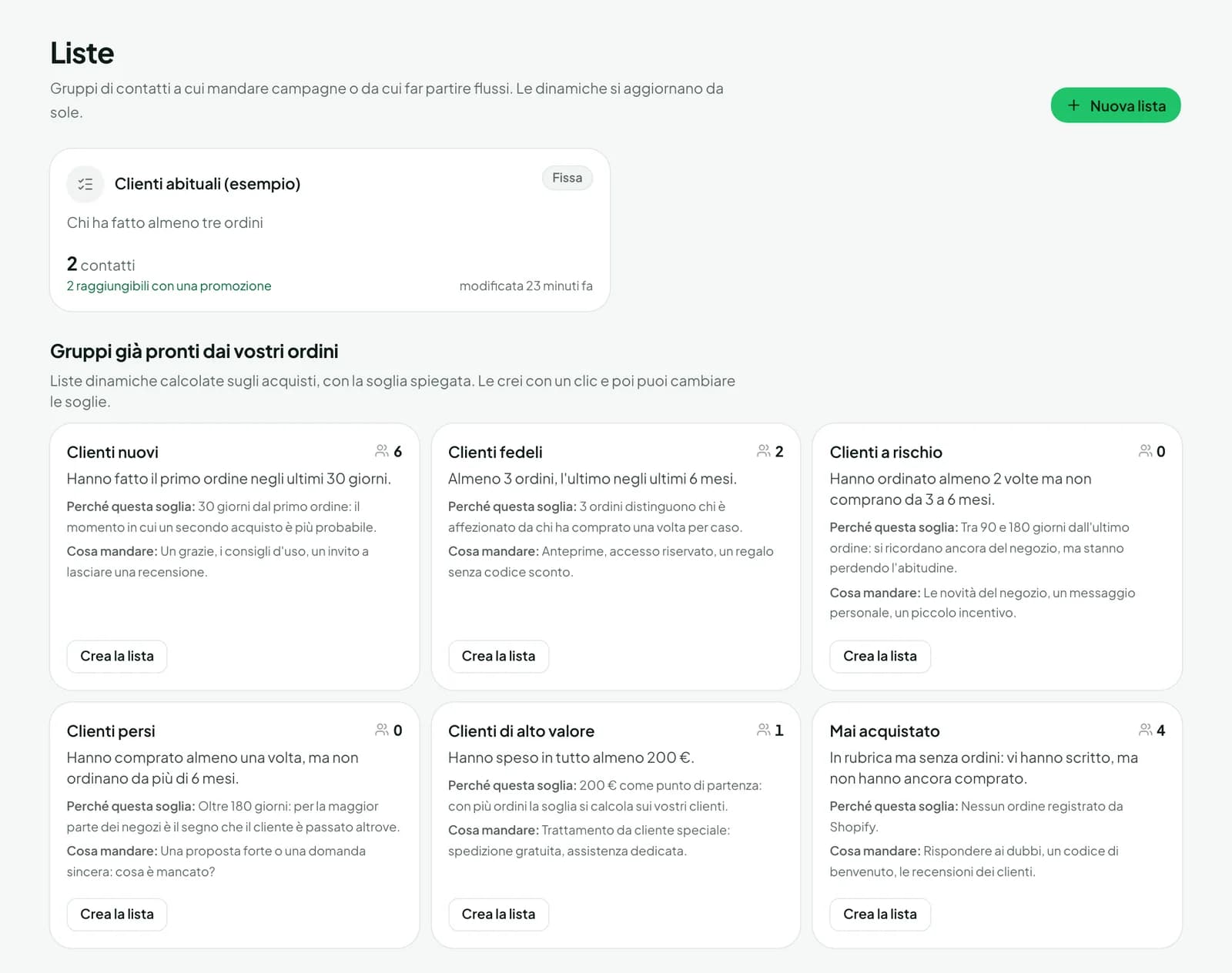
With Shopify connected, on the Lists page you'll find segments already built on orders: new, loyal, at-risk, lost, high-value and never-purchased customers. They update themselves.
- 2
Pick the moment
Each stage has its own recipe: the second order a week after the first, the reorder before the product runs out, the "we miss you" after ninety days of silence.
- 3
Add the right incentive
Where it's needed, a unique discount code created on Shopify at the moment of sending, which works once and expires. Where it isn't, something new or a tip.
- 4
Stop when they come back
The goal of the flows is a purchase: as soon as the customer buys again they leave the flow and get no more reminders.
Who is really inactive
It depends on what you sell. If you sell pet food or coffee, a customer who's been quiet for two months is already lost; if you sell gifts or furniture, you might see them again at Christmas. The ready-made segments start from reasonable thresholds, which you then adapt to your store.
- At-risk customers: at least two orders, but quiet for three to six months.
- Lost customers: bought at least once, quiet for more than six months.
- Never purchased: in your contacts, they've messaged you, but never ordered.
- Loyal customers: at least three orders, the last one in the past six months. More than a discount, they need previews and attention.
The second order
The hardest step is going from one order to two. The "Offer 7 days after the first order" recipe only starts on the first purchase: after a week, at 10 a.m., it sends a unique 10% code valid for seven days. If the customer has already bought again in the meantime, the message doesn't go out, and each customer gets it only once.
The reorder at the right time
For products that run out, the best time to write is just before they do. The "Reorder reminder" recipe works out how often the customer reorders, from their real orders, and writes two days before; if there are too few orders to tell, it uses 30 days. The message has two buttons: with "Yes, reorder" the customer gets last time's cart ready to pay. If the link can't be created, the team gets an alert and sends it from the chat.
The "we miss you", without overdoing it
The "Win back lost customers" recipe writes 90 days after the last order, at 10:30 a.m., with a unique 10% code valid for ten days, and doesn't re-enter anyone before 60 days. These are all marketing messages: they only go to people who opted in and respect the sending rules, including the one that writes at most once every thirty days to people who haven't replied in ninety. A distant customer who gets three offers in a row doesn't come back: they block your number.
Unique discount codes are created on Shopify and expire on their own, so they don't end up on coupon sites.
Without Shopify: the dates you already have
Order-based segments and the "Has purchased?" step require Shopify. If you sell elsewhere, import your customers from a CSV file with the last purchase date in a date field, and start the flow with "A date", ninety days after that date. The discount becomes a fixed code written into the template, and when your management software records a new order it can update the date through the API.
Sample messages
How your customer reads them on WhatsApp. Start from here and change them however you like.
We miss you, after 90 days Hi Giulia, it's been a while! We've got lots of new things: here's the code COMEBACK-4F2A for 10% off, valid for 10 days.
10:24
Marketing template. The code is unique to this customer and expires after ten days.
The second order Hi Giulia, thanks again for your first order! For your next one there's the code THANKS-4F2A for 10% off, valid for 7 days.
10:24
Marketing template, one week after the first purchase, only once per customer.
Reorder reminder Hi Giulia, running low? You can reorder the same products as last time in a moment.
10:24
Marketing template with the "Yes, reorder" and "No, thanks" buttons. A yes brings the cart ready to pay.
The features you use
- FeaturesLists and dynamic segmentsWith Gosendly's lists and dynamic segments, you choose who to message without spreadsheets: “bought in the last 30 days”, “spent more than €100”…Read
- FeaturesUnique discount codes per customerA code that's the same for everyone ends up on coupon sites within a day. With Gosendly's unique discount codes, each customer gets their own…Read
- FeaturesReady-made recipes for online storesYou don't have to start from a blank page. Gosendly's ready-made recipes are complete flows for the typical moments of an online store, with timings…Read
- FeaturesBlock-based WhatsApp automationGosendly's WhatsApp automations are messages that go out on their own at the right moment and stop when they're no longer needed: as soon as the…Read
- FeaturesImport contacts from CSV and ExcelDo you have your customers in a file exported from your management software, your newsletter or your old platform? With Gosendly's import, you bring…Read
- FeaturesWhatsApp campaignsSales, a new collection, the last pieces before Christmas: with Gosendly's WhatsApp campaigns you send one message to many customers at once. Before…Read
Frequently asked questions
After how many days should a customer count as lost?
There's no right number for everyone: it depends on how often people rebuy what you sell. The recipe starts at 90 days and the ready-made segments at three and six months; look at how often your loyal customers reorder and adjust the waits accordingly.
Do I have to offer a discount?
No. At-risk customers often just need a reminder that you exist, with something new or a product chosen for them. Keep the discount for people who have been quiet longer, and always with an expiry.
What happens if the customer buys again?
They leave the flow: the goal is the purchase, so as soon as Shopify records the order the next messages don't go out.
Does it work with customers I imported?
Yes, if the file has the last purchase date: you import it into a date field and the flow starts from there. Before writing, though, you need their consent to receive messages from your store.
Do I need customers' consent?
Yes, these are marketing messages. For WhatsApp, the customer must have given you their number and said yes to your messages; Gosendly automatically skips anyone who hasn't or has unsubscribed.
Keep reading
- FeaturesLists and dynamic segmentsWith Gosendly's lists and dynamic segments, you choose who to message without spreadsheets: “bought in the last 30 days”, “spent more than €100”…Read
- FeaturesUnique discount codes per customerA code that's the same for everyone ends up on coupon sites within a day. With Gosendly's unique discount codes, each customer gets their own…Read
- SolutionsPromotions and launches on WhatsApp, without burning your numberA launch, Black Friday, a sale, a product back in stock. With Gosendly's WhatsApp promotions you only message people who asked for them, at the…Read
- SolutionsCollect reviews after purchase with WhatsAppThree days after delivery, one simple question, three buttons to answer and the link to leave a review. Asking for reviews on WhatsApp with Gosendly…Read
- IndustriesWhatsApp for pet storesKibble always runs out at the wrong moment, a harness has to fit the right measurements and every customer has a name worth remembering: their…Read
- IndustriesWhatsApp for cosmetics and beauty storesA cream runs out, a foundation has to match the skin, a routine needs explaining. With WhatsApp for cosmetics you send the reorder reminder at the…Read
Sources
- WhatsApp Business Policy: opt-in and stop requests(opens in a new tab)Read on October 28, 2026
Sign-ups open soon
Leave your email and we'll tell you when we launch: then you create your account and find a sample store full of data to try right away.
- We'll write to you once
- Every feature when we open
- Sample store already full of data