Automations
Ready-made recipes for online stores
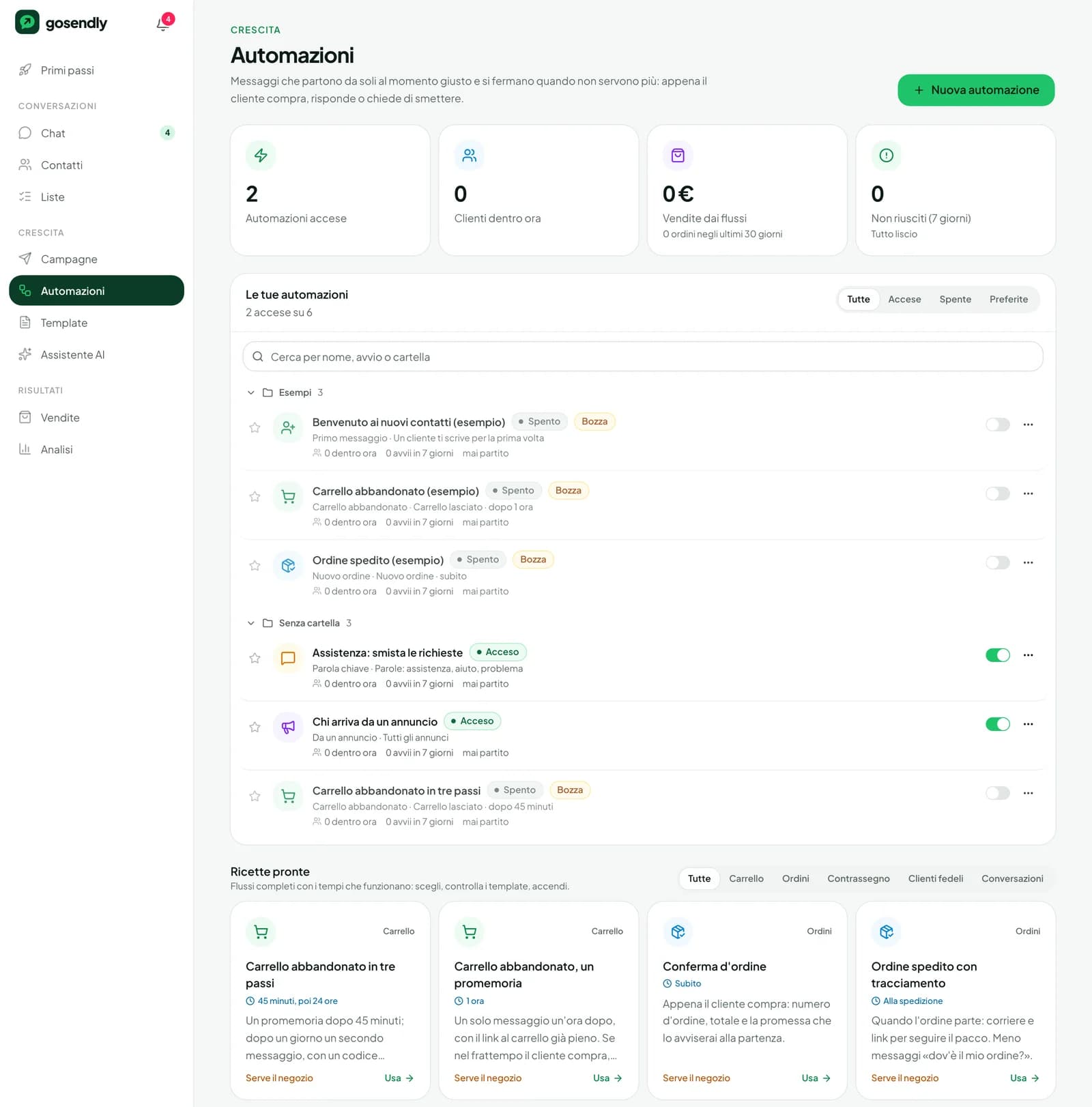
You don't have to start from a blank page. Gosendly's ready-made recipes are complete flows for the typical moments of an online store, with timings already set and templates already written: pick one, review it and switch it on.
What you get
- Complete flows, with steps, timings and template texts already written.
- Missing templates go to Meta with one click.
- Every recipe becomes a regular flow: change it however you like in the builder.
- Sales recipes stop on their own as soon as the customer buys.
How it works
- 1
Pick a recipe
In Automations scroll through the “Ready-made recipes” and filter by Cart, Orders, Cash on delivery, Loyal customers or Conversations. Each recipe tells you when it starts, its steps and which templates it uses.
- 2
Send the templates to Meta
Next to each template you'll see “Ready” or “To create”. With “Submit for approval” the ones to create are sent to Meta, which usually decides within 24 hours.
- 3
Create the flow and switch it on
Click “Create and open in the builder”: the flow is created switched off. You review texts and timings, test it on your own number and switch it on.
Cart, orders and cash on delivery
Store recipes are triggered by Shopify events and require a paid plan:
- “Three-step abandoned cart”: a reminder after 45 minutes, then the next day a second message with a discount code only for carts over €50. Or “Abandoned cart, one reminder”, after an hour.
- Order confirmation, order shipped with tracking, delivered, canceled and refunded.
- “Review request”, three days after delivery: the link goes to everyone, with no rating filters and no rewards, and unhappy customers are also passed to support.
- “Cash-on-delivery order confirmation” and the reminder to have the amount ready for the courier.
- “Parcel out for delivery today”: on the day of delivery the customer gets the link to follow the parcel.
Customers who come back
To bring back people who have already bought, there's an offer 7 days after the first order, a reorder reminder calculated from their real orders (with “Yes, reorder” they get a cart ready to pay), birthday wishes with a personal code, win-back for customers who haven't bought in 90 days, suggestions and matching products a week after purchase, a 5-day promo to launch with a campaign, and “Product back in stock”, for people who asked to be notified. These also use Shopify data.
Conversations, for any store
Eight recipes don't need Shopify: “Welcome and opt-in”, which asks for consent to offers on the first message and records it with proof; “Visitors from an ad”; “Support: route requests”, which recognizes people asking for help even when they phrase it their own way and hands the chat to the right person; “Update customer details”, which asks for the email address and saves it; “In-store review (QR)”, with a QR code to print; the appointment reminders with “Confirm” and “Reschedule”, for Calendly and for Google Calendar; and “Payment failed: try again”, which invites people to retry after 30 minutes.
A recipe is a starting point
Every recipe creates a regular automation: change a timing, add a tag, remove a step. In stores with made-to-order products, for example, it's worth lengthening the wait before the review request. The template texts are a neutral base: rewrite them in your store's voice before sending them to Meta.
Frequently asked questions
Are the recipes included in the Free plan?
The conversation recipes are, within the Free plan's limit of 3 automations. The ones triggered by carts, orders and cash on delivery need Shopify connected and a paid plan, which also removes the automation limit.
Is an abandoned cart message a utility or a marketing message?
In the recipes, cart reminders are marketing templates, so they're only sent to people who have opted in. Confirmations, shipping updates and cash on delivery use utility templates.
Do I have to wait for template approval to create the flow?
No: you can create the flow right away and fine-tune it. It switches on once its templates are approved; until then Gosendly lists it among the things to fix.
I use WooCommerce: do the store recipes work?
Yes: orders from WooCommerce, PrestaShop, Magento and the other connected platforms come into Gosendly just like Shopify's, so the order recipes work the same way. The abandoned cart ones require the platform to send carts: each platform's page in the integrations map says what comes through. For software with no connection, you can start from “From another tool” and send the event from Zapier, Make or n8n.
Keep reading
- FeaturesBlock-based WhatsApp automationGosendly's WhatsApp automations are messages that go out on their own at the right moment and stop when they're no longer needed: as soon as the…Read
- FeaturesAbandoned cart recovery on WhatsAppA customer puts a jacket in the cart, reaches checkout and then gets distracted. With Gosendly's WhatsApp abandoned cart recovery, they get a…Read
- FeaturesOrder confirmation, shipping and delivery on WhatsApp“Where's my package?” is the question online stores get most often. With Gosendly's WhatsApp order notifications, customers receive the…Read
- FeaturesCash on delivery order confirmationA cash on delivery package refused at the door costs you two shipments and a return. With Gosendly's cash on delivery order confirmation, you ask…Read
- SolutionsCollect reviews after purchase with WhatsAppThree days after delivery, one simple question, three buttons to answer and the link to leave a review. Asking for reviews on WhatsApp with Gosendly…Read
More features: Automations
Block-based flows and ready-made recipes that work on their own.
- Block-based WhatsApp automationGosendly's WhatsApp automations are messages that go out on their own at the right moment and stop when they're no longer needed: as soon as the customer buys, replies or asks you to stop…Also included in the Free plan
- WhatsApp chatbot with buttons and menus“Where's my order?”, “What size do you recommend?”, “Do you ship abroad?”. With the Gosendly WhatsApp chatbot, customers pick from buttons and menus with a single tap, the flow takes them…Also included in the Free plan
Sources
- Meta: template review(opens in a new tab)Read on October 28, 2026
Sign-ups open soon
Leave your email and we'll tell you when we launch: then you create your account and find a sample store full of data to try right away.
- We'll write to you once
- Every feature when we open
- Sample store already full of data