Solutions
Recover abandoned carts with WhatsApp
A reminder 45 minutes later, a second message the next day and a discount only when it makes sense: abandoned cart recovery on WhatsApp with Gosendly runs on its own and stops as soon as the customer buys.
Your store
online
Today
The problem
Plenty of customers reach checkout, leave their number and then close the page: a phone call, a doubt about the size, a shipping cost spotted at the last minute. If nobody gets back to them, the order stays half done. A short WhatsApp message with a link to their filled cart lets them finish the purchase in two taps, or reply with the doubt that stopped them.
How Gosendly solves it
- 1
Connect your store
With Shopify connected, every unfinished checkout reaches Gosendly with the products, the total and the cart link. Shopify connects with your store's app credentials, or we can set it up together.
- 2
Install the recipe
In Automations, pick the "Abandoned cart in three steps" recipe. It installs switched off, with timings and texts ready: open it in the block builder and change whatever you like.
- 3
Get the templates approved
The three messages are marketing templates already written. You submit them to Meta from the editor, which first checks variables, lengths and content that Meta rejects.
- 4
Test and switch on
Send a test to your own number and check in the simulation what would go out and when. Then switch the flow on.
The recommended flow, step by step
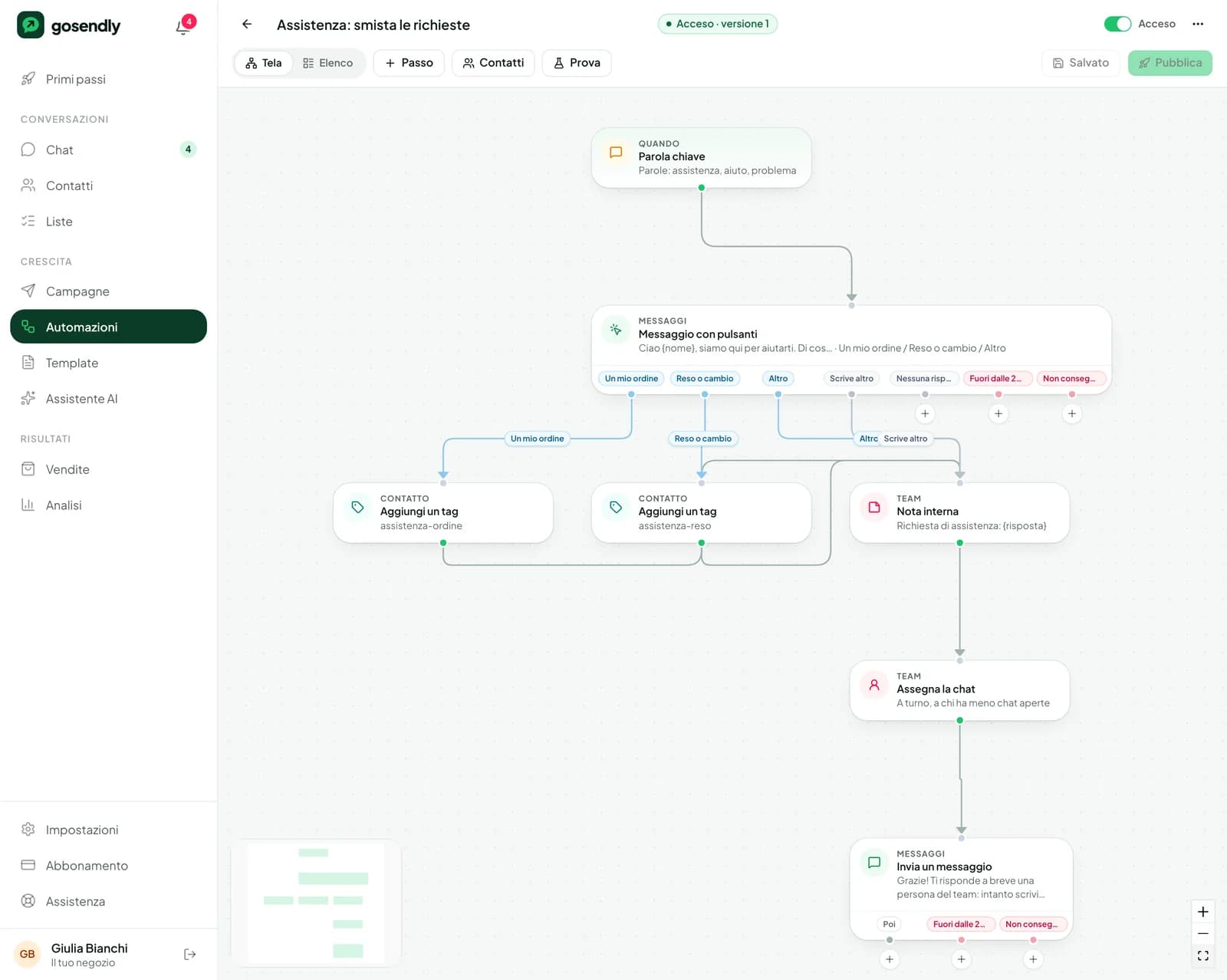
A first message while the cart is still fresh, a second one the next day, and that's it. The discount only comes in the second message, and only for carts that justify it. If the same customer leaves another cart, the flow starts over with the new one.
- After 45 minutes: a first reminder with the link to the filled cart.
- A 23-hour wait, never at night: if it ends between 9 p.m. and 9 a.m., the message goes out at 9 a.m.
- Cart above €50: Gosendly creates a unique 10% code on Shopify, valid for 2 days, and sends it in the second message.
- Cart below €50: one last reminder, with no discount.
- The customer buys at any point: the flow stops and the next reminders don't go out.
Who gets the reminders, and who doesn't
Cart reminders are marketing messages. Gosendly only sends them to people who opted in to offers, for example with the Shopify checkout checkbox, and records the opt-in with proof. Anyone who writes "STOP" or taps "Unsubscribe" leaves all marketing flows right away.
The sending rules that are on by default also apply: no promotions from 9 p.m. to 9 a.m. in the customer's time zone, and at most two marketing messages in seven days to the same person. Someone who leaves three carts in the same week doesn't get six reminders.
A discount only when it pays off
A discount on every cart teaches customers to abandon on purpose. That's why the recipe saves it for the second message and only above a cart total you choose: €50 is just the starting point.
Unique discount codes are created on Shopify at the moment of sending: they work only once and expire, so they don't get passed around in deal groups. Instead of a percentage you can choose a fixed amount or free shipping.
If your store isn't on Shopify
Abandoned carts come in automatically with Shopify, BigCommerce, Wix, Ecwid and Odoo; with WooCommerce, PrestaShop and Magento once you install their free module. Shopware currently sends orders but not carts. With another program you can use the same flow if the store, or one of its plugins, sends the cart event to Zapier, Make or n8n: the tool calls the flow's start URL with the customer's number and the cart link.
In that case the discount is a fixed code written into the template. To stop the reminders after a purchase, you start an order flow the same way, with "Stop other flows" as its first step.
What to check after a week
For each step you see how many messages were sent, delivered and read, who is still waiting and any errors, with the contacts one click away. You also see the sales attributed to the flow.
If the first reminder gets read but few people complete the order, try different wording or a different wait: the stats are kept even when you change a message. The starting text is in the abandoned cart template.
Sample messages
How your customer reads them on WhatsApp. Start from here and change them however you like.
First reminder, after 45 minutes Hi Giulia, you left something in your cart. We're keeping it for you: you can complete your order here yourstore.com/cart
10:24
Marketing template: only sent to people who opted in. The link opens the filled cart.
Second message with the code, the next day Hi Giulia, your cart is still waiting for you. Here's the code BACK-4F2A for 10% off, valid for 7 days. Complete your order here yourstore.com/cart
10:24
Marketing template, only for carts above the threshold. The code is created on Shopify for this customer and works once.
Last reminder, no discount Hi Giulia, one last reminder: the products in your cart are still available, but we can't hold them for long. Here's the link yourstore.com/cart
10:24
Marketing template for carts below the threshold. After this message the flow ends.
The features you use
- FeaturesAbandoned cart recovery on WhatsAppA customer puts a jacket in the cart, reaches checkout and then gets distracted. With Gosendly's WhatsApp abandoned cart recovery, they get a…Read
- FeaturesUnique discount codes per customerA code that's the same for everyone ends up on coupon sites within a day. With Gosendly's unique discount codes, each customer gets their own…Read
- FeaturesReady-made recipes for online storesYou don't have to start from a blank page. Gosendly's ready-made recipes are complete flows for the typical moments of an online store, with timings…Read
- FeaturesBlock-based WhatsApp automationGosendly's WhatsApp automations are messages that go out on their own at the right moment and stop when they're no longer needed: as soon as the…Read
- FeaturesOpt-in and automatic unsubscribeOn WhatsApp, promotions can only be sent to people who have agreed to them, and anyone who no longer wants them must be able to opt out right away…Read
- FeaturesAnalytics: how much you sell thanks to WhatsAppDoes WhatsApp bring in sales, or just extra work? Gosendly's sales analytics answers with your store's real orders: how much revenue you made thanks…Read
Frequently asked questions
How long should I wait before the first reminder?
The recipe uses 45 minutes: the cart is still fresh, and anyone who was just comparing has had time to decide. If you prefer a single message, the "Abandoned cart, one reminder" recipe goes out after an hour. You can change the timings in the builder.
Who receives the reminder?
People who reached checkout, left their phone number and opted in to offers. Someone who only browsed the site can't be contacted: WhatsApp only lets you message people who gave you their number and agreed to receive your messages.
How much does each reminder cost?
Each reminder is a marketing message: Meta charges the store only if it's delivered, through the payment method linked to your WhatsApp Business account. Gosendly shows you the estimate before sending and adds no markup. Current rates are in the WhatsApp pricing guide.
What if the customer has already bought?
The flow stops as soon as Shopify records the order and the next reminders don't go out, even if the customer bought from another cart or another device.
Which plan is it on?
Abandoned cart recovery is included in all paid plans, along with order messages. Sales attributed to each flow are visible on paid plans. You'll find everything on the pricing page.
Keep reading
- FeaturesAbandoned cart recovery on WhatsAppA customer puts a jacket in the cart, reaches checkout and then gets distracted. With Gosendly's WhatsApp abandoned cart recovery, they get a…Read
- GuidesAbandoned cart: WhatsApp or email?To recover an abandoned cart you can contact the customer by email or on WhatsApp. There's no winner that fits everyone: costs, permissions and what…Read
- SolutionsWin back customers who stopped buyingA customer who has already bought knows you, trusts you and knows how your store works. To win back inactive customers, Gosendly finds them in your…Read
- IntegrationsGosendly and ZapierWith Zapier you connect Gosendly to software that has no direct integration: a form filled in on your website, a new row in a back-office tool, a…Read
- IndustriesWhatsApp for clothing storesIn fashion, the doubt is almost always the size. With WhatsApp for your clothing store you answer before the order, handle exchanges in chat and…Read
Sources
- WhatsApp Business Platform pricing (Meta)(opens in a new tab)Read on October 28, 2026
- WhatsApp Business Policy: opt-in and stop requests(opens in a new tab)Read on October 28, 2026
Sign-ups open soon
Leave your email and we'll tell you when we launch: then you create your account and find a sample store full of data to try right away.
- We'll write to you once
- Every feature when we open
- Sample store already full of data