Integrations
Meta's WhatsApp Business Platform
Gosendly runs on the WhatsApp Business Platform, Meta's official service for business messaging, in its Cloud API version. It's what lets several people reply from the same number, send approved templates and automate messages.
What it does
The platform delivers messages between your number and your customers, under Meta's rules on templates, the 24-hour window, consent and limits. On top of it Gosendly builds the team inbox, campaigns, automations and the AI assistant. You pay for messages directly to Meta, according to its rate card.
How to connect it
- 1
Get your Meta Business account ready
You need a Meta Business account (business portfolio) with admin access, a website with your company details for verification and a payment method for messages.
- 2
Choose the number
A number of your own that can receive an SMS or a call for the code, a landline too, or one already active with another provider.
- 3
Connect it with us
In Gosendly, under Settings › WhatsApp number › Connection, click “Send the request”: today we connect it together with you, following the same steps as Meta's window.
WhatsApp Business app or platform?
The WhatsApp Business app is fine for replying from one phone. The platform is what you need as your store grows: several people on the same number, automatic messages about orders and carts, campaigns to people who have given consent. In exchange there are clear rules: 24 hours after the customer's last message you can only write with templates approved by Meta, and messages are paid.
Three ways to bring your number
New number: it has to be registered on the platform with a code sent by SMS or call; if it's already on WhatsApp, Meta asks you to delete it from the app first. Number from another provider: in Meta's new model the number doesn't move, the WhatsApp account is shared; templates have to be recreated, while name, quality rating and limits stay the same.
WhatsApp Business app number with coexistence: it stays active on your phone, and contacts and one-to-one chats from the last 6 months come across, if you choose to share them; groups don't, and photos and files only from the last 14 days. It's only done through Meta's official window, which Gosendly turns on with Gosendly's Meta app, not yet active. The details are on the page about connecting your number.
How much messages cost in Italy
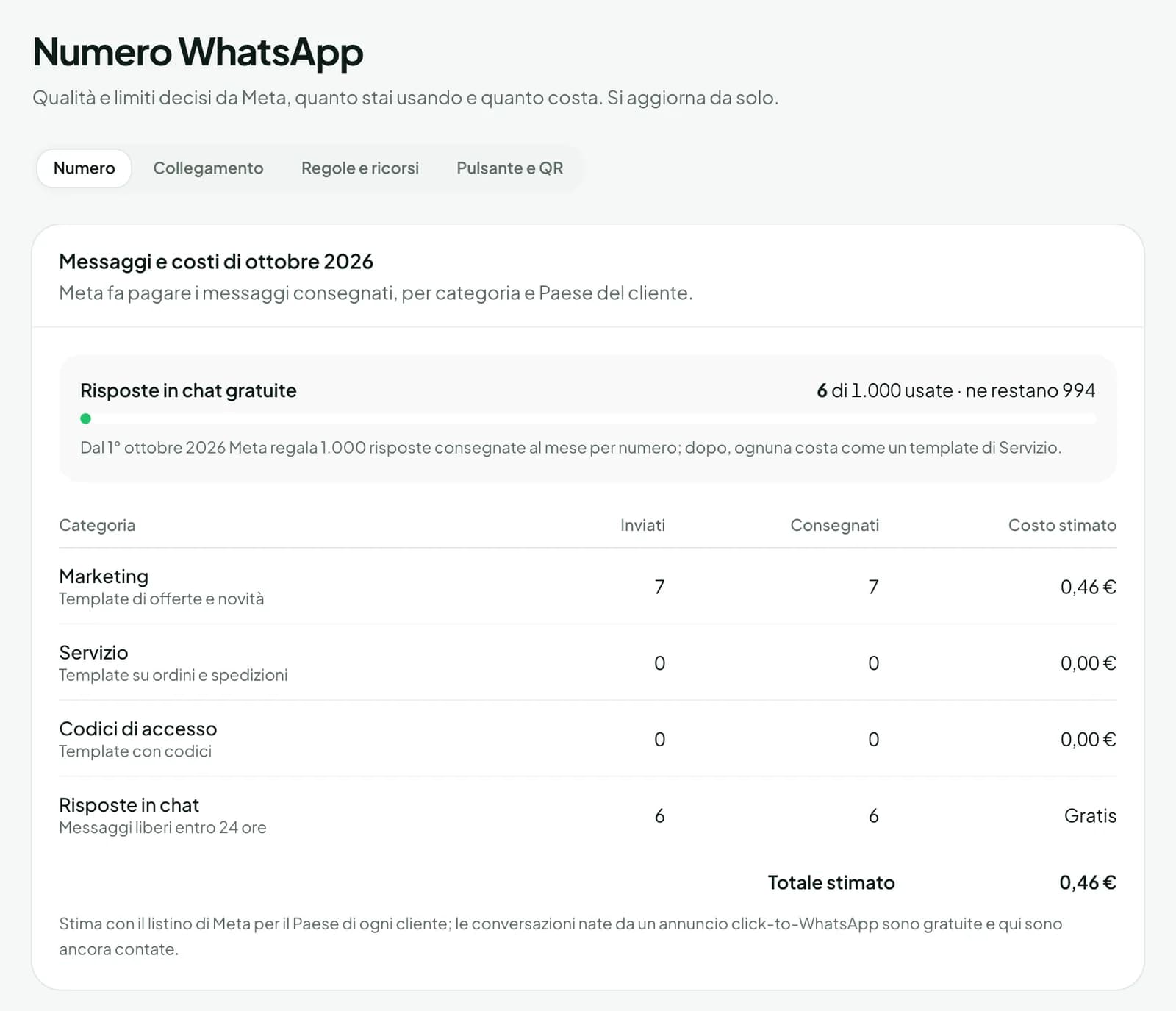
Meta charges for every delivered message, according to its category. With the rate card in force from October 1, 2026, in Italy: €0.0658 for a marketing message, €0.0248 for a utility, authentication or service message. Messages from customers are free.
- Each number gets 1,000 service replies delivered free every month; unused ones don't carry over to the next month.
- From October 1, 2026, utility templates are charged even inside an open chat.
- If a customer writes to you from an ad that opens WhatsApp and you reply within 24 hours, a free window of up to 7 days opens.
- Meta can only change prices on the first day of a quarter.
Who pays and what Gosendly does
Meta bills your store for messages, using the payment method on your account: Gosendly doesn't add any markup. Before each send you see the estimated cost, and the number page counts the month's free replies. To run the numbers there's the cost calculator; for limits, the guide to messaging limits.
Frequently asked questions
Does Gosendly use the official WhatsApp API?
Yes: Gosendly works with the Cloud API of Meta's WhatsApp Business Platform, with no unauthorized apps or tricks on your phone. Today we connect the number together with you.
What happens if I don't add a payment method in Meta?
According to Meta, without a payment method service replies are delivered up to the free threshold and then stop being delivered. To keep messaging customers, you need a payment method on your account.
How many people can I contact per day?
It depends on your Meta business portfolio's limit: you start at 250 unique people in 24 hours outside an open chat, move up to 2,000 with business verification or good sending, then to 10,000, 100,000 and unlimited. Replies in open chats don't count.
Keep reading
- FeaturesConnecting your WhatsApp numberTo use Gosendly, your store's WhatsApp number must be connected to Meta's official platform. Today we do the connection together with you, following…Read
- GuidesWhatsApp Business API: the guide for storesThe WhatsApp Business API is how a store connects WhatsApp to its tools: orders, carts, a shared inbox, automations. This guide explains what you…Read
- GuidesHow much WhatsApp Business costs: Meta's pricesThe WhatsApp Business app is free; the platform for stores is paid per delivered message. Here you'll find WhatsApp Business pricing for Italy as…Read
- Free toolsWhatsApp cost calculatorEnter how many messages you send in a month and where your customers are: the calculator applies Meta's official euro rate card, in effect since…Read
- GuidesWhatsApp messaging limits and how to increase themWhatsApp messaging limits decide how many people you can message first in a day. Here you'll find how they've worked since 2025, the tiers, how to…Read
Other integrations
- Gosendly for ShopifyShopify notifies Gosendly of every order, payment, shipment, refund, cart, customer and product. Gosendly updates your contacts with each customer's value, starts the right flows and…
- Gosendly and ZapierZapier calls a Gosendly flow's trigger address with the customer's phone number, and the flow starts: welcome, confirmation, reminder. The other way round, Gosendly sends its events to…
- Gosendly and MakeMake picks up the event from your software, prepares the customer's phone number and details and calls the flow's trigger address: Gosendly creates or updates the contact and sends the…
- Gosendly and n8nAn n8n workflow receives an event, for example a form submission or a new row in a back-office tool, and calls a Gosendly flow's trigger address with the customer's phone number: the flow…
- Gosendly and Shopify FlowFlow watches your store (an order created, a tag added to a customer, a carrier update), checks the conditions you choose and sends Gosendly the customer's phone number with the order…
- Gosendly API and webhooksAPI v1 creates and updates contacts, sends approved templates and starts flows, with a key that only has the permissions you choose. Outgoing webhooks send every event you pick to your…
Sources
- Meta: WhatsApp Business Platform pricing(opens in a new tab)Read on October 28, 2026
- Meta: rates by country (Italy, in euros)(opens in a new tab)Read on October 28, 2026
- Meta: messaging limits(opens in a new tab)Read on October 28, 2026
- Meta: business phone numbers on the platform(opens in a new tab)Read on October 28, 2026
- Meta: coexistence with the WhatsApp Business app(opens in a new tab)Read on October 28, 2026
- Meta: the new WhatsApp Business account model(opens in a new tab)Read on October 28, 2026
- Meta: tech providers and billing(opens in a new tab)Read on October 28, 2026
Sign-ups open soon
Leave your email and we'll tell you when we launch: then you create your account and find a sample store full of data to try right away.
- We'll write to you once
- Every feature when we open
- Sample store already full of data