Solutions
Promotions and launches on WhatsApp, without burning your number
A launch, Black Friday, a sale, a product back in stock. With Gosendly's WhatsApp promotions you only message people who asked for them, at the right time, and see who read, clicked and bought.
Example
Hi Giulia, Black Friday starts tomorrow, but for those who've been with us a while it opens today: 20% off the whole store until Monday. Come in here 👇
10:24
Preview for loyal customers
The problem
WhatsApp messages get read, and that's exactly why the channel wears out fast. A promotion sent to your whole contact list, at ten at night, for the third time in a week, gets your number blocked by someone. If blocks go up, your number's quality drops and Meta limits sending, including order messages. And after the campaign the same old question remains: did it sell anything?
How Gosendly solves it
- 1
Choose who to message
A list, a segment or a tag. Gosendly automatically leaves out anyone who hasn't opted in, has unsubscribed or is blocked, and tells you how many people are left.
- 2
Prepare the template
A marketing template with text, a header image and a button with a tracked link. The editor checks Meta's rules as you type and warns you if the opt-out option is missing.
- 3
Check before sending
In the final check you see the reachable people, the estimated cost and a preview with a real customer's data. You send a test to your own number.
- 4
Send now or schedule
The campaign goes out right away or at the time you choose. It can start a flow for each recipient, for example a last reminder a few days later.
Who to message
Your best audience is the one you already have. With Shopify connected you'll find ready-made segments built on orders: New customers (first order in the last 30 days), Loyal customers (at least three orders, the last one in the past six months), At-risk customers and High-value customers. You can also filter by people who bought a product or from a collection.
Even without Shopify, you collect interests in the chat: anyone who writes "news" enters a flow that asks for opt-in and adds a tag. At launch you message that tag, and nobody else.
The rules that protect your number
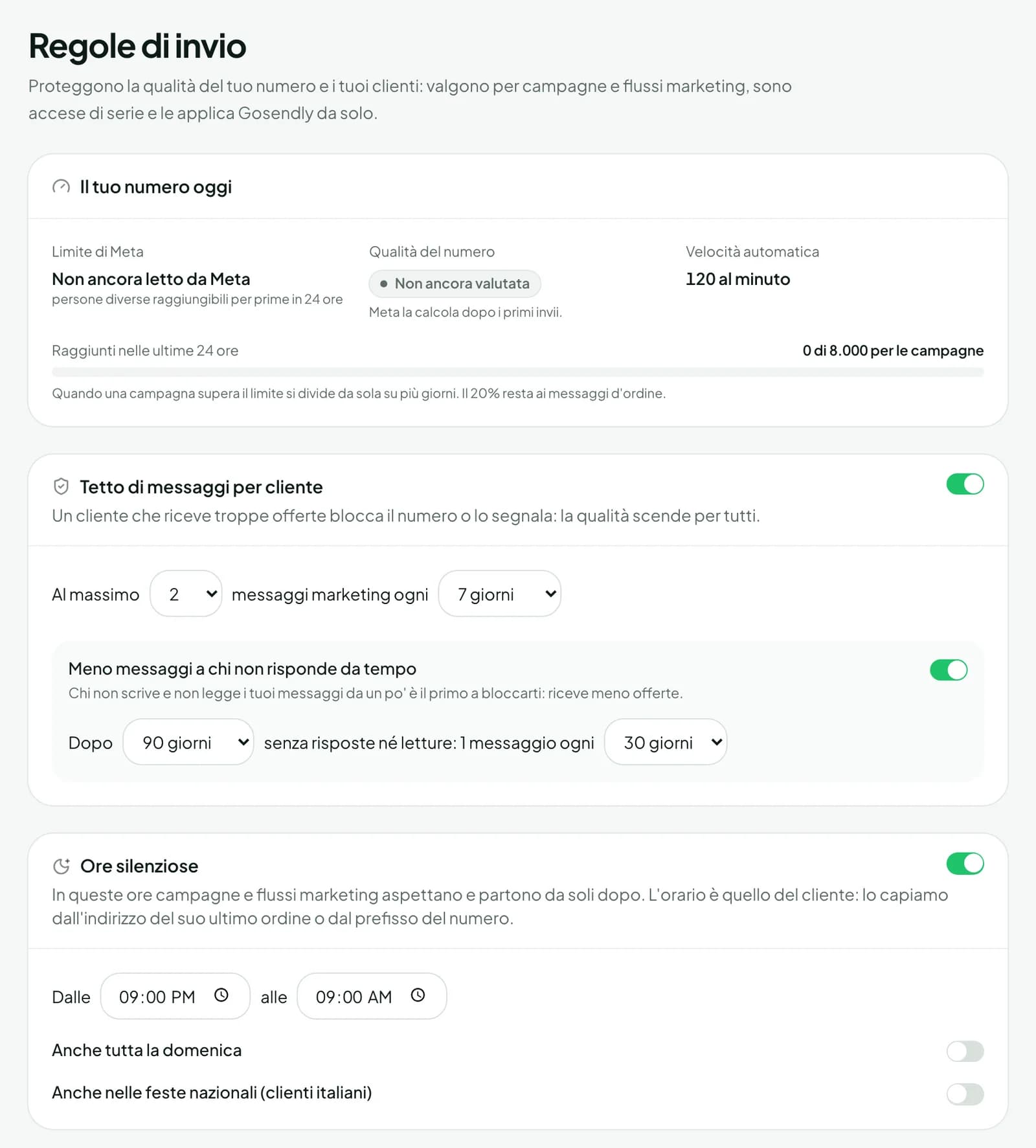
Sending rules are on by default and apply to campaigns and marketing flows. You can change them, but it's worth knowing what they do.
- Per-customer cap: at most two marketing messages in seven days, one every thirty days to people who haven't replied in ninety.
- Quiet hours from 9 p.m. to 9 a.m. in the customer's time, worked out from the last order's address or the phone prefix; Sundays and holidays too if you like.
- New numbers: you start at 250 messages a day and double up, never beyond the limit Meta assigns.
- Reserve for order messages: part of the limit stays free for confirmations and shipping updates.
- Automatic pause if your number's quality drops or Meta pauses the template.
A launch in three messages
First the preview for loyal customers, the evening before. Then the launch to all subscribers, the next morning after 9 a.m. Finally the last day: with the "5-day promo" recipe, the notice only goes to people who haven't bought yet, checked against real Shopify orders. If your store is on another platform, you build a list of people who didn't click from the campaign results and message only them.
Three messages in one week go over the default cap: for a big launch you can raise it, knowing that every extra message has to be earned.
Measure what happened
For every campaign you see sent, delivered, read, replies, clicks and errors, in real time. From the results you create a list in one click, for example people who read but didn't click, and use it for the next message. Temporary errors are retried automatically, the others with "Retry failed". On paid plans, with Shopify, you also see the sales attributed to the campaign.
Clicks are counted on the template's tracked-link button, not on links written in the text.
Black Friday and Christmas: get ahead
Marketing templates must be approved by Meta before sending: prepare them and submit them for approval a few days ahead, not the morning of the launch. Also check how many people you can reach in a day: you'll find it on your number's page, and how Meta's limit works is explained in the guide on messaging limits.
Sample messages
How your customer reads them on WhatsApp. Start from here and change them however you like.
Preview for loyal customers Hi Giulia, Black Friday starts tomorrow, but for those who've been with us a while it opens today: 20% off the whole store until Monday. Come in here 👇
10:24
Marketing template with the "Go to store" button (tracked link). Only to the Loyal customers segment, with opt-in.
Collection launch Hi Giulia, our Christmas collection is here: handmade decorations and gift ideas under €30. Find them here [collection link]
10:24
Marketing template with a header image. To all subscribers, after 9 a.m.
Last day, only to people who haven't bought Hi Giulia, last day to grab the promo: it ends tomorrow. Here's the link [store link]
10:24
Marketing template from the "5-day promo" recipe: people who already bought don't receive it.
The features you use
- FeaturesWhatsApp campaignsSales, a new collection, the last pieces before Christmas: with Gosendly's WhatsApp campaigns you send one message to many customers at once. Before…Read
- FeaturesLists and dynamic segmentsWith Gosendly's lists and dynamic segments, you choose who to message without spreadsheets: “bought in the last 30 days”, “spent more than €100”…Read
- FeaturesSending rules that protect your numberA customer who gets too many offers blocks or reports your number, and quality drops for everyone. Gosendly's sending rules apply to campaigns and…Read
- FeaturesTracked links and clicksYou sent the link to your new collection: who opened it? With Gosendly's tracked links every link becomes a personal short link, and clicks are…Read
- FeaturesOpt-in and automatic unsubscribeOn WhatsApp, promotions can only be sent to people who have agreed to them, and anyone who no longer wants them must be able to opt out right away…Read
- FeaturesWhatsApp templates: create them and get them approvedTo message a customer first, or more than 24 hours after their last message, WhatsApp requires a template approved by Meta. With the Gosendly…Read
Frequently asked questions
How many promotions can I send?
With the default rules, at most two marketing messages in seven days per customer, and one every thirty days to people who haven't replied in ninety. You can change them, but every extra message raises the risk of blocks and reports.
How much does a campaign cost?
Meta charges the store for each delivered marketing message, through the payment method of your WhatsApp Business account; Gosendly adds no markup. Before sending you see the estimated cost; to get an idea beforehand there's the cost calculator.
Can I message people who haven't opted in?
No. Before you message someone, WhatsApp's rules ask for two things: that they gave you their number and that they agreed to your messages; and anyone who asks you to stop must be removed right away. Gosendly automatically leaves out people without opt-in; how to collect it properly is explained in the guide on consent and GDPR.
Can I add an image or a video?
Yes, as the template header. A button with a tracked link also tells you who opened the offer, and you can send an automatic reminder to those who didn't.
Which plan?
Campaigns are included in all paid plans, along with attributed sales. Marketing templates can already be used in flows on paid plans. The details are on the pricing page.
Keep reading
- FeaturesWhatsApp campaignsSales, a new collection, the last pieces before Christmas: with Gosendly's WhatsApp campaigns you send one message to many customers at once. Before…Read
- FeaturesSending rules that protect your numberA customer who gets too many offers blocks or reports your number, and quality drops for everyone. Gosendly's sending rules apply to campaigns and…Read
- GuidesWhatsApp messaging limits and how to increase themWhatsApp messaging limits decide how many people you can message first in a day. Here you'll find how they've worked since 2025, the tiers, how to…Read
- GuidesConsent and GDPR for WhatsApp messagesTo message customers on WhatsApp you need two permissions that go together: the one Meta requires and the one privacy law requires. This guide…Read
- SolutionsWin back customers who stopped buyingA customer who has already bought knows you, trusts you and knows how your store works. To win back inactive customers, Gosendly finds them in your…Read
- IndustriesWhatsApp for clothing storesIn fashion, the doubt is almost always the size. With WhatsApp for your clothing store you answer before the order, handle exchanges in chat and…Read
Sources
- WhatsApp Business Platform pricing (Meta)(opens in a new tab)Read on October 28, 2026
- WhatsApp Business Policy: opt-in and stop requests(opens in a new tab)Read on October 28, 2026
Sign-ups open soon
Leave your email and we'll tell you when we launch: then you create your account and find a sample store full of data to try right away.
- We'll write to you once
- Every feature when we open
- Sample store already full of data