Contacts
Lists and dynamic segments
With Gosendly's lists and dynamic segments, you choose who to message without spreadsheets: “bought in the last 30 days”, “spent more than €100”, “has the bride tag”. Dynamic lists update themselves: people who match the rules join, and people who no longer match leave.
What you get
- Segments that update themselves when orders, tags, fields or consent change.
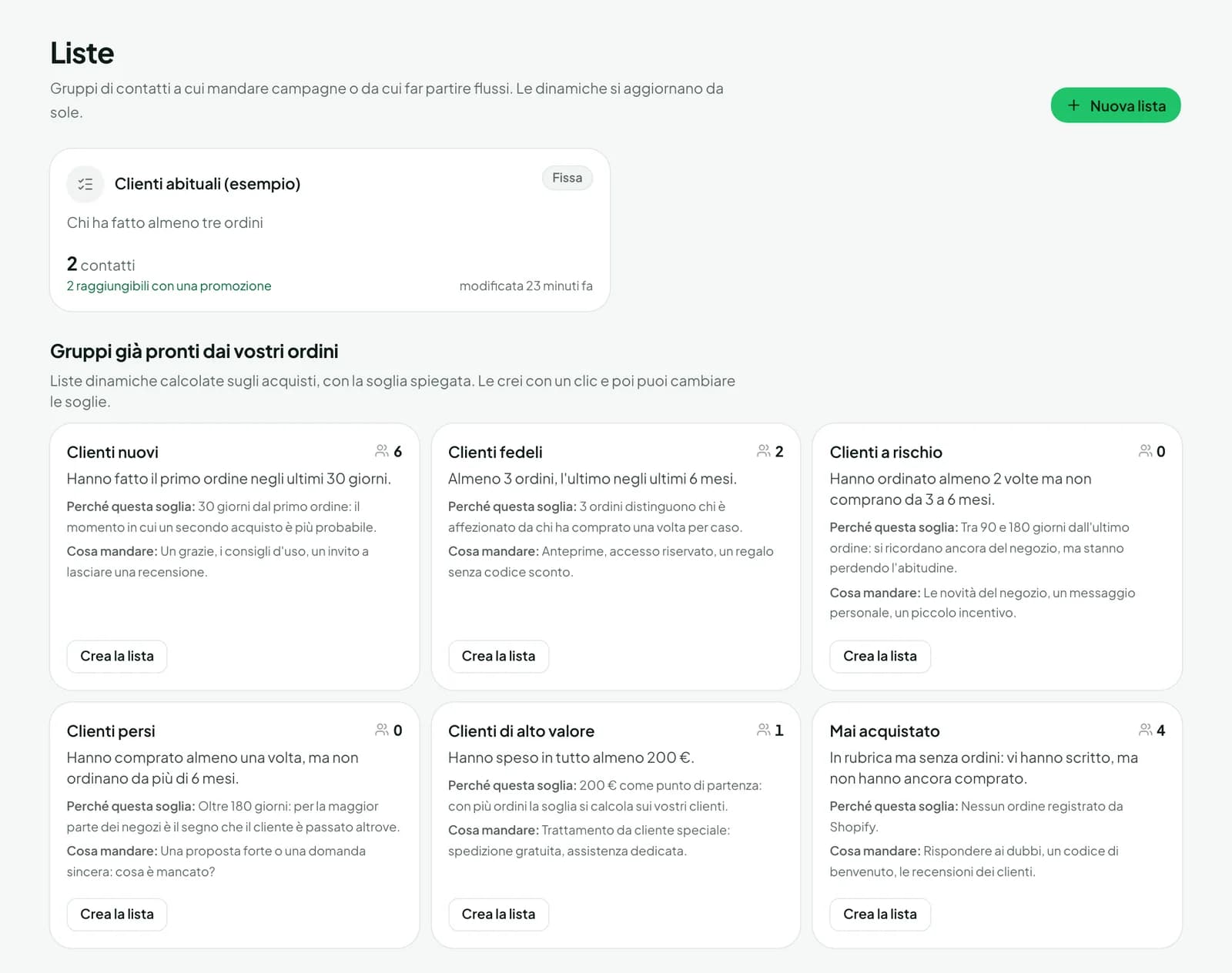
- Ready-made groups from your orders: new, loyal, at-risk and lost customers.
- For each list you see how many people you can reach today with a promotion.
- A flow can start when someone joins or leaves a list.
How it works
- 1
Create the list
In Lists, press “New list” and choose the type: dynamic, which updates itself based on rules, or static, which you fill by hand, from an import or with a flow.
- 2
Write the rules
Combine conditions on contact, consent, messages, purchases, tags, lists and custom fields, in groups too. As you type, you see how many contacts match and how many you can reach today with a promotion.
- 3
Use it
Pick the list as the audience of a campaign, as the trigger of a flow, or as a filter in the chat and contacts.
The rules a store actually needs
The conditions are the ones a store owner really uses, grouped by type:
- Contact: name, phone (e.g. “starts with +39” for Italian numbers), email, language, source, date added.
- Consent and status: marketing consent given, withdrawn or not stated; blocked.
- Messages: last message from you or from them, last customer message (within 24 hours you can write without a template).
- Purchases: number of orders, total spent, first and last order, placed an order of at least a certain amount, bought a product or from a collection.
- Tags and lists, plus your custom fields, like size or birthday.
Ready-made groups from your orders
Below your lists you'll find Ready-made groups from your orders: new customers (first order in the last 30 days), loyal (at least 3 orders, the last one in the past 6 months), at risk, lost, high value and people who have never purchased. Each one explains why it uses that threshold and what to send; with “Create the list” it becomes a dynamic list whose thresholds you can change.
The groups fill up with your Shopify orders: it's the starting point for winning back customers who no longer buy.
How many people you really reach
A list of 2,000 contacts doesn't mean 2,000 messages. On the list page, Gosendly separates people who are reachable today from those without consent and those who unsubscribed or are blocked, so you know beforehand how many people will receive a promotion.
A dynamic list updates when something about the contact changes (tags, fields, consent, orders) and every 15 minutes for time-based rules, like “hasn't bought in 90 days”. If you need a snapshot of today's group, “Freeze (make static)” locks it with the current contacts.
Lists that trigger flows
Joining or leaving a list can start an automation: a customer joins “Loyal customers” and gets a thank-you with a code, or leaves “Product trial” and gets a question. Loops that would send messages over and over are blocked before they start.
Frequently asked questions
What's the difference between a static list and a dynamic list?
You fill a static list yourself and it doesn't change on its own: it's good for event sign-ups or an imported list. A dynamic list is a segment: people who match the rules join and leave without you doing anything.
Can I segment by purchases without Shopify?
Purchase rules use orders coming from Shopify, the direct integration. Without Shopify you can segment by tags, custom fields, consent and messages; you can also update tags and fields through the API or with a flow.
Does everyone on a list necessarily get the messages?
No. Promotions only go to people who have given consent and aren't blocked, and they follow your store's sending rules. That's why the list shows reachable contacts separately.
Do lists cost extra?
No, static and dynamic lists are available on every plan, Free included. To send a campaign to a list you need a paid plan.
Keep reading
- FeaturesCustomer contacts with full historyEveryone who messages you on WhatsApp lands in a customer contact list with full history: messages, orders, tags, consent and flows in a single…Read
- FeaturesWhatsApp campaignsSales, a new collection, the last pieces before Christmas: with Gosendly's WhatsApp campaigns you send one message to many customers at once. Before…Read
- FeaturesBlock-based WhatsApp automationGosendly's WhatsApp automations are messages that go out on their own at the right moment and stop when they're no longer needed: as soon as the…Read
- SolutionsWin back customers who stopped buyingA customer who has already bought knows you, trusts you and knows how your store works. To win back inactive customers, Gosendly finds them in your…Read
- SolutionsPromotions and launches on WhatsApp, without burning your numberA launch, Black Friday, a sale, a product back in stock. With Gosendly's WhatsApp promotions you only message people who asked for them, at the…Read
More features: Contacts
Contact book, lists and consent always in order.
- Customer contacts with full historyEveryone who messages you on WhatsApp lands in a customer contact list with full history: messages, orders, tags, consent and flows in a single timeline. Before you reply, you already know…Also included in the Free plan
- Import contacts from CSV and ExcelDo you have your customers in a file exported from your management software, your newsletter or your old platform? With Gosendly's import, you bring contacts from CSV or Excel into your…Also included in the Free plan
- Opt-in and automatic unsubscribeOn WhatsApp, promotions can only be sent to people who have agreed to them, and anyone who no longer wants them must be able to opt out right away. Gosendly keeps each customer's marketing…Also included in the Free plan
Sign-ups open soon
Leave your email and we'll tell you when we launch: then you create your account and find a sample store full of data to try right away.
- We'll write to you once
- Every feature when we open
- Sample store already full of data