Contacts
Customer contacts with full history
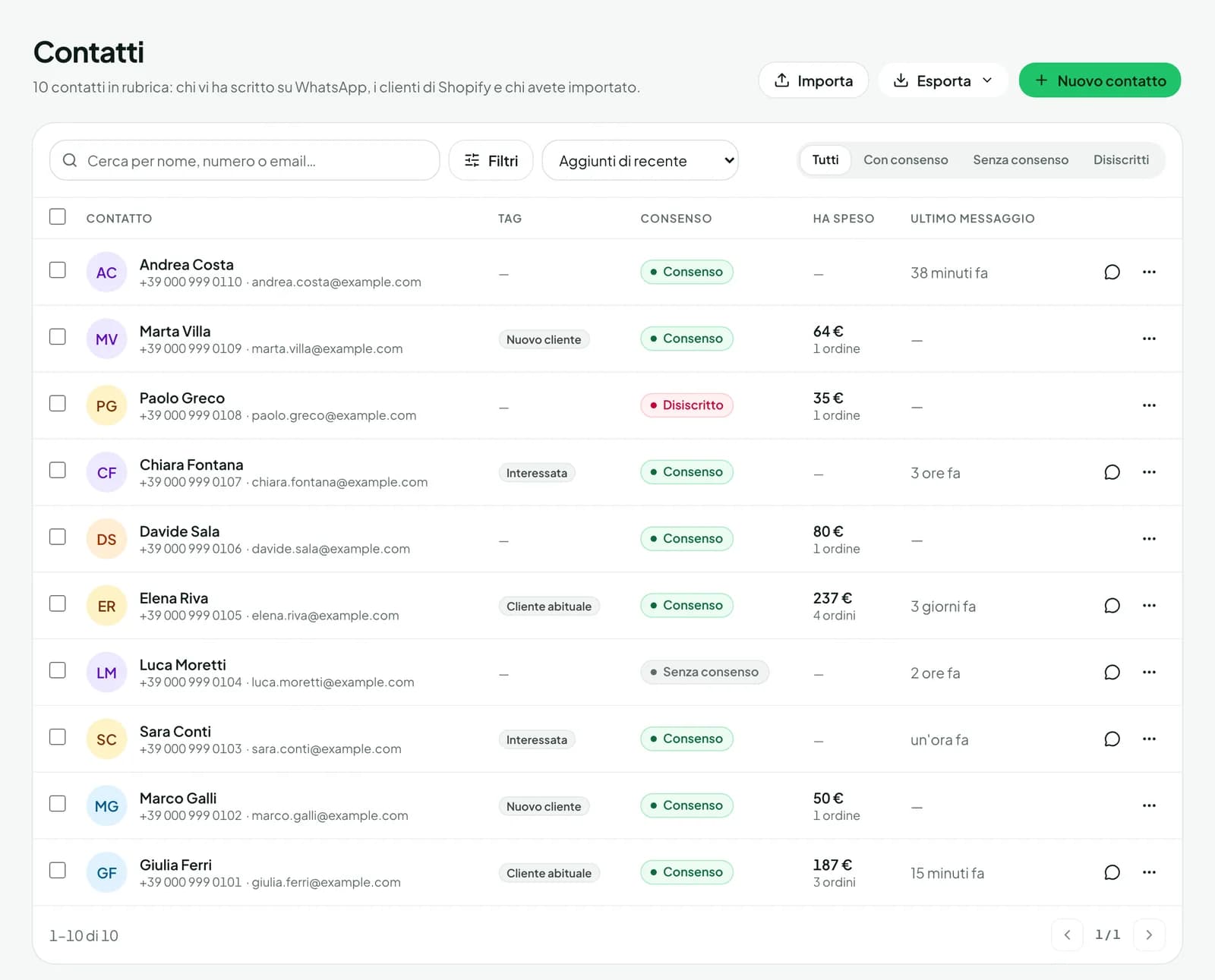
Everyone who messages you on WhatsApp lands in a customer contact list with full history: messages, orders, tags, consent and flows in a single timeline. Before you reply, you already know who you're talking to.
What you get
- The contact is created automatically with the first message: no phone numbers to copy.
- One timeline per customer: messages, orders, tags, consent, flows and notes.
- Your own fields, like size or birthday, to use in messages and filters.
- Unlimited contacts on every plan, Free included.
How it works
- 1
Contacts come in on their own
Anyone who messages you on WhatsApp is added with their name and number. With Shopify connected, your store customers come in too; the rest you import from a file or add with “New contact”.
- 2
Find who you need
In Contacts, search by name, number or email and filter by consent, tag, list, source or blocked. The “Advanced filter” adds orders, spend, custom fields, products purchased and dates.
- 3
Open the customer profile
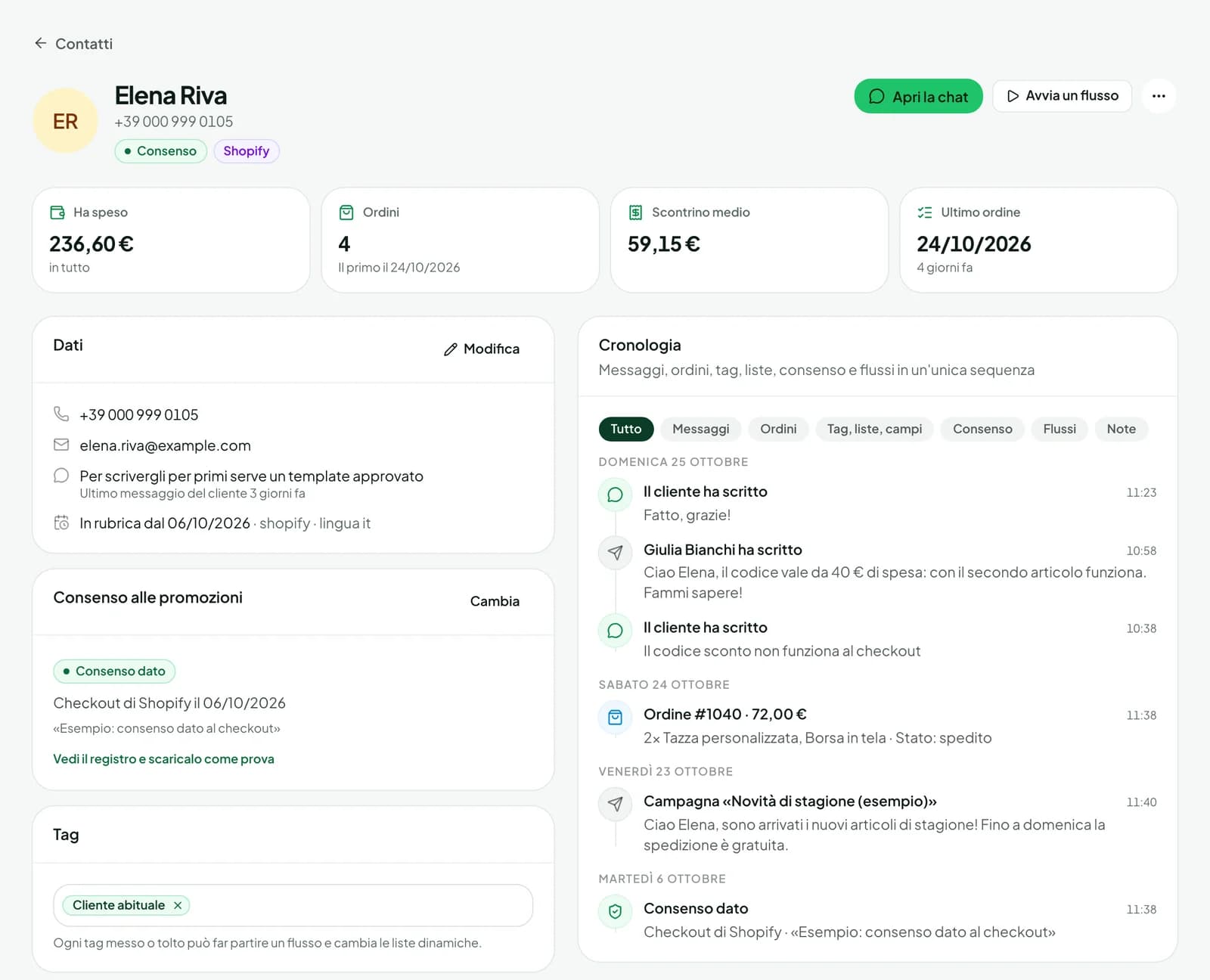
At the top you see the customer's value (total spent, orders, average order value, last order), then details, tags, lists, fields and the “Timeline”.
- 4
Work on many contacts at once
Select contacts, or the whole filter, and use “Add tag”, “Add to a list”, “Consent”, “Assign to a team member” or “Block”.
The customer's whole story in one timeline
A customer writes “my package never arrived”. In the Timeline of her profile you see the messages, the order, the shipment with the “Track shipment” link, the tags added by flows and when she agreed to receive promotions. You can show everything or only messages, orders, tags and lists, consent, flows or notes.
The profile also tells you whether the 24-hour window is open, meaning you can write freely or you need a template.
Custom fields and tags
In Settings › Fields and tags, you decide what you want to know about your customers. A field can be text, number, date, date and time, a choice of values (S, M, L) or yes/no; with the “Fallback value in messages”, an empty field doesn't leave gaps in the text.
With Shopify there are also Store fields, ready-made and updated from orders. Tags are grouped into categories, like “Interests” or “Customer status”, and are used for filters, lists and segments and flows.
Clean numbers, clean contact list
The number fixes itself as you type it (+39, 0039, spaces, dashes) and the same number never gets in twice. Gosendly flags numbers that look wrong and landlines, which usually don't have WhatsApp.
For people who cause trouble there's “Block contact”: their messages still arrive, but no automatic replies or sends go out.
- Sort by recently added, last message, highest spend, most orders or last order.
- Export the whole contact list or just the filter, as Excel (.xlsx) or CSV for Italian Excel: owners and admins can do this.
Frequently asked questions
Do I have to enter contacts by hand?
No. Anyone who messages you on WhatsApp is added automatically; with Shopify connected you can also import all customers who have a phone number. Other lists you upload with the CSV or Excel import.
Can I see orders if I don't use Shopify?
Orders come in automatically only with Shopify, the direct integration. With another platform you can update contacts' name, email, fields and tags through the API (on paid plans), including via Zapier, Make or n8n.
How many contacts can I have?
Unlimited, on every plan. Plan limits apply to team members, automations and AI assistant replies, not to your contacts.
A customer asks me to delete their data: how do I do it?
From the profile, use deletion with history: chats, messages, files, notes and timeline are deleted, and you're left with a receipt without the customer's name to send them. If they ask for a copy instead, “Download all their data” prepares the file.
Keep reading
- FeaturesLists and dynamic segmentsWith Gosendly's lists and dynamic segments, you choose who to message without spreadsheets: “bought in the last 30 days”, “spent more than €100”…Read
- FeaturesImport contacts from CSV and ExcelDo you have your customers in a file exported from your management software, your newsletter or your old platform? With Gosendly's import, you bring…Read
- FeaturesOpt-in and automatic unsubscribeOn WhatsApp, promotions can only be sent to people who have agreed to them, and anyone who no longer wants them must be able to opt out right away…Read
- SolutionsWin back customers who stopped buyingA customer who has already bought knows you, trusts you and knows how your store works. To win back inactive customers, Gosendly finds them in your…Read
- IntegrationsGosendly for ShopifyShopify is Gosendly's direct integration: once your store is connected, orders, carts, shipments, customers and products come in on their own, with…Read
More features: Contacts
Contact book, lists and consent always in order.
- Lists and dynamic segmentsWith Gosendly's lists and dynamic segments, you choose who to message without spreadsheets: “bought in the last 30 days”, “spent more than €100”, “has the bride tag”. Dynamic lists update…Also included in the Free plan
- Import contacts from CSV and ExcelDo you have your customers in a file exported from your management software, your newsletter or your old platform? With Gosendly's import, you bring contacts from CSV or Excel into your…Also included in the Free plan
- Opt-in and automatic unsubscribeOn WhatsApp, promotions can only be sent to people who have agreed to them, and anyone who no longer wants them must be able to opt out right away. Gosendly keeps each customer's marketing…Also included in the Free plan
Sign-ups open soon
Leave your email and we'll tell you when we launch: then you create your account and find a sample store full of data to try right away.
- We'll write to you once
- Every feature when we open
- Sample store already full of data