Solutions
Reply after hours too, with AI
Customers write in the evening, on Sundays, on public holidays. With Gosendly's after-hours auto replies, the AI assistant answers the questions it knows, from your store's information, and leaves the ones that need a person to the team, with the summary ready for the morning.
Your store
online
Today
The problem
Many online purchases are decided in the evening, when the store is closed. The customer has a simple question, shipping times, a size, a return, and if nobody replies they buy elsewhere or give up. The classic "we're closed, we'll get back to you" is honest, but it doesn't answer the question. And the next morning the team finds twenty chats to read from scratch.
How Gosendly solves it
- 1
Set your hours
In Settings, enter your store's weekly hours. Italian public holidays are already loaded, Easter and Easter Monday included; you add vacations and closures yourself.
- 2
Give the assistant your information
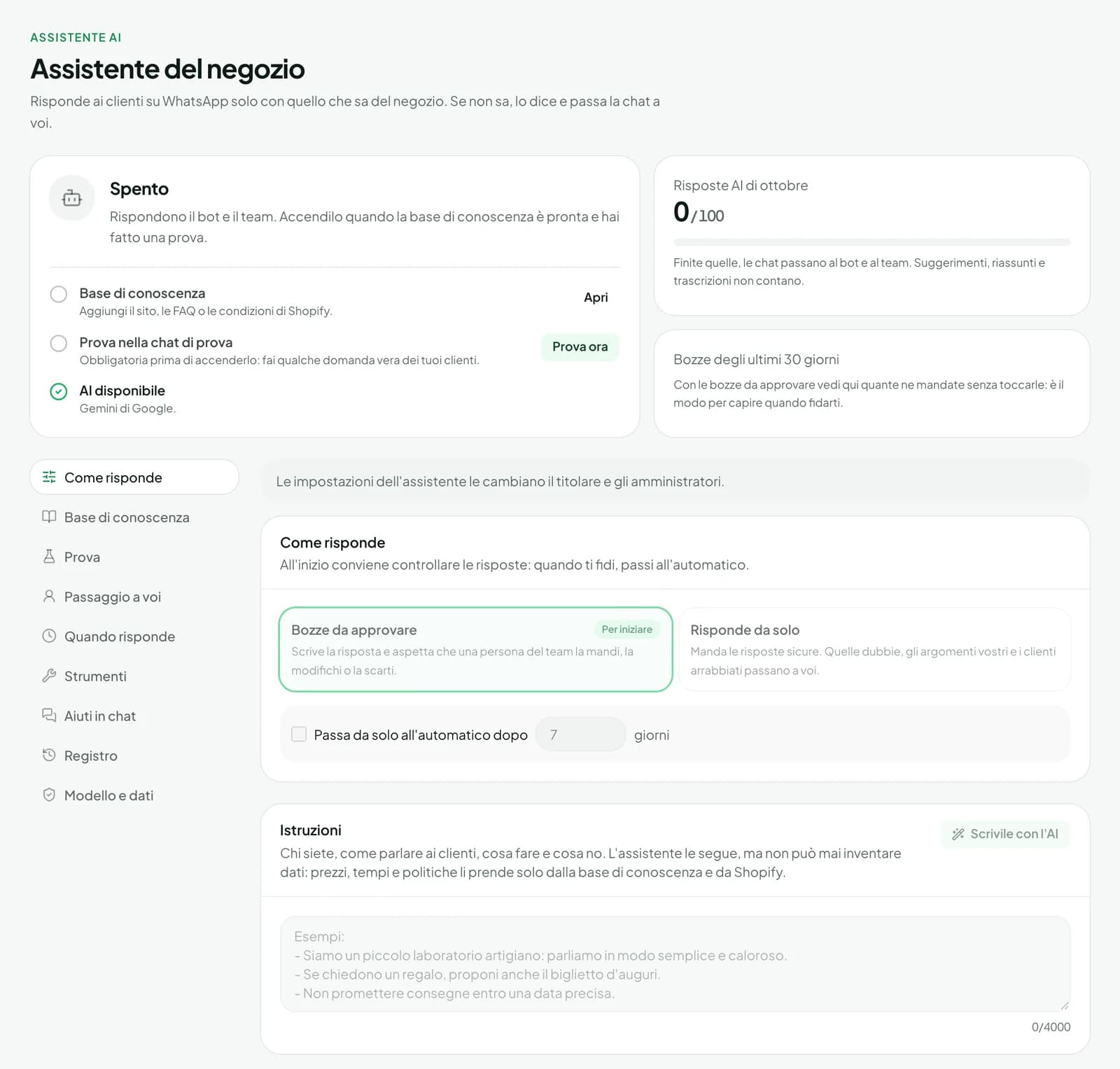
In the knowledge base you upload your site, FAQs, terms of sale, PDF or CSV files. The assistant only answers from there and cites the source.
- 3
Start with drafts
In the first days the assistant writes drafts that the team sends, edits or discards. When you trust it, you switch to "Replies on its own", even automatically after the number of days you choose.
- 4
Choose when it replies
"Only when you're closed" follows your store hours, holidays and closures included. Alternatively: always, or up to two time slots a day of your choice.
What it answers and what it doesn't
The assistant uses Google's Gemini and only answers with what it finds in your sources: it doesn't make up prices, times or return rules. When it quotes a condition, it says where it got it. If the information isn't there, it tells the customer and hands the chat to the team; unanswered questions go into a list, so you know what to add to the knowledge base.
In the first message the customer reads that they're talking to a virtual assistant, with a text you choose. With Shopify connected, the assistant also reads the status and tracking of the writer's order, and answers "where's my parcel?".
When it hands the chat to a person
Some rules always apply, even in automatic mode. Others are up to you.
- The customer asks for a person, with "agent", "real person" and the like.
- The information isn't in the sources: it says so and doesn't make anything up.
- The customer brings up a topic you handle yourselves, like quotes or refunds.
- The customer is angry: strong words, capital letters, angry emojis.
- The AI isn't confident enough about the answer.
- The customer writes one of the words you chose, for example "wholesale" or "invoice".
The simple after-hours message
If you don't want AI yet, the after-hours message is available on all plans, Free included. Outside your opening hours the bot lets people know you'll reply as soon as possible, at most once every 12 hours per chat, so someone who sends three messages in a row doesn't get three notices. It stays quiet when someone on the team has just written in that chat.
The next morning
When the assistant hands over a chat, the customer gets your handover message and, if you're closed, Gosendly automatically adds when you reopen, taken from your hours. The assistant then stays quiet in that chat for the time you choose.
In the morning, chats waiting for a person are in the "To reply" tab, oldest on top, assigned to whoever is on shift or open to whoever gets there first. Every handed-over chat has its summary: whoever opens it doesn't have to reread everything.
What it costs and where the data goes
The AI assistant is included in all paid plans, with a number of replies per month that grows with the plan: the details are on the pricing page. On the WhatsApp side its replies are service messages, within 24 hours of the customer's message: Meta doesn't charge for the first 1,000 delivered per month per number.
Store data isn't used to train models, and Gosendly's servers are in Germany. Who processes what, provider by provider, is listed on the Security and providers page.
Sample messages
How your customer reads them on WhatsApp. Start from here and change them however you like.
Assistant reply, with the source Hi Giulia! Orders placed by 2 p.m. ship the same day and arrive within 24-48 hours anywhere in Italy. You can also find this in our shipping terms. Can I help with anything else?
10:24
Free text within the 24 hours. The times are an example: the assistant takes them from your terms.
Evening handover to the team A person from our team will answer this request: we're closed now, we're back tomorrow from 9 a.m. and we'll message you.
10:24
Handover message chosen by you; Gosendly adds the reopening time from your store hours.
After-hours message, no AI Hi Giulia, thanks for writing to us! We're closed right now: we'll reply as soon as we reopen.
10:24
Automatic bot reply, at most once every 12 hours per chat.
The features you use
- FeaturesAI assistant that answers from your sourcesThe Gosendly AI assistant answers customers on WhatsApp using your store's information: shipping, returns, sizes, order status. If it doesn't know…Read
- FeaturesKnowledge base from your website, FAQs and PDFsThe AI assistant answers only as well as its sources are clear. The Gosendly knowledge base gathers what you know about your store, from your…Read
- FeaturesBusiness hours, holidays and away messageA customer messages you at 10 p.m. on Sunday and has no idea if anyone will read it. With your store hours set in Gosendly, they instantly get the…Read
- FeaturesSuggested replies, summaries and translationsNot everyone wants an AI writing to their customers. Gosendly's chat helpers work for whoever is replying: they suggest three replies, summarize the…Read
- FeaturesShared WhatsApp inbox for your teamWith the Gosendly shared WhatsApp inbox, your whole team replies from the store's same number, each person with their own login, from a computer or…Read
- FeaturesAutomatic chat assignmentWhen several people reply from the same number, you need to know who is handling which customer. With automatic chat assignment, Gosendly hands each…Read
Frequently asked questions
Can the assistant make mistakes?
It can happen, just as with a person. That's why it only answers from your sources, hands over the chat when in doubt, and works with drafts at first: you check them for a few days before letting it reply on its own. Every reply stays in the log.
Does the customer know they're talking to an AI?
Yes. In the assistant's first message the customer reads that a virtual assistant is replying, with a text you choose.
Can I exclude certain topics?
Yes. Topics you handle yourselves, like quotes, refunds or complaints, go in the instructions and are handed to the team right away. You can also add specific words that trigger the handover.
Does it work if my store isn't on Shopify?
Yes, for all questions answered in your sources: site, FAQs, terms, files. Questions about an order's status require Shopify connected; without it, the assistant hands the chat to a person.
What if the customer writes while we're open?
With "Only when you're closed" the team replies, as always. If you want it during the day too, choose "Always": when someone on the team writes in a chat, the assistant steps aside in that chat.
Keep reading
- FeaturesAI assistant that answers from your sourcesThe Gosendly AI assistant answers customers on WhatsApp using your store's information: shipping, returns, sizes, order status. If it doesn't know…Read
- FeaturesKnowledge base from your website, FAQs and PDFsThe AI assistant answers only as well as its sources are clear. The Gosendly knowledge base gathers what you know about your store, from your…Read
- FeaturesBusiness hours, holidays and away messageA customer messages you at 10 p.m. on Sunday and has no idea if anyone will read it. With your store hours set in Gosendly, they instantly get the…Read
- GuidesChatbots and AI on WhatsApp: what actually worksA chatbot or AI assistant on WhatsApp can answer at night, route questions and save your team hours. It can also annoy customers if it promises…Read
- SolutionsWhatsApp customer service, with your whole teamOne number, many people replying, no message lost. WhatsApp customer service with Gosendly puts your whole team in the same inbox, routes requests…Read
- GosendlySecurity and providersRead
Sources
- WhatsApp Business Platform pricing (Meta)(opens in a new tab)Read on October 28, 2026
Sign-ups open soon
Leave your email and we'll tell you when we launch: then you create your account and find a sample store full of data to try right away.
- We'll write to you once
- Every feature when we open
- Sample store already full of data