Guide
Chatbots and AI on WhatsApp: what actually works
A chatbot or AI assistant on WhatsApp can answer at night, route questions and save your team hours. It can also annoy customers if it promises things it can't deliver. Here you'll find Meta's rules as of 2026 and what actually works for an online store.
At a glance
- A rule-based chatbot guides the customer with buttons and lists; an AI assistant understands questions written in the customer's own words and answers using your store's information.
- WhatsApp policy allows automation within the 24-hour window, but always requires a prompt, clear and direct handoff to a person.
- Since January 15, 2026, Meta's terms prohibit using WhatsApp to offer general-purpose AI assistants as the primary service; AI that helps your store's customers is an ancillary use.
- AI pays off on repetitive questions (shipping, returns, sizes, order status); refunds, complaints and angry customers should go to a person.
- Automated replies are service messages: 1,000 free per month per number, then €0.0248 each in Italy.
Chatbots and AI assistants: two different tools
A rule-based chatbot follows a path you design: “Want to know where your order is? Tap here.” On WhatsApp you build it with interactive messages: up to 3 reply buttons, each with text of up to 20 characters, or a list of up to 10 items. It's predictable and doesn't make mistakes, but it only understands the taps and words you planned for.
An AI assistant reads the question however it's written (“what if the size is too small, can I exchange it?”) and answers with the information you've given it. It's more flexible, but it needs instructions and oversight. In online stores they often work together: buttons for frequent requests, AI for open questions, a person for everything else.
What WhatsApp policy says
The WhatsApp Business Messaging Policy, updated September 23, 2026, allows automation when you reply within the 24-hour window, on one condition: there must be prompt, clear and direct paths to reach a person. The policy gives examples such as handing the chat to a live agent, phone, email, website support, an in-store visit or a support form.
Outside the 24-hour window, even a bot can only send approved templates. And all the other rules still apply: no requests for sensitive data such as a full card number, and no sharing one customer's information with another.
Meta's rules on AI assistants
Since January 15, 2026, Meta's terms for the WhatsApp Business Platform (section 4.7, “AI Providers”) prohibit providers of AI technologies, such as large language models and general-purpose AI assistants, from using the platform to offer those technologies when they are the primary functionality of the service. The exception is countries where Meta is legally required to allow it.
For a store, the distinction matters: an assistant that answers your customers about orders, products and returns is an ancillary use of AI that serves your business, not a general-purpose chatbot offered to the public. The terms also allow you to use an AI provider as your solution provider, with one clear limit: WhatsApp data can't be used to create, train or improve AI models, except for fine-tuning a model for your exclusive use.
Meta also introduced dedicated pricing for general-purpose AI providers, with different dates by country: for Italy, charges applied from February 16 to May 12, 2026 and no longer apply as of May 13, 2026. Meta states that this rule doesn't change pricing for any other business.
Meta's own AI agent
Meta has its own assistant for businesses, Meta Business Agent. In the WhatsApp Business app you set it up from the app's tools; it learns from past chats, your website and your catalog, and hands the conversation to you when needed. It's available to eligible businesses in some markets.
On the API platform its messages are a separate category, billed by usage: $2 per million tokens, which according to Meta usually works out to 4-5 US cents per message. They aren't covered by free service replies or by the free entry point window from ads. It's an extra option, to compare with the assistant in the software you use on cost, control and connection to your store.
What actually works
Automation pays off where questions are frequent, repetitive and have a clear answer in your store's information. Typical examples:
- Shipping: delivery times, costs, carriers, free shipping above a threshold.
- Order status: where the package is, with the tracking link.
- Returns and exchanges: within how many days, how to do it, who pays for shipping.
- Sizes and products: size guide, materials, availability of a variant.
- After hours: replying at 11 p.m. to someone coming from an ad, instead of making them wait until morning.
- Routing: working out whether it's an order question, a product question or a problem, and passing it to the right person with a summary.
What to leave to people
In some situations automation does harm, even when it answers “well”. Here the handoff to a person should be immediate:
- Refunds, disputes and lost packages: they require decisions and accountability.
- Angry customers: a polite automated reply makes things worse.
- Personalized products with special requests: names, measurements, custom lead times.
- Negotiating prices and discounts: AI must not make up offers. A customer who writes “give me 50% off” should get a polite no, not a code.
- Anything not covered in your sources: “I don't know, let me hand you to a colleague” is better than a made-up answer.
How to set it up properly
The quality of an AI assistant depends almost entirely on what you give it to read and when you tell it to stop. A cautious way to start:
- Gather your sources: shipping and returns pages, FAQs, terms of sale, size guide, catalog. This is your knowledge base.
- Write short instructions: tone, what never to promise, topics to always hand to a person.
- For the first few days, have the AI prepare drafts that an agent approves, then turn on automatic replies only when it's confident.
- Test it with real questions from recent months, including badly written ones or ones in dialect.
- Decide the hours: always, only after hours, or in specific time slots.
- Every week, review the questions left unanswered and add the missing information.
Telling customers an AI is replying
It's a matter of trust: customers should know who they're talking to and how to reach a person. A good message is short and says both. In Gosendly the default text, which you can change, is: “Hi! You're chatting with the store's virtual assistant. If you'd prefer a person, type ‘operator’.” It appears with the assistant's first message and again after 24 hours of silence.
What it costs
For Meta, replies from a bot or AI assistant within the 24-hour window are service messages: each number gets 1,000 delivered free per month and, as of October 1, 2026, each one above that threshold costs €0.0248 in Italy. If the customer comes from an ad that opens WhatsApp and you reply in time, the messages fall within the free entry point window of up to 7 days. The full picture is in the guide to WhatsApp Business costs.
On top of that comes the cost of the assistant. In Gosendly, AI replies are included in the plan: from 150 to 5,500 per month, depending on the conversation tier; the Free plan doesn't include the assistant.
How it works in Gosendly
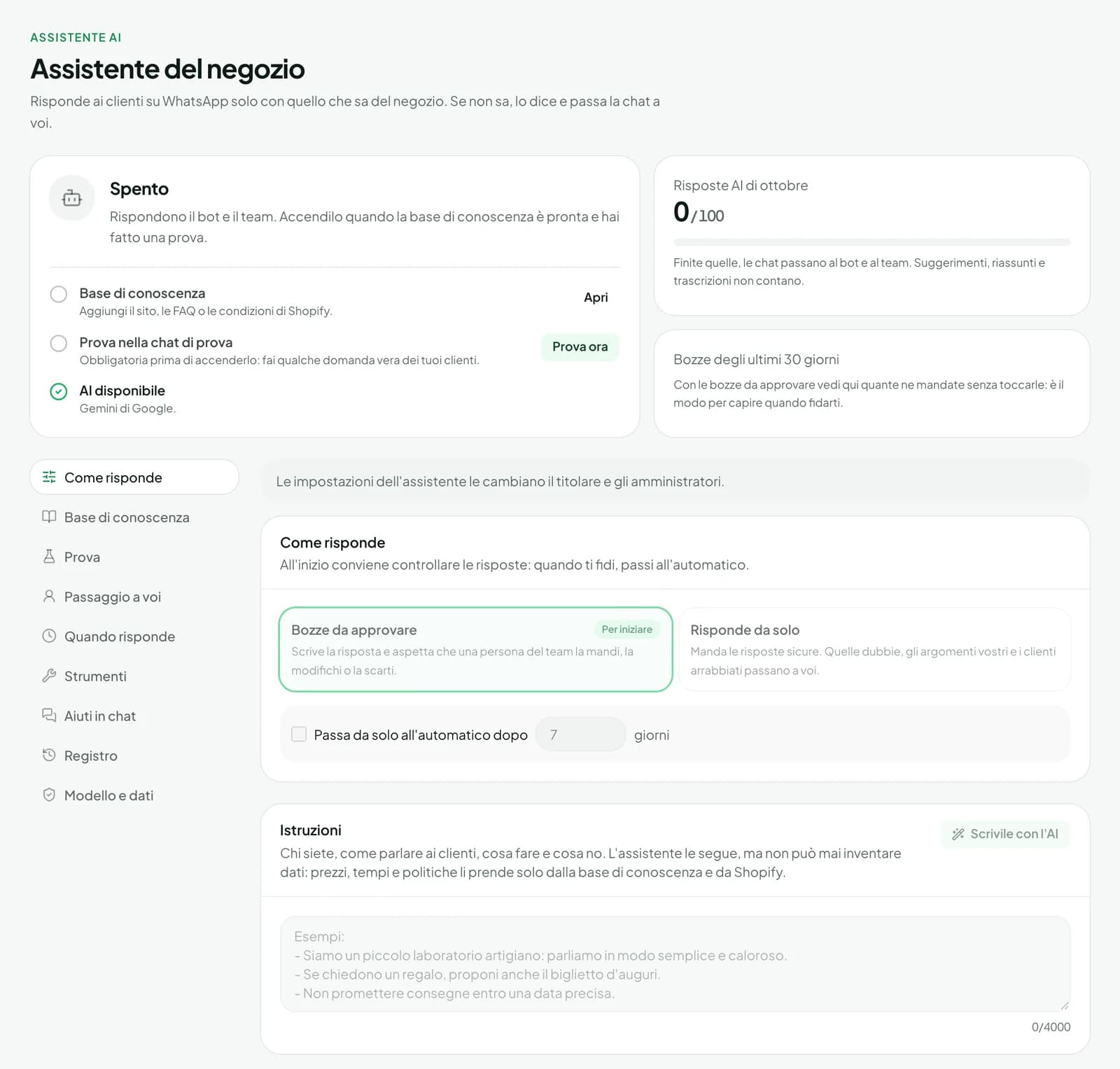
In Gosendly you build the chatbot from blocks, with buttons, lists, waits and handoff to an agent. The AI assistant uses Google's Gemini and answers from your store's sources (website, texts, FAQs and files such as PDFs), citing them; if it doesn't know, it says so and hands the chat to a person. It also hands over the chat when the customer asks for an agent, when they're angry or when they raise a topic you've blocked, and leaves your colleague a summary of the conversation.
You can choose drafts to approve or automatic replies only above a confidence threshold, as well as the hours when the assistant replies. Every AI action is recorded in a log with the source it used, and actions that change something can require an agent's approval. According to the security and providers page, store data doesn't train AI models.
Frequently asked questions
Can I use a model like ChatGPT or Gemini to reply to customers on WhatsApp?
Yes, if it's used to help your store's customers: under Meta's terms that's an ancillary use of AI. What's prohibited is offering a general-purpose AI assistant on WhatsApp as the primary service. In any case, WhatsApp data can't be used to train models, except for fine-tuning a model for your exclusive use.
Can the chatbot message customers whenever it wants?
No. Within the 24-hour window it can reply freely; outside the window it can only send templates approved by Meta, like any other sender.
Do I have to tell customers an AI is replying?
It's the most honest and the simplest choice: customers know who they're talking to and how to reach a person, which WhatsApp policy requires you to offer anyway. Gosendly does this by default with the assistant's first message.
How much does an AI assistant on WhatsApp cost?
Its replies are service messages: 1,000 free per month per number, then €0.0248 each in Italy. On top of that comes the cost of the assistant; in Gosendly, AI replies are included in the plan, from 150 to 5,500 per month.
What if the AI gets an answer wrong?
It can happen, which is why you need clear sources, a confidence threshold, blocked topics and a quick handoff to a person. At the start it's best to use drafts for approval and review the conversations.
Sources
- WhatsApp Business Messaging Policy (updated September 23, 2026)(opens in a new tab)Read on October 28, 2026
- Meta Terms for WhatsApp Business Platform, section 4.7 AI Providers (last modified September 23, 2026)(opens in a new tab)Read on October 28, 2026
- Meta for Developers: AI Providers (pricing and dates by country)(opens in a new tab)Read on October 28, 2026
- Meta for Developers: Non-template messages (service and Meta Business Agent)(opens in a new tab)Read on October 28, 2026
- Meta for Developers: Pricing on the WhatsApp Business Platform(opens in a new tab)Read on October 28, 2026
- WhatsApp Business: Meta Business Agent(opens in a new tab)Read on October 28, 2026
- Meta for Developers: Interactive reply buttons messages(opens in a new tab)Read on October 28, 2026
- Meta for Developers: Interactive list messages(opens in a new tab)Read on October 28, 2026
Keep reading
- FeaturesAI assistant that answers from your sourcesThe Gosendly AI assistant answers customers on WhatsApp using your store's information: shipping, returns, sizes, order status. If it doesn't know…Read
- FeaturesWhatsApp chatbot with buttons and menus“Where's my order?”, “What size do you recommend?”, “Do you ship abroad?”. With the Gosendly WhatsApp chatbot, customers pick from buttons and menus…Read
- FeaturesKnowledge base from your website, FAQs and PDFsThe AI assistant answers only as well as its sources are clear. The Gosendly knowledge base gathers what you know about your store, from your…Read
- SolutionsReply after hours too, with AICustomers write in the evening, on Sundays, on public holidays. With Gosendly's after-hours auto replies, the AI assistant answers the questions it…Read
- GuidesClick-to-WhatsApp ads: the guideClick-to-WhatsApp ads take people from Facebook and Instagram straight into a chat with your store. They work if someone on the other end replies…Read
More guides
- GuideHow much WhatsApp Business costs: Meta's pricesThe WhatsApp Business app is free; the platform for stores is paid per delivered message. Here you'll find WhatsApp Business pricing for Italy as Meta publishes it, with sample…
- GuideWhatsApp Business API: the guide for storesThe WhatsApp Business API is how a store connects WhatsApp to its tools: orders, carts, a shared inbox, automations. This guide explains what you really need to activate it, without…
- GuideWhatsApp Business app vs API: the differencesWhatsApp Business app or API: the choice depends on how many chats you have, who replies and what you want to automate. Here you'll find the differences laid out side by side and the signs…
- GuideWhatsApp blue checkmark: how to get itThe blue checkmark on WhatsApp tells customers they really are messaging your store. Today there are two different ways to get it, one for the API platform and one for the app: here you'll…
- GuideWhatsApp messaging limits and how to increase themWhatsApp messaging limits decide how many people you can message first in a day. Here you'll find how they've worked since 2025, the tiers, how to move up and how to plan a Black Friday…
- GuideConsent and GDPR for WhatsApp messagesTo message customers on WhatsApp you need two permissions that go together: the one Meta requires and the one privacy law requires. This guide explains consent and GDPR for WhatsApp…
Sign-ups open soon
Leave your email and we'll tell you when we launch: then you create your account and find a sample store full of data to try right away.
- We'll write to you once
- Every feature when we open
- Sample store already full of data