AI assistant
AI assistant that answers from your sources
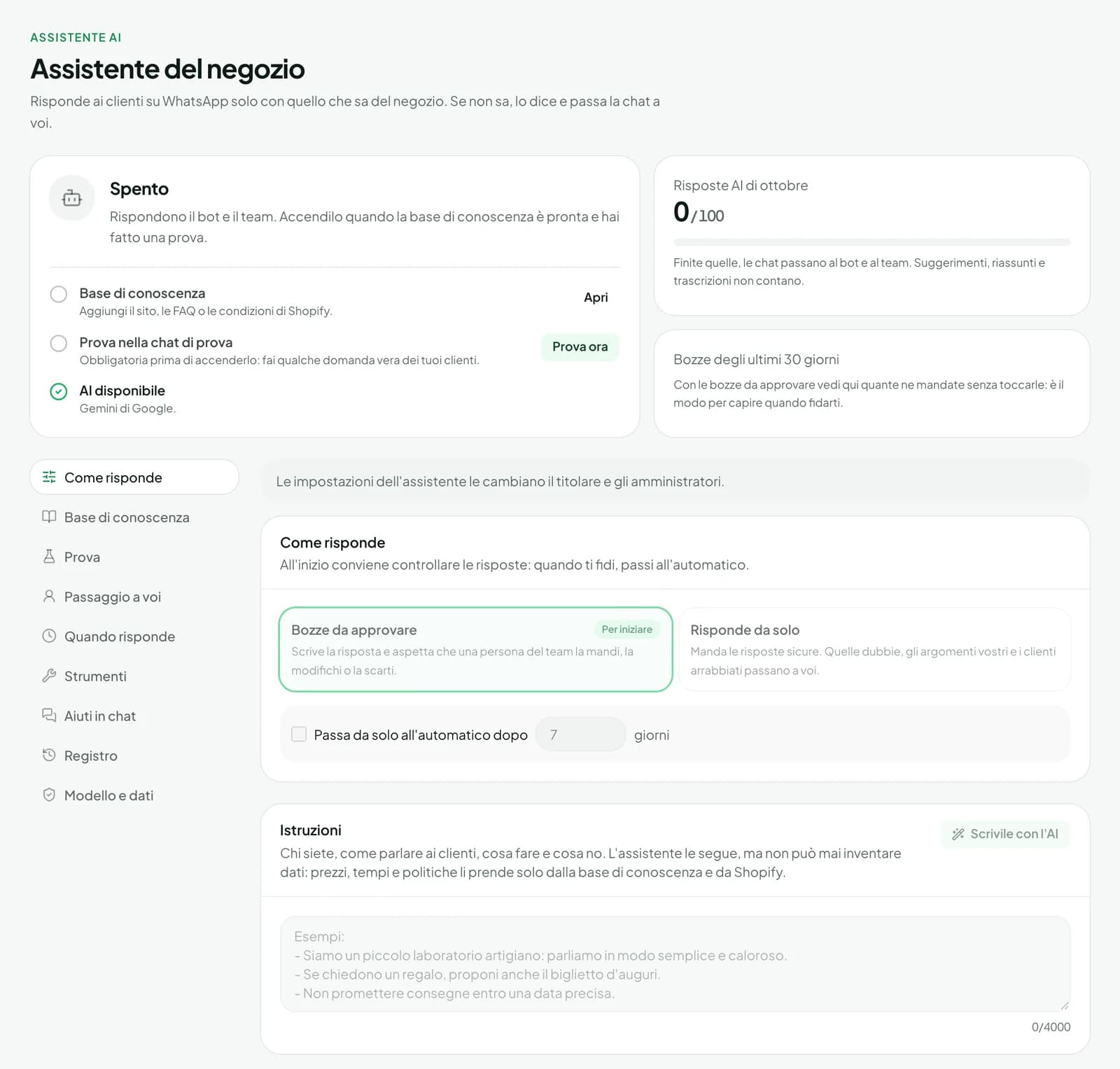
The Gosendly AI assistant answers customers on WhatsApp using your store's information: shipping, returns, sizes, order status. If it doesn't know, it says so and hands the chat to your team instead of making things up.
What you get
- It only answers from what it finds in your sources, and for every reply you can see where it came from.
- You start with drafts to approve: switch to automatic once you trust it.
- It hands the chat to a person if the customer is upset, if it isn't sure, or if the topic is one your team handles.
- It can reply all the time, only when you're closed, or during time slots you choose.
How it works
- 1
Give it the information
In the “Knowledge base” tab, add your website, FAQs, policies and store documents. With Shopify connected, it also reads your policies and catalog.
- 2
Decide how it should reply
In “How it replies”, choose “Drafts to approve” or “Replies on its own”, then set instructions, tone, accuracy and confidence threshold. Write the topics your team handles the way you'd explain them to a colleague.
- 3
Test it
In the “Test” tab, write as a customer would: for each reply you see where it came from, how confident it is, and what it would do in a real chat. Testing is required before you turn it on.
- 4
Turn it on
Press “Turn on the assistant”. Replies, handoffs to your team and actions all go into the “Log”.
It only answers with what it knows
A customer asks “how much is shipping to Germany?”. The assistant searches the knowledge base and answers with the rule you wrote. It takes prices, timelines and policies only from your sources and from Shopify: a reply containing information that isn't in your sources always goes to a person.
With Shopify connected, it can share the order status with the real carrier and tracking, and recommend products available in the requested variant, with photo and price. If you turn on tools, it creates a discount code within the limit you set and, on paid plans, prepares a payment link; canceling an order always requires your confirmation.
Drafts first, automatic later
With Drafts to approve, the assistant writes the reply in the chat and waits: a person sends it, edits it or discards it. For the last 30 days you can see how many drafts went out without changes: that's how you know when to trust it.
With Replies on its own, it sends the confident replies; doubtful ones, topics your team handles and upset customers go to you.
When it hands the chat to a person
The handoff kicks in if the customer is upset, if the assistant is below the confidence threshold, or if the customer asks for an agent or uses one of the words you choose, such as “quote”. The customer receives your message, the chat goes to whoever is on shift or stays in “To reply”, and a three-line summary sits at the top of the chat.
After the handoff, the assistant stays quiet for the time you choose, and you can trigger a flow. There's also a maximum number of replies per chat within 24 hours.
Transparent with the customer and with you
In the assistant's first message, and after 24 hours of silence, the customer reads that a virtual assistant is replying, with the text you choose. In the “Log” you find every reply with its sources, every handoff and every action, and from there you can undo the ones that can be undone, like a tag added by mistake.
The assistant uses Google's Gemini through the paid API, and your store's information doesn't train any model: details are in Security and providers.
Frequently asked questions
How many replies can the assistant send?
Each paid plan includes between 150 and 5,500 customer replies per month, depending on the tier. Once they're used up, chats go to the bot and the team until the 1st of the month. Suggestions, summaries and transcriptions don't count toward these replies.
Can it reply only at night and on weekends?
Yes. In “When it replies”, choose “Only when you're closed”: it follows your store hours, including holidays and closures. Or set up to two time slots per day of your choice.
What if it makes up an answer?
It's built not to: it only answers from your sources, hands over to you below the confidence threshold and, if it can't find the answer, tells the customer. The question lands among the ones “it couldn't answer”, where you add the right answer.
Do AI replies on WhatsApp also cost something on Meta's side?
For Meta they are service messages, just like replies written by a person: each number gets 1,000 delivered for free per month, then in Italy €0.0248 each.
Do I need Shopify?
No: with your website, FAQs and documents it can answer for any online store. With Shopify connected it adds order status, product recommendations, payment links and discount codes.
Keep reading
- FeaturesKnowledge base from your website, FAQs and PDFsThe AI assistant answers only as well as its sources are clear. The Gosendly knowledge base gathers what you know about your store, from your…Read
- FeaturesSuggested replies, summaries and translationsNot everyone wants an AI writing to their customers. Gosendly's chat helpers work for whoever is replying: they suggest three replies, summarize the…Read
- FeaturesWhatsApp chatbot with buttons and menus“Where's my order?”, “What size do you recommend?”, “Do you ship abroad?”. With the Gosendly WhatsApp chatbot, customers pick from buttons and menus…Read
- SolutionsReply after hours too, with AICustomers write in the evening, on Sundays, on public holidays. With Gosendly's after-hours auto replies, the AI assistant answers the questions it…Read
- GuidesChatbots and AI on WhatsApp: what actually worksA chatbot or AI assistant on WhatsApp can answer at night, route questions and save your team hours. It can also annoy customers if it promises…Read
More features: AI assistant
Answers from your sources, suggestions and transcriptions.
- Knowledge base from your website, FAQs and PDFsThe AI assistant answers only as well as its sources are clear. The Gosendly knowledge base gathers what you know about your store, from your website to your FAQs, from PDFs to your…Included in all paid plans
- Suggested replies, summaries and translationsNot everyone wants an AI writing to their customers. Gosendly's chat helpers work for whoever is replying: they suggest three replies, summarize the chat in three lines and translate…Included in all paid plans
- Voice message transcriptionA customer sends a two-minute voice message while you're at the register. With Gosendly voice message transcription, the voice message becomes text, with a one-line summary next to it: you…Included in all paid plans
Sources
- Meta: service message pricing(opens in a new tab)Read on October 28, 2026
- Meta: rates by country (Italy, in euro)(opens in a new tab)Read on October 28, 2026
Sign-ups open soon
Leave your email and we'll tell you when we launch: then you create your account and find a sample store full of data to try right away.
- We'll write to you once
- Every feature when we open
- Sample store already full of data