Guide
WhatsApp Business API: the guide for stores
The WhatsApp Business API is how a store connects WhatsApp to its tools: orders, carts, a shared inbox, automations. This guide explains what you really need to activate it, without developer jargon.
At a glance
- The API is part of Meta's WhatsApp Business Platform: messages go through the Cloud API, hosted by Meta.
- You need a Meta business portfolio, a WhatsApp account with the phone number, a messaging account with templates and a payment method, and software or an app that uses them.
- You can build everything yourself with Meta's developer tools or go through a provider, which spares you the technical part.
- Outside the 24-hour window you can only send approved templates; messaging limits start at 250 people per day for new portfolios.
- You pay per delivered message according to Meta's rate card, plus the software you choose.
What it is, in plain words
Meta calls the set of tools that let businesses talk to customers on WhatsApp at scale the WhatsApp Business Platform. At its core is the Cloud API: a service hosted by Meta that sends and receives messages on behalf of your number. Alongside it are the Marketing Messages API, designed for promotional messages, and the tools to manage accounts, numbers and templates.
For a store owner, the difference from the app is this: the app is a phone with a chat; the platform is a line you can connect to your online store, to multiple agents and to automations. The WhatsApp Business Platform entry in our glossary sums it up in a few lines.
What you need to activate it
Before you send your first message you need a few pieces. Meta's connection window creates many of them automatically, but it helps to know what they are, because you'll find them again in the settings. In its updated documentation, Meta separates the account that holds the number from the one that holds templates and billing.
- A Meta business portfolio (formerly Business Manager): the container for accounts and permissions. See business portfolio.
- A WhatsApp account with the phone number and the display name.
- A messaging account with templates, payment method and currency. The old WABA ID now identifies this account: if a provider asks you for the WABA, this is what they mean. Details in the WhatsApp Business account entry.
- An app or software authorized to use the API: your own, if you build it, or a provider's.
- A phone number you can verify by SMS or voice call.
The phone number
The number must be yours, with its international prefix, and it must be able to receive an SMS or a call for verification; short codes are not accepted. A number already used on WhatsApp can't be registered on the platform until the account is deleted from the app.
There is an important exception if you already use the WhatsApp Business app: coexistence. With this procedure the same number stays in the app and is also connected to the API, and you can bring over contacts and chats from the last 6 months. We cover it in the app vs API guide.
The number is paired with a display name, which Meta reviews, and it's worth turning on two-step verification: it's also one of the requirements for the blue badge. A new portfolio can register 2 numbers; the limit rises to 20 after business verification or once you reach the 2,000 messaging limit.
Two paths: on your own or with a provider
On your own. With Meta's developer tools you create an app, get the permissions, set up an address that receives webhooks (the notifications for incoming messages) and build the interface to reply. It makes sense if you have a developer and want something custom.
With a provider. The provider has already done all of this: you connect your number from Meta's official window (it's called Embedded Signup) and use their software. Meta recognizes two kinds of provider:
- The solution provider (Solution Partner, often called a Business Solution Provider or BSP): it can cover Meta's costs upfront with its own credit line and invoice them to you.
- The Tech Provider: it doesn't cover the costs, so the store adds its own payment method and Meta bills the store directly.
What you can do with the API
Once the number is connected, the API gives you tools the app doesn't have, or doesn't have in this form.
- Message customers first with approved templates: order confirmations, shipping updates, cart reminders, promotions.
- Reply within the 24-hour window with text, photos, documents, buttons (up to 3) and lists (up to 10 items).
- Receive every message and every status (delivered, read, undelivered) in real time, for automations and analytics.
- Have several people work on the same number, with assignments and notes, through the software you use.
- Connect your online store, your contact list and other tools with webhooks and API calls.
Limits to know before you start
The platform has rules designed against spam. The most important ones for a store:
Messaging limit. It counts how many different people you can contact first (outside the window) in 24 hours. A new portfolio starts at 250 and goes up to 2,000, 10,000, 100,000 and unlimited. How to grow is explained in the messaging limits guide.
Throughput. By default a number sends up to 80 messages per second, but no more than one message every 6 seconds to the same person: short bursts are tolerated, then you have to wait.
Templates. Each messaging account can have 250 templates if the portfolio is not verified, up to 6,000 if it is verified and the display name is approved. Every template goes through Meta's review: the template approval guide explains how to avoid rejections.
How much it costs
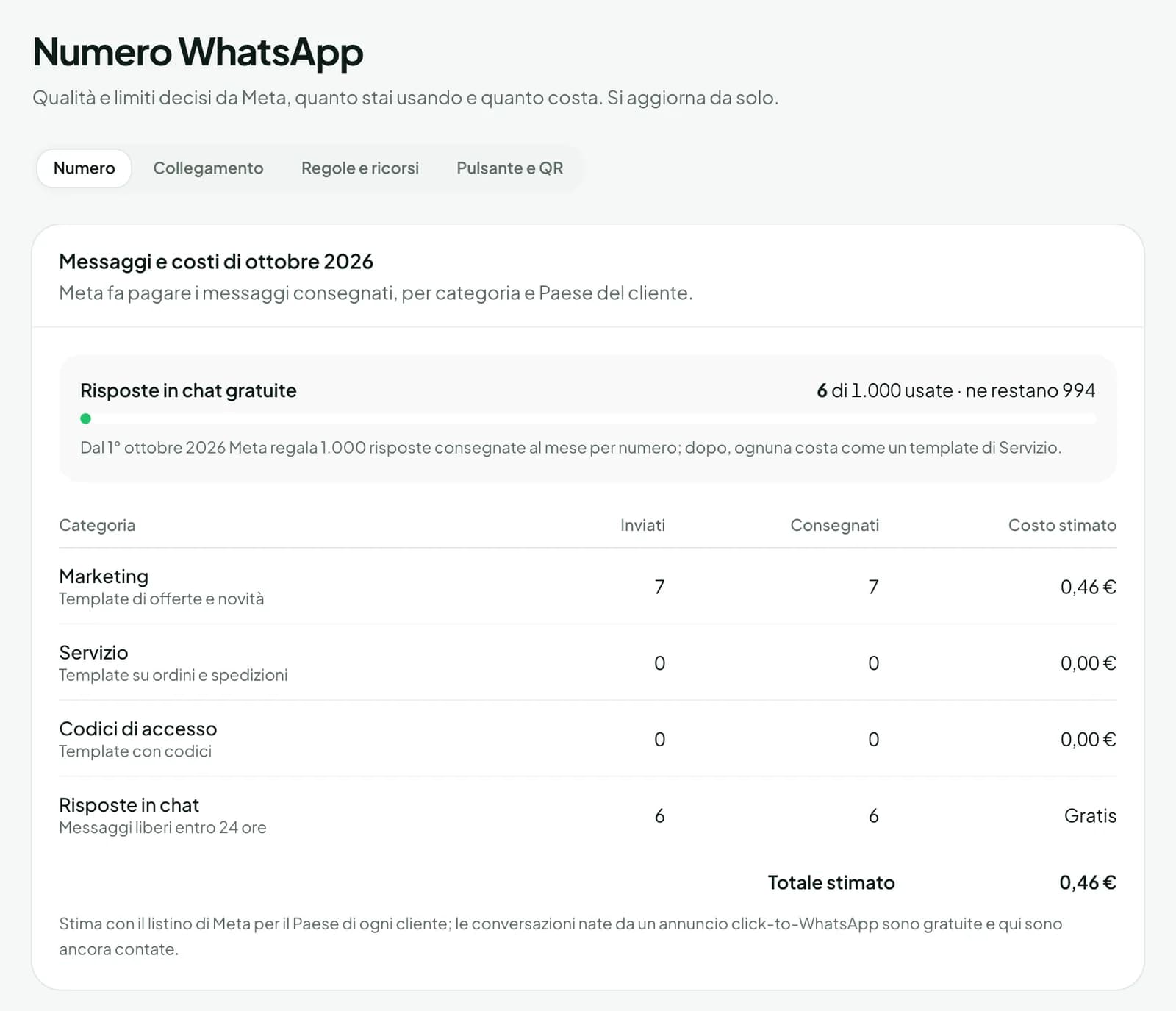
Meta charges for each delivered message based on the category and the recipient's country. In Italy, as of October 28, 2026, a marketing message costs €0.0658 and a utility message €0.0248; replies in chat are free up to 1,000 per month per number. All the math, with examples, is in the WhatsApp Business costs guide.
On top of that comes the cost of the software or the development. When you compare providers, always ask whether you pay Meta's messages directly or through them, and with what markup.
If your number is already with another provider
You don't need to start over with a new number. The WhatsApp account, with its number and name, can be shared with several providers (Meta allows up to five), so you switch by authorizing the new provider from Meta's window. In its 2026 documentation Meta allows each provider to have its own messaging account, the one holding the templates: ask the new provider whether your already approved templates stay available or need to be resubmitted.
Before switching, export your contacts from the old provider together with their consent and the date they gave it: the contact list and the proof of consent are yours to keep, not the platform's.
How it works with Gosendly
Gosendly uses Meta's Cloud API and is built for people who sell online. Today we connect the number together with the store: Meta's window to do it yourself, with a new number, your app number or a number from another provider, is ready and will be switched on with Gosendly's Meta app as a Tech Provider.
Once connected you get the shared inbox for your team, the template editor with approval status, automations and, on paid plans, the Shopify integration. You pay for messages directly to Meta, with an estimate before every send. In Gosendly today there is one number per store.
Frequently asked questions
Do I need a developer to use the WhatsApp Business API?
Only if you want to build everything yourself. With a provider you connect your number from Meta's official window and use their software: you don't write any code. With Gosendly, today, we do the connection together.
Can I use the number I already have on the WhatsApp Business app?
Yes, in two ways: with coexistence, which keeps the number both in the app and on the API, or by deleting the account from the app and registering the number on the platform. In the second case, the app's chats don't carry over to the API.
How many people can I contact per day at the start?
A new business portfolio starts at 250 different people in 24 hours outside the customer service window. Replies to customers who message you don't count toward this limit. The limit rises to 2,000 with business verification or through one of the other paths Meta provides.
Can I have multiple numbers on the same API?
Meta allows 2 numbers for a new portfolio and up to 20 after verification. In Gosendly, today, there is one number per store.
Sources
- Meta for Developers: About the WhatsApp Business Platform(opens in a new tab)Read on October 28, 2026
- Meta for Developers: Business phone numbers(opens in a new tab)Read on October 28, 2026
- Meta for Developers: WhatsApp Business accounts(opens in a new tab)Read on October 28, 2026
- Meta for Developers: Solution providers overview(opens in a new tab)Read on October 28, 2026
- Meta for Developers: Messaging limits(opens in a new tab)Read on October 28, 2026
- Meta for Developers: Templates overview(opens in a new tab)Read on October 28, 2026
- Meta for Developers: Onboard WhatsApp Business app users (coexistence)(opens in a new tab)Read on October 28, 2026
Keep reading
- GuidesWhatsApp Business app vs API: the differencesWhatsApp Business app or API: the choice depends on how many chats you have, who replies and what you want to automate. Here you'll find the…Read
- GuidesHow much WhatsApp Business costs: Meta's pricesThe WhatsApp Business app is free; the platform for stores is paid per delivered message. Here you'll find WhatsApp Business pricing for Italy as…Read
- GuidesWhatsApp messaging limits and how to increase themWhatsApp messaging limits decide how many people you can message first in a day. Here you'll find how they've worked since 2025, the tiers, how to…Read
- IntegrationsMeta's WhatsApp Business PlatformGosendly runs on the WhatsApp Business Platform, Meta's official service for business messaging, in its Cloud API version. It's what lets several…Read
- FeaturesConnecting your WhatsApp numberTo use Gosendly, your store's WhatsApp number must be connected to Meta's official platform. Today we do the connection together with you, following…Read
More guides
- GuideHow much WhatsApp Business costs: Meta's pricesThe WhatsApp Business app is free; the platform for stores is paid per delivered message. Here you'll find WhatsApp Business pricing for Italy as Meta publishes it, with sample…
- GuideWhatsApp Business app vs API: the differencesWhatsApp Business app or API: the choice depends on how many chats you have, who replies and what you want to automate. Here you'll find the differences laid out side by side and the signs…
- GuideWhatsApp blue checkmark: how to get itThe blue checkmark on WhatsApp tells customers they really are messaging your store. Today there are two different ways to get it, one for the API platform and one for the app: here you'll…
- GuideWhatsApp messaging limits and how to increase themWhatsApp messaging limits decide how many people you can message first in a day. Here you'll find how they've worked since 2025, the tiers, how to move up and how to plan a Black Friday…
- GuideConsent and GDPR for WhatsApp messagesTo message customers on WhatsApp you need two permissions that go together: the one Meta requires and the one privacy law requires. This guide explains consent and GDPR for WhatsApp…
- GuideWhatsApp for Shopify: the complete guideWhatsApp for Shopify means updating customers on their orders, recovering carts and answering in chat without leaving your store's workflow. This guide starts from what Shopify already…
Sign-ups open soon
Leave your email and we'll tell you when we launch: then you create your account and find a sample store full of data to try right away.
- We'll write to you once
- Every feature when we open
- Sample store already full of data