Campaigns
WhatsApp campaigns
Sales, a new collection, the last pieces before Christmas: with Gosendly's WhatsApp campaigns you send one message to many customers at once. Before sending you see who will actually get it and what it costs; afterwards, who read, clicked and bought.
What you get
- Message, audience and sending on a single page, with a final check before you launch.
- Meta's estimated cost, by country, before you hit send.
- Opt-in, message cap and quiet hours are applied automatically.
- Results customer by customer: delivered, read, replies, clicks and sales.
How it works
- 1
Message
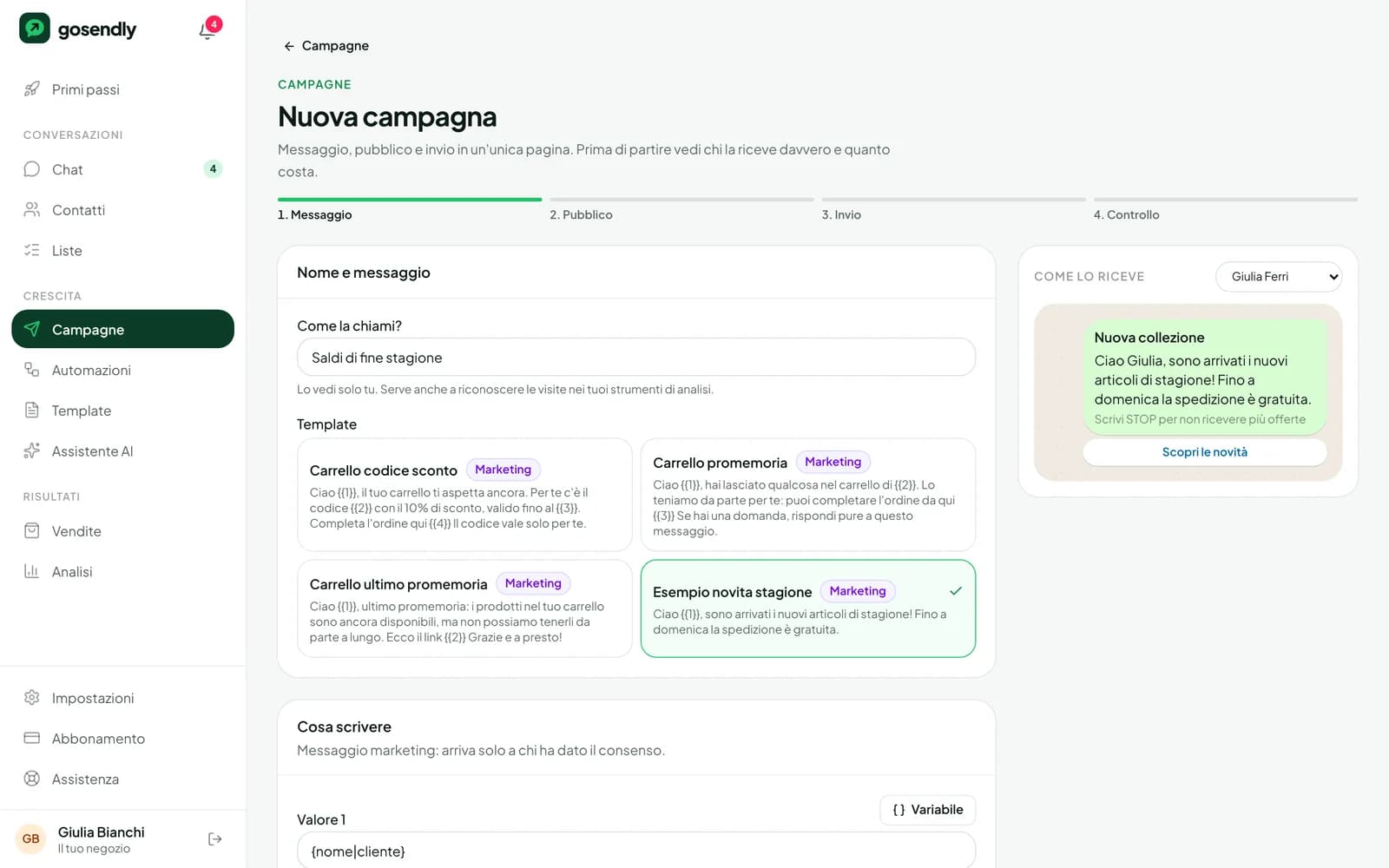
In Campaigns click “New campaign”, give it a name and choose a template approved by Meta. Fill in the variables, such as {nome}, and check the preview with a real customer's data.
- 2
Audience
Choose “All contacts” or pick lists, tags and people, and exclude anyone you want to leave out. Someone in several groups gets the message only once.
- 3
Sending
Launch the campaign right away or schedule it for a day and time: it starts on its own even if you close the app. The sending speed can be automatic or set by you.
- 4
Review
See how many people will receive it, who is left out and why, and the estimated cost. With “Send me a test” you get it first on your own number.
Before you launch: who gets it and what it costs
A list of 3,000 contacts doesn't mean 3,000 messages. In the final review Gosendly removes people who haven't opted in, people who are blocked and people who have already received too many promotions, and tells you the reason for each one.
Next to it you see the estimated cost, broken down by country. You pay for messages directly to Meta, with the payment method on your account: Gosendly adds no markup. In Italy, under the rate card in effect since October 1, 2026, a delivered marketing message costs €0.0658 and a utility message €0.0248; you only pay for what gets delivered.
Large sends without putting your number at risk
The sending rules apply automatically: no promotions during the customer's quiet hours, a message cap per person, gradual ramp-up for new numbers and a pace that always stays below Meta's limit.
Above 1,000 sends it's worth rotating 2 or 3 templates: if Meta pauses one for low quality, the campaign continues with the others. If your number's quality rating drops during the send, the campaign stops and alerts you; if Meta reactivates a paused template, it resumes on its own, only for the people still waiting.
After sending: who read, clicked and bought
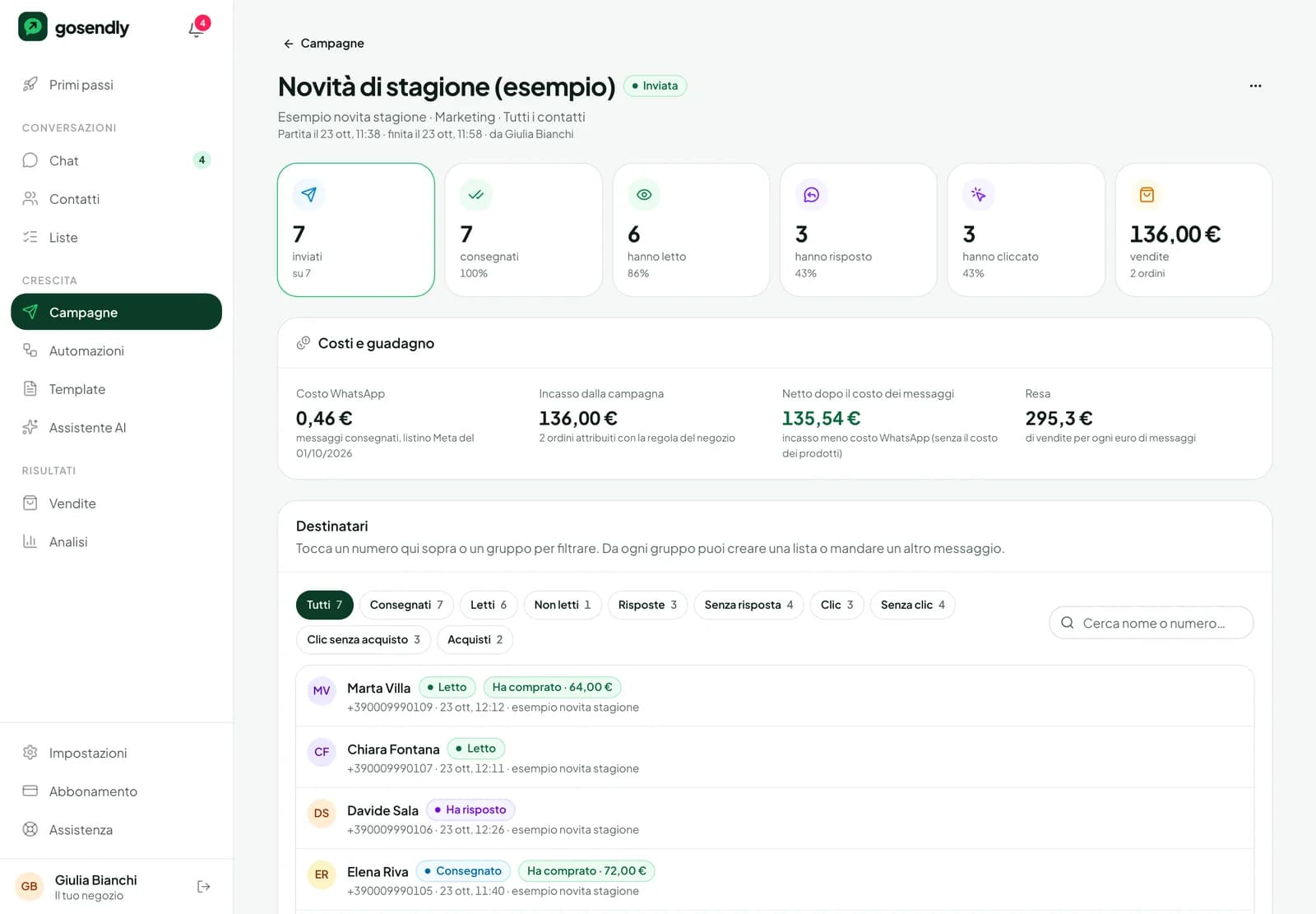
On the campaign page you see delivered, read, replies, clicks and, if you connect Shopify, the attributed orders with revenue and the net after message costs. Every number is a group of customers: “Didn't read”, “Clicked but didn't buy”, “Bought”.
From each group you can create a list or send another message. Failed sends show the reason in plain language: temporary errors are retried automatically up to 3 times, the others with “Retry” once you've fixed the issue.
Reminders, thank-yous and flows
With “Send a reminder”, anyone who hasn't read, replied or clicked after the hours you choose gets a second message; people who bought don't. With “Thank buyers”, a thank-you goes out, only once, when an order is attributed to the campaign. For longer journeys, each recipient can enter an automation that waits for the reply and adds a tag.
Frequently asked questions
Can I send a campaign to all my contacts?
You can select them all, but the marketing message only reaches people who have opted in and aren't blocked. It's a WhatsApp rule and it protects your number: people who receive unwanted promotions block and report you.
Do I need an approved template?
Yes. Outside the 24-hour customer service window WhatsApp only allows templates approved by Meta, and a campaign almost always writes to people who haven't messaged you recently. You prepare the template in the template editor and Meta usually decides on approval within 24 hours.
How much does a campaign cost?
Campaigns are included in all paid plans, from €59 a month excluding VAT. Messages are billed by Meta to your store: in Italy, €0.0658 for each delivered marketing message. Gosendly shows the estimate before sending and adds nothing on top.
Can I stop a campaign that has already started?
Yes, with “Pause”: people who haven't received it yet wait. With “Resume” it restarts only for the people still waiting, with no duplicates.
How do I know how many sales it brought in?
With Shopify connected, orders from customers who received the campaign are attributed to it using the rule you choose in Settings › Store and sales (for example: within 7 days of the message). The campaign page shows orders, revenue and net.
Keep reading
- FeaturesSending rules that protect your numberA customer who gets too many offers blocks or reports your number, and quality drops for everyone. Gosendly's sending rules apply to campaigns and…Read
- FeaturesTracked links and clicksYou sent the link to your new collection: who opened it? With Gosendly's tracked links every link becomes a personal short link, and clicks are…Read
- FeaturesLists and dynamic segmentsWith Gosendly's lists and dynamic segments, you choose who to message without spreadsheets: “bought in the last 30 days”, “spent more than €100”…Read
- SolutionsPromotions and launches on WhatsApp, without burning your numberA launch, Black Friday, a sale, a product back in stock. With Gosendly's WhatsApp promotions you only message people who asked for them, at the…Read
- GuidesHow much WhatsApp Business costs: Meta's pricesThe WhatsApp Business app is free; the platform for stores is paid per delivered message. Here you'll find WhatsApp Business pricing for Italy as…Read
- Free toolsWhatsApp cost calculatorEnter how many messages you send in a month and where your customers are: the calculator applies Meta's official euro rate card, in effect since…Read
More features: Campaigns
Promotions and launches with Meta-approved templates.
- Tracked links and clicksYou sent the link to your new collection: who opened it? With Gosendly's tracked links every link becomes a personal short link, and clicks are counted per customer, per campaign and per…Also included in the Free plan
- Sending rules that protect your numberA customer who gets too many offers blocks or reports your number, and quality drops for everyone. Gosendly's sending rules apply to campaigns and marketing flows, are switched on by…Also included in the Free plan
Sources
- Meta: WhatsApp Business Platform pricing(opens in a new tab)Read on October 28, 2026
- Meta: rate card by country (Italy, in euro)(opens in a new tab)Read on October 28, 2026
- Meta: template pausing for low quality(opens in a new tab)Read on October 28, 2026
- Meta: template review(opens in a new tab)Read on October 28, 2026
Sign-ups open soon
Leave your email and we'll tell you when we launch: then you create your account and find a sample store full of data to try right away.
- We'll write to you once
- Every feature when we open
- Sample store already full of data