WhatsApp templates: create them and get them approved
To message a customer first, or more than 24 hours after their last message, WhatsApp requires a template approved by Meta. With the Gosendly template editor you write it, see exactly how the customer will receive it, and Gosendly checks Meta's rules before you submit it.
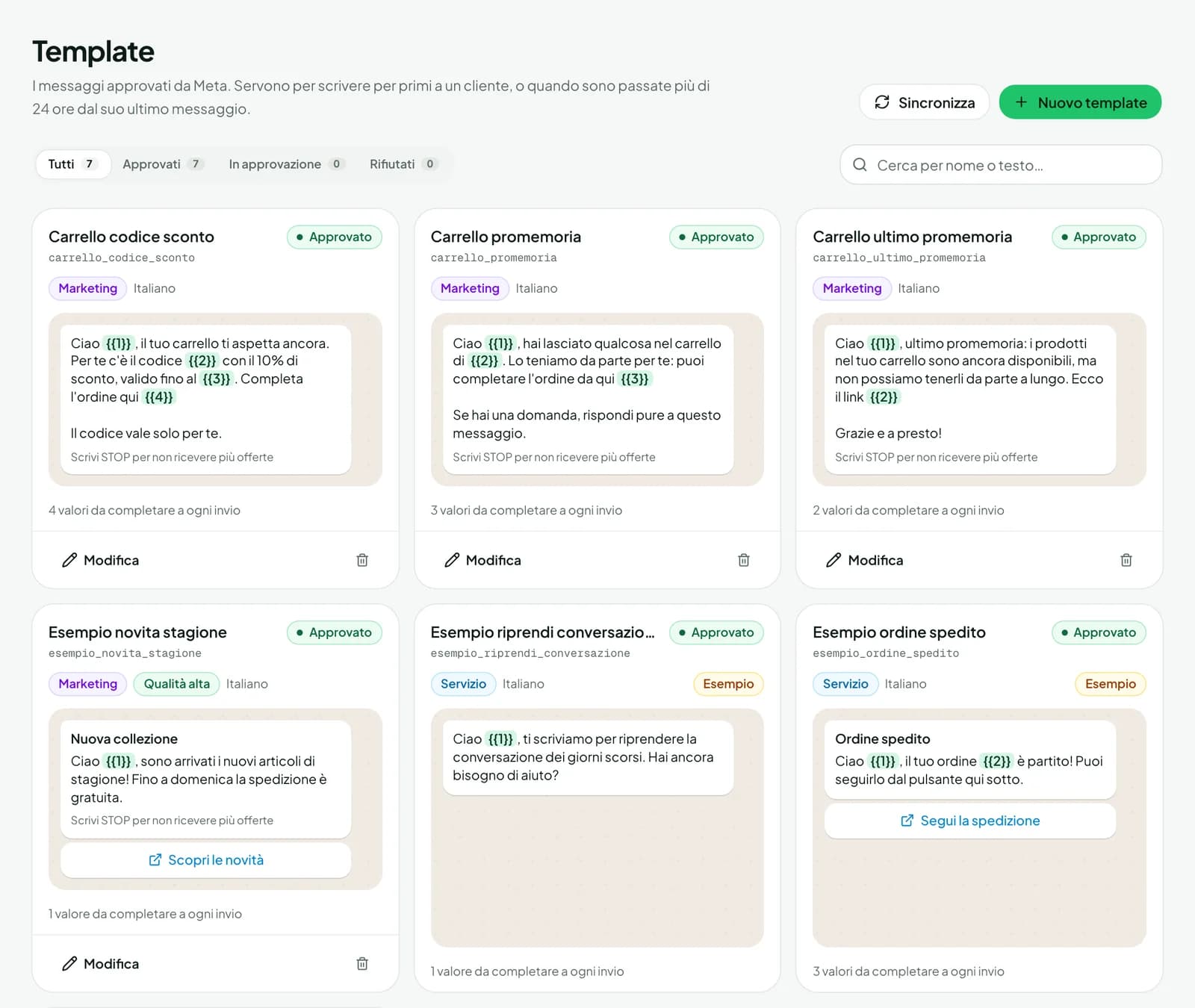
What you get
- Checks as you type: variables, lengths, buttons and category.
- A preview filled with a real customer's details, just as they will receive it.
- Status updated from Meta's notifications, with the rejection reason explained clearly.
- Three versions written by AI, if you don't know where to start.
How it works
- 1
Name, language and category
In Templates, click “New template”: choose the name for Meta (for example order_shipped), the language and the category, Utility or Marketing.
- 2
Write the message
Optionally add a header (text, image, video, PDF or location), the body with variables such as {{nome}}, a footer and buttons. For each variable, write a realistic sample: Meta requires it.
- 3
Check and test
The checks panel shows you what to fix, and “Fix automatically” can do it for you. In “Test with a real customer”, the variables are filled in with that customer's details.
- 4
Submit to Meta
Click “Submit to Meta”. Meta usually decides within 24 hours and Gosendly lets you know; if it's rejected, you fix it and click “Resubmit to Meta”.
The right category, before you submit
Utility is for orders, shipping, payments, appointments and replies to a request, with no promotions. Marketing is for offers, new arrivals, abandoned carts, win-back messages and review requests. For Meta, an order update with a promotion inside is marketing, and Meta can approve it as marketing or change its category later, with one day's notice.
Gosendly checks for promotional wording inside a utility template and warns you beforehand. If Meta announces a category change, you see it on the template's card. The category also affects the cost: in Italy, €0.0658 per delivered marketing message and €0.0248 per utility message.
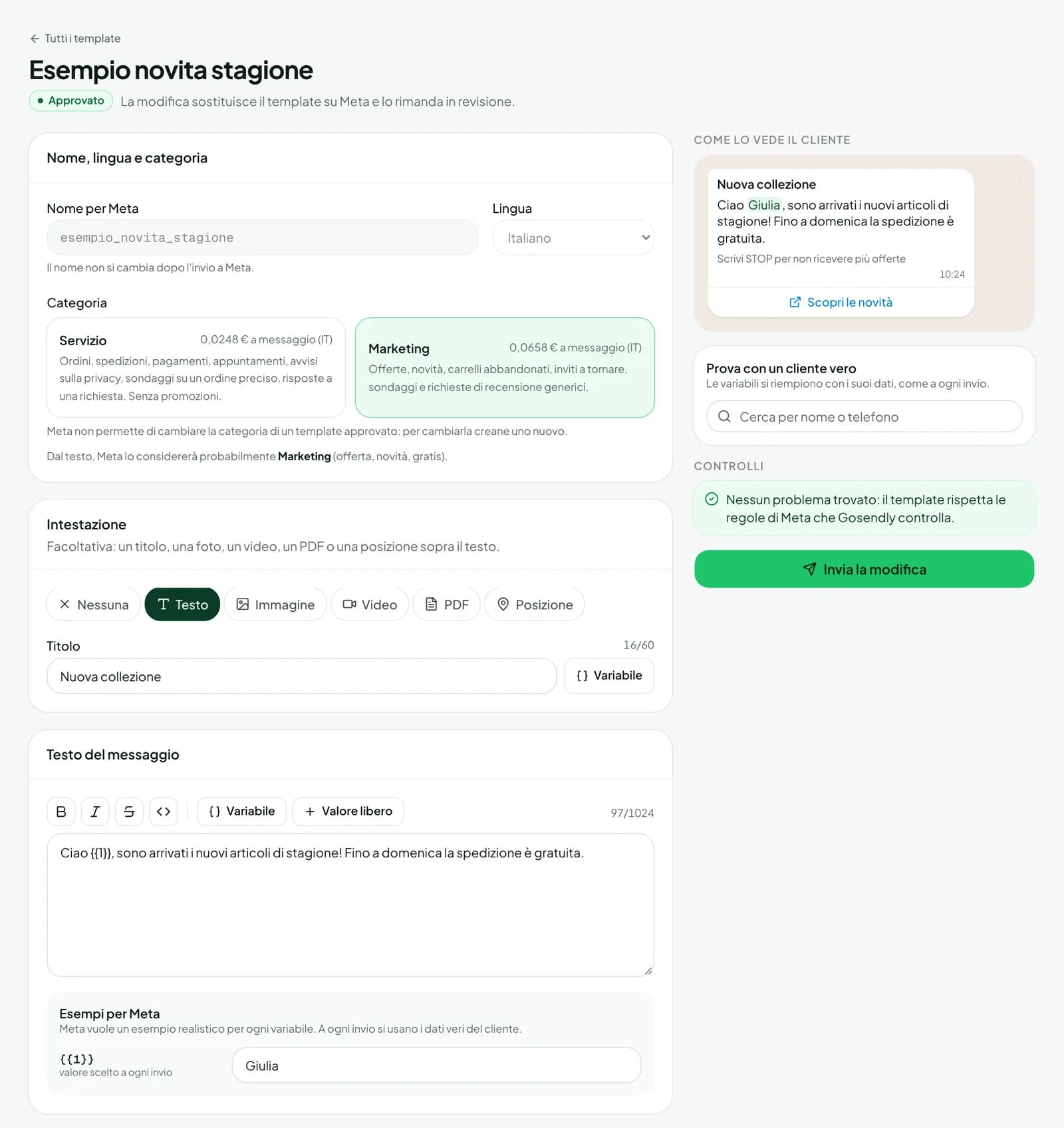
The checks that prevent a rejection
As you type, Gosendly flags what Meta usually rejects:
- Body text that starts or ends with a variable, or variables placed right next to each other.
- Too many variables for a short text, or missing samples.
- Body over 1,024 characters, header and footer over 60.
- Buttons: up to 10 in total, at most 2 website links, 1 call button, 1 copy code button, and button text up to 25 characters.
- Test text and requests for sensitive information, which Meta does not accept.
Status and quality of every template
In the template library you see which templates are approved, in review, rejected or paused, and the quality rating Meta gives each one: high, medium, low or pending. If a template drops to low quality, Meta pauses it for 3 hours the first time and 6 hours the second, then disables it: the campaigns using it stop and, if Meta reactivates it, they resume on their own for the recipients still left.
With “Sync” you also bring into Gosendly the templates created in WhatsApp Manager, such as authentication templates for login codes, which the editor doesn't create.
Three versions written by AI
On paid plans, with “Write with AI” you describe what the message should achieve, for example “let the customer know the order has shipped”, click “Write 3 versions” and the AI suggests three texts that already follow Meta's rules, with the expected category. It can only mention products and prices it finds in your store. Before submitting one to Meta, review it yourself, or test it with the template checker tool.
Frequently asked questions
How long does Meta take to approve a template?
Meta states that the decision can take up to 24 hours. Gosendly updates the status on its own when Meta's notification arrives and lets you know.
Which plan lets me create templates?
Utility templates are available on every plan, including Free. Marketing templates and the three AI-written versions are on paid plans.
Can I change the category of an approved template?
No, Meta doesn't allow it: to change it, you create a new template with a different name. If Meta changes it instead, you see it on the template's card.
Can I create carousel or countdown templates?
Not yet: today the editor creates templates with a header, body, footer and quick reply, link, call and copy code buttons.
Keep reading
- GuidesHow to get WhatsApp templates approvedEvery message you send first on WhatsApp starts from a template that Meta has to approve. Here you'll find how WhatsApp template approval works, how…Read
- Free toolsCheck your template before Meta doesWrite or paste your template and instantly see the errors that get it rejected, the warnings, the category Meta will likely assign and how your…Read
- FeaturesWhatsApp campaignsSales, a new collection, the last pieces before Christmas: with Gosendly's WhatsApp campaigns you send one message to many customers at once. Before…Read
More features: WhatsApp
Number, templates and a button for your website.
- WhatsApp button for your website and QR codesA shopper looking at a product with a question about sizing shouldn't have to hunt for your number. With the Gosendly WhatsApp website button they tap, WhatsApp opens with the message…Also included in the Free plan
- Connecting your WhatsApp numberTo use Gosendly, your store's WhatsApp number must be connected to Meta's official platform. Today we do the connection together with you, following the same steps as Meta's signup window…Also included in the Free plan
Sources
- Meta: template categorization(opens in a new tab)Read on October 28, 2026
- Meta: template review(opens in a new tab)Read on October 28, 2026
- Meta: template components and limits(opens in a new tab)Read on October 28, 2026
- Meta: template pausing and quality(opens in a new tab)Read on October 28, 2026
- Meta: pricing by country (Italy, in euros)(opens in a new tab)Read on October 28, 2026
Sign-ups open soon
Leave your email and we'll tell you when we launch: then you create your account and find a sample store full of data to try right away.
- We'll write to you once
- Every feature when we open
- Sample store already full of data